

Download Privoxy – Free Privacy‑Focused HTTP Proxy & Ad‑Blocking Tool
Overview
Privoxy is a powerful, open‑source HTTP proxy that sits between your web browser and the Internet, giving you granular control over every request that leaves your machine. Unlike a VPN, which encrypts traffic and routes it through remote servers, Privoxy works locally, filtering content, stripping tracking headers, and blocking intrusive advertisements before the data ever reaches your ISP. This approach makes it an excellent choice for users who want a lightweight, free solution to protect their privacy, customize web content, or enforce network‑wide policies without the overhead of a full‑scale VPN service.
When you enable Privoxy, it creates a “proxy layer” that intercepts HTTP and HTTPS traffic (when combined with a tunneling tool) and applies a set of configurable rules. These rules can hide your IP address from third‑party trackers, remove banner ads, block malicious scripts, and even rewrite URLs to enforce safe‑browsing policies. Because the filtering happens on the client side, you retain full control over which sites are allowed or blocked, making Privoxy a flexible tool for families, small businesses, or tech‑savvy individuals.
One trade‑off to consider is speed. Since each request must pass through the proxy engine, you may notice a slight latency increase, especially on media‑rich sites like YouTube or large streaming platforms. In practice, the slowdown is modest for text‑heavy pages and is often outweighed by the privacy gains. Privoxy’s configuration files are plain text, allowing advanced users to fine‑tune performance, logging, and rule sets to match their exact needs.
Overall, Privoxy delivers a robust, free, and highly customizable privacy shield. Whether you’re looking to block annoying ads, prevent data leakage, or create a controlled browsing environment for multiple users, Privoxy provides the core capabilities you need without demanding a subscription or invasive telemetry.
Key Features of Privoxy
- Advanced Ad Blocking: Uses customizable filter lists to remove banner ads, pop‑ups, and tracking pixels from any web page.
- Privacy Header Scrubbing: Strips out HTTP headers that reveal your browser version, operating system, and other fingerprinting data.
- Content Filtering: Allows you to block specific domains, URLs, or content types (e.g., JavaScript, Flash) with fine‑grained rules.
- Per‑User Configuration: Supports separate configuration files for different users or groups, ideal for shared computers or small networks.
- Template‑Based Page Modification: Modify HTML on the fly using built‑in templates, useful for removing annoying elements or adding custom branding.
- Logging & Debugging: Detailed request logs help you understand what is being filtered and why, facilitating troubleshooting.
- Cross‑Platform Support: Runs on Windows, macOS, Linux, and can be paired with mobile tunneling tools for Android and iOS.
- Open‑Source & Free: Licensed under GPL, with an active community that contributes updates, rule sets, and documentation.
- Low Resource Footprint: Designed to operate with minimal CPU and memory consumption, making it suitable for older hardware.
- Extensible via External Scripts: Can invoke external programs or scripts to handle complex filtering logic or integrate with other security tools.
These features combine to create a versatile proxy solution that can serve as both a personal privacy tool and a lightweight network guardian. The modular design lets you enable only the components you need, keeping the system lean while still delivering comprehensive protection.
Installation, Configuration & Daily Usage
Getting Privoxy up and running is straightforward, but it does require a few manual steps to ensure optimal performance. Below is a step‑by‑step guide for Windows, macOS, and Linux users.
Windows Installation
- Download the latest Windows installer from the official Privoxy website.
- Run the .exe file and follow the wizard – choose “Install as a service” if you want Privoxy to start automatically with Windows.
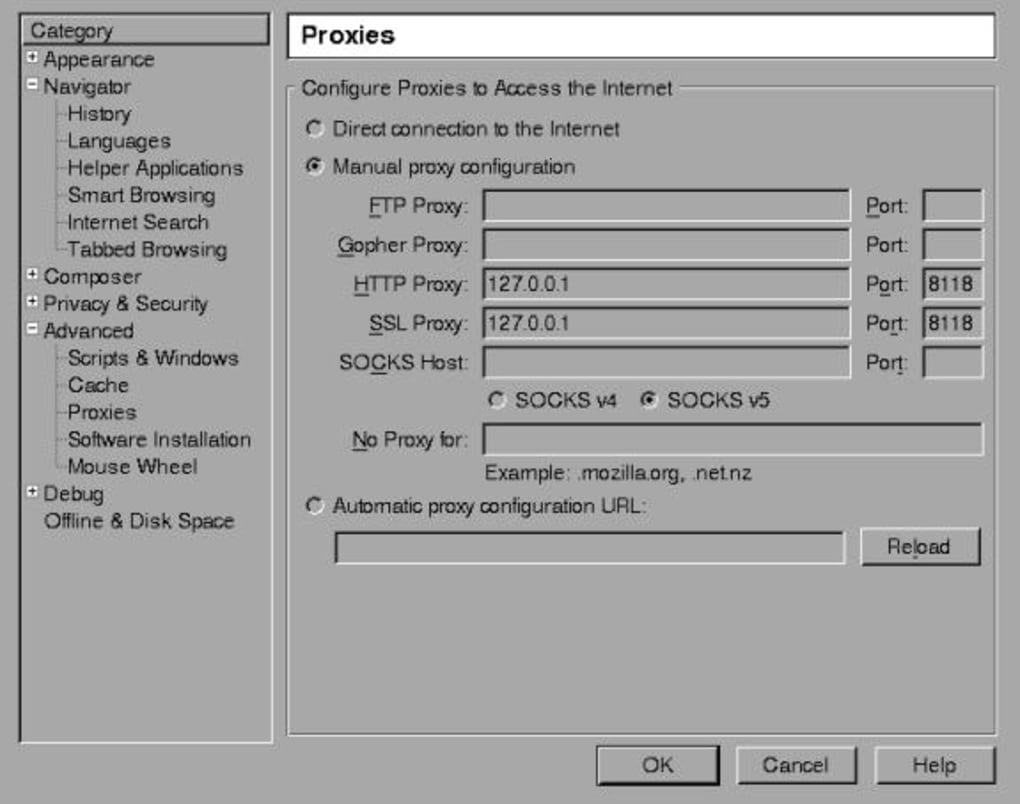
- By default, Privoxy listens on
127.0.0.1:8118. Open your browser’s proxy settings and set the HTTP/HTTPS proxy to this address. - Restart the browser to apply the changes.
macOS Installation
- Use Homebrew:
brew install privoxy. This installs the latest stable version. - Start the service with
brew services start privoxyor manually run/usr/local/sbin/privoxy /usr/local/etc/privoxy/config. - Configure your system proxy (System Preferences → Network → Advanced → Proxies) to point to
127.0.0.1:8118. - Verify the proxy is active by visiting config.privoxy.org – you should see the Privoxy status page.
Linux Installation
- On Debian/Ubuntu:
sudo apt-get update && sudo apt-get install privoxy. - On Fedora/CentOS:
sudo dnf install privoxyoryum install privoxy. - After installation, edit
/etc/privoxy/configto adjust listening address (default is127.0.0.1:8118). - Restart the daemon:
sudo systemctl restart privoxy. - Set your browser or system proxy to the same address.
Basic Configuration Tips
Privoxy’s main configuration file (config) contains directives such as listen-address, forward-socks5 (for chaining with Tor), and actionsfile which point to rule sets. Beginners can start with the default settings, then enable the pre‑installed default.action and default.filter files for out‑of‑the‑box ad blocking.
For more granular control, create a custom user.action file. Example rule to block Facebook tracking scripts:
{ +block{Facebook Tracker} }
.facebook.com/track
After editing, reload Privoxy with privoxyctl reload (Linux/macOS) or restart the service on Windows.
Daily usage is as simple as keeping your browser pointed at the local proxy. All HTTP requests will be filtered automatically. For HTTPS, you can combine Privoxy with a tunneling tool like Tor or stunnel to preserve encryption while still benefiting from Privoxy’s filtering.
Compatibility, Pros & Cons, and Frequently Asked Questions
Privoxy runs natively on Windows (7, 8, 10, 11), macOS (10.12 and later), Linux distributions (Debian, Ubuntu, Fedora, Arch, etc.) and can be paired with Android or iOS devices through third‑party tunneling apps, giving it a truly cross‑platform footprint.
Pros
- Completely free and open‑source – no hidden fees or subscription models.
- Highly customizable rule sets let you tailor privacy and ad‑blocking to exact needs.
- Low system resource usage, suitable for older PCs and low‑power devices.
- Works alongside VPNs or Tor for layered security.
- Detailed logging helps troubleshoot and understand filtered content.
Cons
- Initial configuration can be intimidating for non‑technical users.
- Because it is an HTTP proxy, HTTPS filtering requires additional tunneling tools.
- May introduce noticeable latency on media‑heavy sites.
- No native mobile apps – reliance on third‑party tunneling for Android/iOS.
- Not a full‑replaceable VPN; it does not encrypt traffic on its own.
FAQ
Is Privoxy a VPN?
No. Privoxy is an HTTP proxy that filters and modifies web traffic. It does not encrypt your connection like a VPN, but it can be combined with a VPN or Tor for added security.
Can Privoxy block all ads on YouTube?
Privoxy can block many standard ad elements, but YouTube uses dynamic, embedded ads that may bypass simple filters. For complete YouTube ad removal, consider using a dedicated browser extension alongside Privoxy.
Do I need to restart my browser after configuring Privoxy?
Yes. After setting the proxy address, restart your browser to ensure it routes traffic through Privoxy. Some browsers allow you to apply proxy changes without a full restart, but a quick relaunch guarantees proper operation.
Is Privoxy safe to use on a public Wi‑Fi network?
Privoxy helps hide tracking headers and blocks malicious scripts, which adds a layer of privacy on public Wi‑Fi. However, because it does not encrypt traffic, pairing it with a VPN or HTTPS sites is recommended for sensitive data.
Can I use Privoxy on multiple devices simultaneously?
Yes. By configuring Privoxy on a central machine and pointing other devices’ proxy settings to its IP address (instead of 127.0.0.1), you can filter traffic for an entire LAN. Ensure firewall rules allow inbound connections on the chosen proxy port.
Overall rating: 4 out of 5 stars. Privoxy excels at providing a free, highly configurable privacy layer, though it requires a modest learning curve.
Conclusion & Call to Action
Privoxy stands out as a mature, open‑source solution for anyone serious about controlling what leaves their browser and what reaches it. Its ability to strip tracking headers, block ads, and enforce custom content policies makes it a valuable addition to any privacy‑focused toolkit. While it isn’t a replacement for full‑blown VPN services, its low‑resource footprint and extensive configurability give it a niche that many power users appreciate.
If you’re ready to take control of your browsing experience without paying for a subscription, download Privoxy today. Follow the installation guide above, tweak the default rule sets to match your needs, and enjoy a cleaner, more private web experience. Remember, the best defense against invasive tracking starts with a single, well‑configured proxy.
Ready to protect your privacy? Click here to download Privoxy for free and begin securing your online footprint now.








