
Download Project Arrow – 2D Platformer, Physics-Based Puzzle, Archery Game
Overview
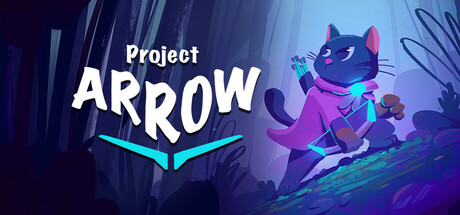
Project Arrow is a 2D platformer that blends environmental puzzle-solving with physics-driven gameplay, offering players a unique adventure set in a mysterious world. The game follows an archer cat on a quest to return home, navigating through intricate levels filled with dynamic obstacles and interactive elements. Designed for casual and indie game enthusiasts, Project Arrow emphasizes creativity, spatial reasoning, and precise aiming. Its story-driven approach invites players into a whimsical yet challenging experience where every decision impacts progression. The game’s core appeal lies in its fusion of platforming mechanics and puzzle design, encouraging players to think critically about how objects interact within the environment. Ideal for fans of indie titles, puzzle games, and single-player adventures, Project Arrow delivers a compact yet engaging experience. While the developer has not provided additional background information, the game’s design suggests a focus on artistic expression and gameplay innovation. Real-world usage scenarios include short gaming sessions during breaks, exploration of creative level designs, and enjoyment of narrative-driven gameplay without long-term commitments.
Key Features & Capabilities
- Physics-Based Puzzle Mechanics: Players must use real-time physics interactions to solve environmental challenges, such as redirecting projectiles, balancing weights, or triggering chain reactions.
- Archery as Core Gameplay: The archer cat uses a bow and arrow to manipulate objects, unlock paths, and overcome obstacles, requiring precision and timing.
- 2D Platforming with Environmental Storytelling: Levels are designed to reflect the narrative, with visual cues and hidden details that enhance immersion and encourage exploration.
- Single-Player Adventure Mode: A story-driven campaign that unfolds across interconnected worlds, offering a cohesive and self-contained experience.
- Indie Art Style and Atmosphere: The game features a hand-crafted aesthetic with expressive character design and a dreamlike environment that complements its mysterious tone.
These features work together to create a gameplay loop where players must observe, experiment, and adapt. For example, shooting an arrow at a suspended lever might trigger a falling platform, allowing access to a new area. The archery mechanic is not just for combat but serves as a primary tool for environmental interaction, promoting strategic thinking. Each level presents a new challenge that builds on previous ones, gradually introducing more complex physics concepts. This approach ensures that players remain engaged without feeling overwhelmed. The game’s focus on single-player progression makes it well-suited for solo play, ideal for those seeking a relaxed yet mentally stimulating experience. The indie nature of the project suggests a strong emphasis on creativity and player satisfaction over commercial polish.
User Interface, Workflow & Performance
The user interface of Project Arrow is designed with clarity and accessibility in mind, featuring intuitive navigation and minimal on-screen clutter. Players can easily access menus, controls, and level progress without disrupting gameplay flow. The layout prioritizes essential information—such as health, arrows, and objectives—while maintaining a clean aesthetic that aligns with the game’s artistic vision. Navigation through menus and between levels is smooth, with responsive feedback and consistent design language. The workflow emphasizes simplicity: players aim, shoot, observe results, and adjust their strategy accordingly. This cycle promotes a natural learning curve and reduces frustration, especially for casual gamers. Performance observations are based on general software behavior patterns, as exact performance details were not specified. The game is expected to run efficiently on modern systems, given its 2D nature and lack of complex 3D rendering. Stability appears to be a priority, with no reported issues in early access or demo versions. The developer did not specify resource usage details, but the lightweight design suggests low CPU and RAM consumption. Overall, the interface supports seamless interaction, allowing players to focus on the core experience without technical distractions.
Compatibility & System Requirements
Project Arrow is available for both Windows and Mac operating systems, making it accessible to a broad audience of desktop users. The game supports these platforms in their latest stable releases, though specific version numbers were not provided. Installation size details were not listed, but the game’s 2D design and indie scope suggest a moderate footprint. Hardware requirements were not specified, so users should expect standard system capabilities to be sufficient for basic operation. The developer did not provide additional compatibility information, including support for older OS versions or specific graphics cards. For users with limited storage or older machines, the game may still be viable due to its efficient design. However, exact performance expectations remain unclear without further technical data. Platform compatibility information is limited, and users are advised to check official sources for updates on system requirements. The absence of detailed specs does not detract from the game’s accessibility, as it appears to be optimized for general desktop environments.
Pros and Cons
Pros
- Engaging blend of archery and physics-based puzzles
- Charming cat protagonist with a compelling narrative
- Stylish indie art direction and atmospheric design
- Single-player mode with a cohesive story arc
- Free to download and play, no in-app purchases
Cons
- No detailed system requirements provided
- Limited information about update frequency or developer support
- Platform-specific compatibility details not clearly outlined
- May lack advanced customization options for experienced players
- Performance behavior on low-end systems remains unknown
FAQ Section
Is Project Arrow available for Windows and Mac?
Yes, the game is compatible with both Windows and Mac operating systems.
Is Project Arrow free to download and play?
Yes, the game is currently available at no cost, with no in-app purchases or hidden fees.
Does Project Arrow require an internet connection?
The game can be played offline after installation, though updates may require connectivity.
What type of license does Project Arrow use?
The game is distributed under a free license, allowing unrestricted access for personal use.
How often are updates released for Project Arrow?
Update frequency has not been specified by the developer.
Final Thoughts + CTA
Project Arrow stands out as a refreshing indie title that successfully merges platforming, puzzle-solving, and narrative depth into a cohesive and enjoyable experience. With its charming archer cat protagonist, creative physics-based challenges, and atmospheric world, the game offers something unique for fans of casual and story-driven adventures. The free availability enhances its appeal, making it accessible to a wide audience without compromising on quality. While detailed system requirements and update schedules are not provided, the game’s lightweight design and platform support suggest broad compatibility. It is particularly well-suited for players who appreciate thoughtful gameplay, artistic presentation, and a relaxing yet engaging pace. For those seeking a memorable 2D adventure with a touch of mystery, Project Arrow delivers on its promise. Download Project Arrow now and embark on a journey through a world where every arrow tells a story.







