
Download ProPix – AI Profile Photo Maker, Free & Secure Tool
Overview of ProPix – Your One‑Tap AI Photo Companion
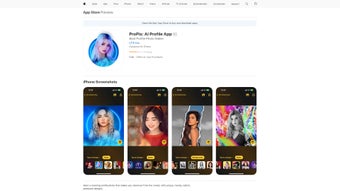
ProPix is a cutting‑edge, AI‑driven photo‑editing app that transforms ordinary selfies into polished, professional‑looking profile pictures in a single tap. Designed for freelancers, influencers, remote workers, and anyone who wants a strong visual presence online, ProPix blends neural‑style transfer technology with a curated library of modern templates that rival the results of expensive desktop suites. The user interface is intentionally minimal: choose a template, upload a portrait, and let the on‑device AI do the heavy lifting. While the core features are completely free, a modest Pro subscription unlocks premium effects, removes ads, and grants early access to new template drops. Security is baked into the design—every image is processed locally on the device, meaning no personal data ever leaves the phone, preserving privacy and delivering near‑instant results even on modest hardware. Frequent updates bring fresh, on‑trend templates so users can keep their avatars current without manually downloading assets. ProPix runs on iOS 14.0 and later, covering the vast majority of iPhone and iPad models, and the app is offered exclusively in English to streamline onboarding for a global audience. Whether you need a sleek LinkedIn headshot, a vibrant Instagram avatar, or a polished image for a video conference, ProPix provides a fast, secure, and cost‑effective solution that eliminates the need for professional photographers or complex software.
Key Features That Set ProPix Apart
- AI‑Powered Template Engine: Over 150 curated templates automatically adapt to facial features, lighting, and background.
- One‑Tap Editing: Transform a raw selfie into a stylized profile photo with a single tap, no manual adjustments required.
- Local Processing: All AI calculations run on the device, guaranteeing privacy and lightning‑fast turnaround.
- Pro Subscription Benefits: Access premium effects, an ad‑free experience, and early entry to new template drops.
- Continuous Template Updates: Weekly additions keep the style library fresh, reflecting the latest social‑media trends.
- Export Options: Save images in high‑resolution JPEG or PNG formats, ready for LinkedIn, Instagram, Twitter, or any platform.
- Lightweight Web Access: No bulky installations; launch instantly from Safari or Chrome for quick edits.
- Cross‑Device Sync: Pro users can sync favorite templates across iPhone and iPad via iCloud, preserving workflow continuity.
Each feature is built around ease of use. The AI model, trained on millions of images, intelligently balances color, contrast, and background blur to match the selected template’s aesthetic. Even users with limited technical knowledge can achieve a professional look thanks to step‑by‑step guidance built into the UI. The privacy‑first architecture means photos never leave the device, eliminating concerns about data mining or unauthorized sharing. Regular template updates ensure that users can always align their visual identity with current design trends without hunting for new assets. Altogether, ProPix delivers a powerful yet approachable toolkit that turns the time‑consuming task of photo polishing into a quick, enjoyable experience.
Getting Started, Compatibility, Pros & Cons, and Frequently Asked Questions
Installation & Usage Instructions
Installing ProPix is straightforward. Open the App Store on any iPhone or iPad running iOS 14.0 or later, search for “ProPix – AI Profile Photo Maker,” and tap “Get.” After authenticating with Face ID, Touch ID, or your Apple ID password, the app downloads and appears on your home screen. Launch it, grant permission to access your photo library, and you’re ready to start editing. The workflow consists of three simple steps: select a template from the carousel, upload a clear, well‑lit selfie, and tap “Apply.” The AI engine instantly blends your portrait with the chosen template, adjusting colors, shadows, and background elements in real time. Once satisfied, tap “Save” to export the image as a high‑resolution JPEG or PNG, or share directly to your favorite social platform. Pro subscribers will notice an extra “Advanced Effects” button offering layered overlays, animated backgrounds, and custom color palettes, as well as a “Favorites” collection for quick reuse of beloved templates. Because processing is performed locally, you’ll experience near‑instant previews even on older devices, and you can work offline after the initial download.
Compatibility
ProPix is officially compatible with iOS 14.0 and later, supporting iPhone models from the iPhone 6S onward as well as all iPadOS devices. The app is optimized for both Retina and non‑Retina displays, ensuring crisp output regardless of screen resolution. While a web version can be accessed from any modern browser, the full suite of AI features and Pro‑level effects is exclusive to the native iOS application.
Pros
- Privacy‑first architecture; no cloud upload of personal photos.
- Instant, one‑tap transformations make editing effortless.
- Regular template updates keep styles current.
- Pro version provides an ad‑free experience and exclusive effects.
- Lightweight footprint; no heavy installations required.
Cons
- Only available on iOS; Android users must wait for future support.
- Limited to English language, which may hinder non‑English speakers.
- Advanced manual editing tools (e.g., brush or layer controls) are not offered.
- Pro subscription required for the most premium effects.
- Template library, while extensive, may feel restrictive for niche artistic needs.
Frequently Asked Questions
Is ProPix really free to use?
Yes, the core app and a selection of templates are free. The optional Pro subscription unlocks premium effects, removes ads, and grants early access to new templates.
How does ProPix protect my privacy?
All image processing occurs locally on your device. No photos are uploaded to external servers, ensuring that your personal data stays private.
Can I use ProPix on Android devices?
Currently, ProPix is exclusive to iOS. The development team has indicated that an Android version is under consideration for a future release.
Do I need an internet connection to edit photos?
No. Since the AI engine runs locally, you can edit images offline after the initial app download.
What export formats does ProPix support?
You can save your final image as high‑resolution JPEG or PNG, ready for upload to any social platform.
Conclusion & Call to Action
ProPix delivers a compelling blend of AI sophistication, privacy‑first design, and a user‑friendly workflow that makes creating standout profile pictures a breeze. Whether you’re a busy professional needing a quick avatar upgrade or an influencer looking to stay ahead of visual trends, ProPix offers a reliable, secure, and constantly refreshed toolbox. The free tier is generous enough for occasional use, while the Pro subscription adds depth for power users who demand premium effects and an ad‑free environment. If you’re ready to elevate your online presence without compromising your data, download ProPix today and start crafting profile images that truly reflect your personality.
Remember, a polished profile picture is often the first impression you make in the digital world. With ProPix, that impression can be both professional and uniquely you.



.png)




