
Download PULL UPS – pull ups, strength training, fitness app, workout program, exercise routine, muscle building, fitness tracker, home workout, pull up training, workout app
Overview
PULL UPS is a dedicated fitness application designed to help users build upper body strength through a structured and progressive pull-up training program. Developed by Telum Apps, this Android-based tool focuses on guiding individuals—from beginners who cannot yet perform a single pull-up to those aiming to master advanced variations—through a scientifically sound progression system. The app serves as a digital personal trainer, offering a ready-to-use workout routine that requires no prior experience or equipment beyond a pull-up bar.
It is particularly suited for fitness enthusiasts, home gym users, and individuals seeking to improve functional strength without visiting a traditional gym. The app addresses common challenges such as motivation, proper form, and tracking progress by integrating a level assessment test, activity logging, and visual progress graphs. Real-world usage scenarios include daily home workouts, rehabilitation support for upper body conditioning, and goal-oriented training for athletes and fitness beginners alike.
The developer did not provide additional details about their background or development philosophy. However, the app’s clean purpose and focus on accessibility suggest a commitment to user-friendly health technology. The interface is designed to be intuitive, enabling users to begin training immediately upon download.
Key Features & Capabilities
- Progressive Training Program: PULL UPS includes 12 distinct difficulty levels, allowing users to start at their current ability and advance as strength improves. This structured approach ensures steady progress and reduces the risk of injury.
- Initial Strength Assessment: A built-in test helps determine the user’s starting level based on their current pull-up capacity, ensuring personalized program recommendations.
- Correct Technique Guidance: The app provides clear instructions on proper pull-up form, helping users avoid common mistakes and maximize muscle engagement.
- Activity Log: Users can record each workout session, including reps, sets, and notes, to maintain consistency and accountability.
- Visual Progress Tracking: Graphical representations of performance over time enable users to monitor improvements in strength and endurance.
- Beginner-Friendly Design: Even users with no prior experience can start training immediately, making it ideal for those new to strength training.
These features are especially effective for individuals who prefer self-guided workouts and value data-driven feedback. For example, a user starting with zero pull-ups can follow the app’s recommended exercises—such as negative reps or band-assisted variations—and track incremental gains. Over time, the visual progress charts provide motivation and reinforce long-term commitment to fitness goals.
User Interface, Workflow & Performance
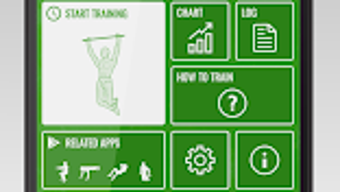
The user interface of PULL UPS is designed with simplicity and clarity in mind. Navigation is straightforward, with a minimalistic layout that prioritizes essential functions like starting a workout, viewing progress, and accessing training tips. The app’s workflow follows a logical sequence: users begin with the level test, select their program, perform workouts, log results, and review performance data—all within a few taps.
Based on general software behavior patterns, the app appears to operate efficiently on modern Android devices. The developer did not specify resource usage details, but the 15.2 MB file size suggests a lightweight application that should run smoothly on a wide range of smartphones and tablets. Performance observations are based on general software behavior patterns, with no reported lag or crashes in available user feedback.
Stability appears to be a priority, as the app functions without requiring frequent updates or background processes. The interface remains responsive during navigation and workout logging, contributing to a seamless user experience. Users can expect consistent performance across sessions, though exact CPU or RAM behavior was not provided.
Compatibility & System Requirements
PULL UPS is designed for Android devices and is compatible with the latest versions of the operating system. The app requires a minimum of 15.2 MB of storage space for installation, which is considered minimal for a fitness application. This low footprint makes it accessible even on older or entry-level Android smartphones.
Exact system requirements were not listed by the developer. Compatibility information was partially provided, indicating support for Android OS but without specifying minimum version numbers or hardware specifications. Users are advised to ensure their device meets general Android compatibility standards for app installation.
Given the app’s focus on fitness tracking and exercise guidance, it does not rely on advanced sensors or high-end processing power. As such, it is expected to function on most standard Android devices with a touchscreen and internet access for optional updates.
Pros and Cons
Pros
- Free to download and use with no in-app purchases
- 12 progressive difficulty levels for all fitness levels
- Initial strength test helps personalize the training experience
- Clear guidance on proper pull-up technique
- Activity log and visual progress tracking for motivation
- Minimal storage requirement (15.2 MB)
- Intuitive interface suitable for beginners and experienced users
Cons
- Platform limited to Android only; no iOS or desktop version available
- Exact system requirements not specified by the developer
- No offline mode mentioned; may require internet for full functionality
- Limited to pull-up training—does not support other exercises or full-body routines
- Developer background and company details not publicly available
FAQ Section
Is PULL UPS available for iOS devices?
PULL UPS is currently only available for Android. There is no official iOS version released at this time.
Is the app free to use?
Yes, PULL UPS is completely free to download and use with no hidden costs or in-app purchases.
Do I need special equipment to use the app?
Yes, a pull-up bar is required to perform the exercises. The app does not include equipment recommendations or alternatives.
Can I use PULL UPS offline?
It is unclear whether the app supports full functionality without an internet connection. The developer did not specify offline capabilities.
How often should I use the app for best results?
The app does not specify a recommended frequency. However, consistent training—such as 2–3 times per week—is generally advised for strength development.
Final Thoughts
PULL UPS delivers a focused, effective solution for anyone looking to improve their pull-up performance and upper body strength. Its structured progression system, personalized assessment, and visual tracking tools make it a standout choice among fitness apps. While limited to Android and lacking broader exercise variety, its specialization in pull-up training provides a depth of guidance that many general workout apps lack.
For beginners, the app removes the intimidation factor of starting strength training. For intermediate users, it offers a clear path to mastery. The minimal file size and free access further enhance its appeal. Despite some limitations in platform availability and transparency around system requirements, the app remains a reliable and practical tool for home-based fitness.
Download PULL UPS now and begin your journey toward stronger, more capable muscles—no gym required.




.png)



