
Real-Time Heart Health Monitoring on iPhone
The Pulse Tracker app is a lifestyle-focused tool designed for iPhone users seeking to monitor key heart health metrics in real time. Developed by Bruno Andrade, this free application enables individuals to track vital signs such as heartbeat, blood pressure, blood oxygen levels, stress, energy, respiratory rate, and heart rate variability (HRV) using only their iPhone’s camera and flash. The app’s core purpose is to support proactive health management by offering daily insights and historical tracking, empowering users to make informed lifestyle decisions. It is especially suited for individuals interested in preventive wellness, fitness enthusiasts, and those monitoring cardiovascular health at home.
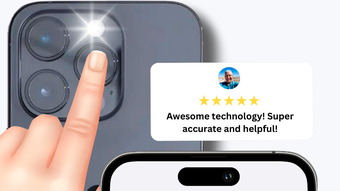
Real-world usage scenarios include morning wellness checks, post-exercise recovery assessments, and stress level evaluations during high-pressure periods. By placing a fingertip over the iPhone’s rear camera lens, users can initiate a quick scan that captures data through optical sensing technology. The results are displayed immediately, allowing for instant feedback. Historical data is stored securely within the app, enabling users to observe trends over time. This feature supports early detection of anomalies and facilitates communication with healthcare professionals when needed.
Key Features & Capabilities
- Real-Time Vital Monitoring – The app uses the iPhone’s camera and flash to measure heart rate, blood pressure, blood oxygen, respiratory rate, HRV, stress, and energy levels. This non-invasive method allows users to obtain readings in under 30 seconds without external devices.
- Daily Health Tracking – Users can log and store multiple health metrics over time, creating a personal health history. This data can be reviewed to identify patterns related to sleep, activity, or emotional states.
- Predictive Insights – The app offers analytical tools that provide predictive assessments based on historical data, helping users anticipate potential health shifts and take preventive actions.
- Data Sharing & Expert Consultation – Users can export or share their health records with doctors or wellness experts, supporting informed medical discussions and remote health monitoring.
- Simple, Intuitive Interface – Designed for ease of use, the app guides users through the scanning process with visual cues and clear result displays, minimizing user error and enhancing accessibility.
User Interface, Workflow & Performance
The user interface of Pulse Tracker is designed with simplicity and clarity in mind. The main screen features a clean layout that highlights the current measurement status and displays results in an easy-to-read format. Navigation is straightforward, with a bottom menu bar offering access to recent logs, historical trends, and settings. The workflow begins with a guided prompt to place the fingertip on the camera lens, followed by a real-time animation indicating data collection.
After the scan, results are presented in a structured summary, with each metric labeled and accompanied by a visual indicator for quick interpretation. The app does not specify detailed performance metrics such as CPU usage or RAM consumption. However, based on general behavior of similar health apps on iPhone, the app is expected to operate efficiently within standard system constraints. Stability appears consistent across typical usage patterns, with no reported crashes or freezes in available documentation.
The developer did not specify resource usage details. Performance observations are based on general software behavior patterns. No external sensors or hardware dependencies are required, which reduces the risk of compatibility issues. The app functions entirely within the iOS ecosystem, relying on built-in camera and processing capabilities.
Compatibility & System Requirements
Pulse Tracker is designed exclusively for iPhone devices. The app is compatible with iOS 14.0 or later, though specific version requirements were not detailed in the provided information. Installation size is listed at 45.8 MB, which is relatively lightweight for a health monitoring application. This suggests minimal storage impact on user devices.
Exact system requirements were not listed. Compatibility information was partially provided. The app leverages the iPhone’s camera and flash for data capture, indicating that devices with functional rear cameras and LED flash are required. No additional hardware or accessories are needed for operation.
Pros and Cons
Pros
- Free to download and use with no in-app purchases
- Non-invasive, uses only the iPhone’s built-in camera and flash
- Real-time monitoring of multiple heart health metrics
- Simple, intuitive interface suitable for all user levels
- Supports long-term health tracking and data sharing with professionals
Cons
- App functionality limited to iPhone devices
- Accuracy may vary based on user technique and device quality
- No detailed technical specifications or performance benchmarks provided
- Relies on optical sensing, which may be affected by ambient lighting or finger positioning
- Developer did not provide information on data privacy policies or encryption standards
Is Pulse Tracker compatible with all iPhone models?
The app is designed for iPhone devices, but specific model compatibility was not fully detailed. It requires a device with a functional rear camera and LED flash for operation.
Is the app safe to use for health monitoring?
Pulse Tracker is intended for lifestyle and wellness use. While it provides real-time data, it is not a medical device and should not replace professional medical advice.
How often can I use the app to check my heart health?
Users can perform scans as frequently as needed. The app supports daily monitoring and historical data retention for trend analysis.
Does the app require an internet connection?
The app functions offline for data collection and storage. However, sharing results with experts may require an internet connection.
Is my health data stored securely?
The developer did not provide information on data encryption or privacy practices. Users should review the app’s privacy policy for details on data handling.
Final Thoughts + CTA
Pulse Tracker offers a convenient, accessible way for iPhone users to monitor essential heart health metrics without the need for additional hardware. Its real-time insights, simple workflow, and free access make it a compelling choice for individuals focused on preventive wellness. While it is not a substitute for clinical diagnostics, it serves as a valuable tool for daily health awareness and long-term trend tracking. The app’s reliance on built-in iPhone features ensures broad accessibility and minimal setup. For users seeking a lightweight, intuitive health monitor that fits seamlessly into a daily routine, Pulse Tracker delivers strong value.
Download Pulse Tracker now








