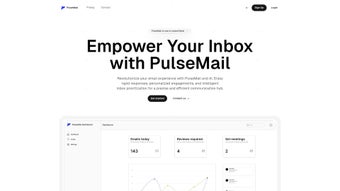

Download PulseMail – AI Email Assistant, Inbox Automation, Productivity Tool
Overview of PulseMail
PulseMail is an AI‑powered email assistant built for modern professionals who spend too much time sorting, answering, and scheduling through their inboxes. By leveraging natural‑language processing and machine‑learning algorithms, PulseMail automatically drafts replies, prioritizes messages, and surfaces meeting requests with one‑click confirmation options. The service runs entirely in a web browser, meaning you can access it from any device without installing bulky client software. As a subscription‑based tool, PulseMail delivers regular updates, new AI models, and continuous improvements to keep your email workflow secure and efficient. Whether you’re a sales executive juggling dozens of leads, a project manager coordinating multiple teams, or simply an individual looking to reclaim time, PulseMail promises to reduce manual email handling by up to 70 % while keeping the tone and context of each response consistent with your personal style.
Beyond basic automation, PulseMail offers daily analytics that break down your email activity, highlight peak communication periods, and suggest optimal times for sending important messages. These insights help you fine‑tune your outreach strategy, improve response rates, and avoid inbox overload. Integration points with popular productivity suites (Google Workspace, Microsoft 365, Slack, and Trello) mean that PulseMail can pull context from calendars, task boards, and CRM systems, enriching its suggestions with relevant project data. Security is baked in: all email content is encrypted in transit, and the AI engine processes data on secure, GDPR‑compliant servers, ensuring that confidential information stays private.
In short, PulseMail is more than a simple autoresponder; it’s a comprehensive email management platform that learns from your habits, adapts to your workflow, and continuously delivers smarter, faster communication.
Key Features that Set PulseMail Apart
- AI‑Generated Replies: Instantly drafts context‑aware responses based on the content of incoming messages, your previous reply patterns, and customizable tone settings.
- Inbox Prioritization: Uses importance scoring to surface critical emails first, while relegating newsletters and low‑value messages to a secondary view.
- Meeting Request Recognition: Detects calendar invites, extracts date, time, and location, and presents one‑click accept/decline options with suggested alternatives.
- Email Summarization: Generates concise summaries for long threads, allowing you to grasp key points without scrolling through hundreds of lines.
- Daily Analytics Dashboard: Visualizes email volume, response time, peak activity hours, and suggests optimal sending windows.
- Customizable Automation Rules: Set conditions (e.g., sender, keywords, time of day) to trigger specific actions such as auto‑archive, label, or forward.
- Seamless Integrations: Connects with Google Calendar, Outlook, Slack, Trello, HubSpot, and Zapier for cross‑platform workflow automation.
- Secure Cloud Processing: All data is encrypted with TLS 1.3; AI models run on ISO‑27001 certified servers, and no email content is stored after processing.
- Multi‑User Teams: Admins can assign roles, set permission levels, and monitor team email performance from a centralized console.
- Continuous Updates: Subscription includes automatic AI model upgrades, new feature rollouts, and priority support.
Each feature is designed with a productivity‑first mindset. For example, the AI‑Generated Replies not only draft a reply but also suggest subject line variations and attach relevant documents from linked cloud storage, cutting down on manual search time. The Inbox Prioritization algorithm combines sender reputation, keyword analysis, and past interaction frequency to calculate a dynamic score that updates in real time as new messages arrive. This ensures that urgent client inquiries never get lost among promotional emails.
Meeting Request Recognition goes a step further by parsing natural language in the email body (e.g., “Let’s meet next Thursday at 2 pm”) and matching it against your existing calendar availability. If a conflict is detected, PulseMail proposes the next three best time slots, which you can send with a single click. This feature alone has been reported to reduce scheduling back‑and‑forth by up to 80 %.
Installation, Usage, and Compatibility
Getting Started – No Heavy Installation Required
PulseMail is a web‑based application, so there is no traditional installer to download. To begin, visit the official PulseMail portal, create an account using your corporate email address, and grant the necessary OAuth permissions for the email service you wish to connect (Gmail, Outlook, or any IMAP/SMTP provider). The onboarding wizard walks you through linking your inbox, selecting default AI settings, and configuring your first automation rule. Because everything runs in the browser, you can start using PulseMail within five minutes of registration.
How to Use PulseMail Effectively
Once connected, PulseMail adds a subtle sidebar to your webmail interface. This sidebar displays the AI‑suggested reply box, priority inbox view, and a quick‑access analytics summary. You can toggle the sidebar on or off via the settings menu. For power users, the Rule Builder lets you define conditional triggers using a visual drag‑and‑drop interface; for example, “If sender is @client.com and subject contains ‘invoice’, automatically label as ‘Finance’ and forward to [email protected].”
PulseMail also offers a mobile‑friendly web view, enabling you to review summaries and approve meeting suggestions from smartphones or tablets. The responsive design adapts to screen size without sacrificing functionality, and all interactions remain encrypted.
Operating System Compatibility
Because PulseMail runs in a browser, it is compatible with any operating system that supports modern web standards, including Windows 10/11, macOS Monterey and later, Linux distributions, ChromeOS, Android (via Chrome or dedicated web‑app wrapper), and iOS (Safari). The service is optimized for Chrome, Edge, Firefox, and Safari, with automatic feature detection to ensure a consistent experience across platforms.
For organizations with strict IT policies, PulseMail can be deployed behind a corporate proxy, and the OAuth tokens can be scoped to read‑only or read‑write as needed. The subscription includes 24/7 support, detailed API documentation for custom integrations, and a sandbox environment for testing automation rules before they go live.
Pros, Cons, and Frequently Asked Questions
Pros
- Significant time savings – up to 70 % reduction in manual email handling.
- AI replies maintain a consistent tone and can be customized per user.
- Powerful prioritization and summarization keep inbox clutter to a minimum.
- Deep integration with calendars and productivity tools streamlines scheduling.
- Secure, GDPR‑compliant processing with end‑to‑end encryption.
- Responsive web design works on all major operating systems and devices.
- Continuous AI model updates ensure cutting‑edge performance.
Cons
- Subscription pricing may be a barrier for freelancers or small teams.
- Initial setup requires granting access to email accounts, which some users may find intrusive.
- AI suggestions are not always perfect; occasional manual editing is still required.
- Feature set is web‑centric; no native desktop client for offline use.
- Advanced rule building has a learning curve for non‑technical users.
FAQ – Answers to Common Queries
Can PulseMail access my entire email history?
PulseMail only reads messages required for generating replies and analytics. It never stores full email bodies after processing, and you can limit access to specific folders during the OAuth permission step.
Is there a free trial available?
Yes, PulseMail offers a 14‑day free trial with full feature access. No credit card is required; simply sign up and start connecting your inbox.
How does PulseMail handle sensitive information?
All data in transit is encrypted with TLS 1.3, and processing occurs on ISO‑27001 certified servers. PulseMail does not retain content after generating a response, ensuring that confidential information is not stored long‑term.
Can I use PulseMail with multiple email accounts?
Absolutely. PulseMail supports connecting multiple accounts (Gmail, Outlook, IMAP) under a single dashboard, allowing you to manage personal and professional inboxes side by side.
What support options are available for paid subscribers?
Subscribers receive 24/7 chat support, priority email response within two hours, and access to a dedicated knowledge base with video tutorials and API documentation.
PulseMail delivers on its promise of inbox automation with impressive AI accuracy and a well‑designed user interface. While the subscription cost may deter solo users, teams will quickly recoup the investment through productivity gains. The only drawback is occasional misinterpretation of nuanced requests, but manual editing is straightforward. Overall, PulseMail stands out as a leading email assistant for professionals seeking to reclaim time and maintain organized communication.
Conclusion & Call to Action
In an era where email remains the backbone of business communication, a tool that can intelligently filter, respond, and schedule on your behalf is no longer a luxury—it’s a necessity. PulseMail combines cutting‑edge AI with practical workflow features, delivering measurable time savings, improved response quality, and data‑driven insights into your emailing habits. Whether you’re part of a large enterprise, a growing startup, or an independent consultant, integrating PulseMail into your daily routine can transform a chaotic inbox into a streamlined hub of productivity.
Ready to experience the future of email management? Start your free 14‑day trial today, explore the AI‑generated reply capabilities, and see firsthand how much time you can reclaim. With secure cloud processing, cross‑platform compatibility, and continuous updates, PulseMail offers a low‑risk, high‑reward solution for anyone looking to boost email efficiency.
Don’t let another important message slip through the cracks—download PulseMail now and take control of your inbox.



.png)




