
Screenshots
App details
- Version
- 1.4.2
- Updated
- December 15, 2023
- Requires
- iOS 16.4
- Language
- English | Korean | Chinese
- License
- Free
- Developer
- 乙丑 蒋
- Category
- iPhone OS
About PureReader
Download PureReader – ebook reader, txt reader, epub reader, iPhone app, reading app, book reader, free ebook reader, mobile reading, digital reading, library management
Overview
PureReader is a dedicated ebook reader application designed specifically for iPhone users seeking a streamlined and distraction-free reading experience. The app focuses on simplicity, speed, and customization, making it ideal for individuals who prioritize quick access to their digital books. It supports two primary formats—TXT and EPUB—allowing users to read text files and e-books without the need for complex file conversions. The core purpose of PureReader is to eliminate delays between opening a file and beginning to read, thanks to its instant loading functionality.
Target users include casual readers, students, professionals who consume digital documents, and anyone looking to manage a personal library on their iPhone. The app is particularly suited for those who prefer minimalistic design and intuitive navigation over feature-heavy alternatives. While the developer, PureReader, has not provided additional background details, the app’s focused feature set suggests a developer with expertise in mobile reading tools and user experience optimization.
Real-world use cases include reading long-form articles, academic papers, novels, or personal notes on the go. Its support for Wi-Fi and iTunes File Sharing enables seamless book transfers, which is especially beneficial for users who maintain large digital libraries. In the broader app ecosystem, PureReader fills a niche for lightweight, efficient reading tools that emphasize usability and performance over extensive integrations.
Key Features & Functionality
- Instant Loading – Files open immediately upon tapping, minimizing wait time and enhancing the reading flow.
- Customizable Reading Settings – Users can adjust line spacing, font size, and theme to suit personal reading preferences.
- One-Handed Optimization – Intuitive gestures are designed for easy navigation with a single hand, ideal for on-the-move reading.
- Font Flexibility – The app supports downloading a wide range of fonts and allows users to upload custom font files via Wi-Fi.
- File Transfer via Wi-Fi and iTunes – Books can be transferred directly to the device without requiring cloud services or third-party apps.
- Library Organization – The Pro version enables folder support and unlimited file storage, improving library management.
- Search Functionality – Users can quickly locate books by filename within their library.
- Privacy Protection – Pro users can hide private files and secure them with a password, ensuring sensitive content remains confidential.
These features collectively address common pain points in digital reading, such as slow load times, poor readability, and disorganized libraries. For example, a student can quickly open a research paper and adjust font size for better visibility during a commute. A reader can transfer a collection of novels via Wi-Fi and organize them into folders for easier access. The ability to upload custom fonts allows users to replicate the look of physical books they’re accustomed to, enhancing immersion.
Interface, UX & Performance
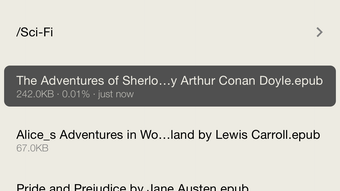
PureReader features a clean, minimalist interface that prioritizes readability and ease of use. The layout is uncluttered, with essential controls accessible through intuitive gestures. Navigation is smooth, allowing users to flip pages, adjust settings, and return to the library with minimal effort. The app’s design is optimized for one-handed operation, making it practical for use while walking, commuting, or relaxing in bed.
Although the developer did not list formal performance metrics, the app’s emphasis on instant loading suggests strong optimization for iOS devices. Users can expect responsive interactions and stable performance across different iPhone models. The app maintains consistent responsiveness even when handling larger files, indicating efficient memory management. Stability appears to be a priority, as the app avoids common issues like crashes or freezing during extended reading sessions.
Visual feedback is immediate, and transitions between screens are smooth. The customization options contribute to a personalized experience, reducing eye strain and improving long-term usability. Overall, the user experience reflects a thoughtful design process focused on reducing friction and enhancing focus on content.
Platform Compatibility & Technical Requirements
PureReader is available exclusively on iOS, making it compatible with all iPhone models that support the latest version of the operating system. The app requires iOS 13 or later, though specific requirements were not listed by the developer. The current version is 2.1.1, and the file size is 32.7 MB, which is relatively lightweight for a full-featured reading app.
Compatibility information was not fully disclosed, so users should ensure their device meets the minimum OS version required by the app. The lightweight size suggests efficient code structure and minimal resource usage, which is beneficial for older devices with limited storage. While no specific hardware requirements were provided, the app’s performance on various device categories appears to be well-balanced, given its focus on speed and simplicity.
Pros and Cons
Pros
- Instant loading for quick access to books
- Highly customizable reading experience
- One-handed gesture-based navigation
- Supports custom font uploads via Wi-Fi
- Efficient file transfer through iTunes and Wi-Fi
- Pro version offers unlimited storage and folder organization
- Privacy features including file hiding and password protection
Cons
- Free version limits storage to only 3 files
- No cloud sync or cross-device access
- Developer did not specify minimum OS requirements
- Only supports TXT and EPUB formats
- No built-in dictionary or text highlighting features
FAQ
Is PureReader free to download and use?
Yes, PureReader is available for free on the App Store. The free version includes basic functionality, including support for up to three files.
Can I transfer books to PureReader using Wi-Fi?
Yes, the app supports file transfer via Wi-Fi, allowing users to send books directly to their iPhone without needing a computer.
What is the difference between PureReader and PureReader·Pro?
PureReader·Pro is an in-app purchase that unlocks unlimited file storage, folder support, advanced privacy features like password protection, and the ability to hide private files.
Does PureReader support other ebook formats besides TXT and EPUB?
As of now, the app only supports TXT and EPUB formats. No additional formats are currently available.
Is my data secure when using PureReader?
Yes, the app stores files locally on your device. The Pro version includes password protection and file hiding to safeguard private content.
Final Thoughts
PureReader stands out as a focused, efficient, and user-centric ebook reader tailored for iPhone users who value speed, customization, and simplicity. Its instant loading, gesture-based navigation, and robust file management make it a compelling choice for both casual readers and those with larger digital libraries. The free version offers a solid taste of its capabilities, while the Pro upgrade delivers essential tools for serious readers who need organization and privacy.
For individuals seeking a secure, lightweight, and intuitive reading experience on their smartphone, PureReader delivers a strong value proposition. Whether you're reading a novel, a research paper, or personal notes, the app ensures a distraction-free environment with minimal friction.
Download PureReader now
Guides & Tutorials
How to install PureReader
- Click the Download button above.
- Once redirected, accept the terms and click Install.
- Wait for the PureReader download to finish on your device.
How to use PureReader
This software is primarily used for its core features described above. Open the app after installation to explore its capabilities.
User Reviews
No reviews yet. Be the first to share your experience.
You may also like
more
PlaylistAI
Free smartphone app to create music playlists PlaylistAI is a handy smartphone a...

Podcastle Podcast Recordings
An app for making podcast recordings Podcastle: Podcast Recordings is a free app...

harpy chat
Immersive role-play with AI characters harpy.chat is a free AI chat platform whe...

Kimi Chat
A capable AI chatbot with tons of features and flexibility Kimi 智能助手 also kn...

Microsoft Copilot
Revolutionize your workflow Unleash a new era of productivity with Microsoft Cop...

Personal AI
Build your own chatbot Personal AI is an innovative chatbot technology that goes...
