Encapsulation is one of the fundamental concepts in object-oriented programming (OOP), including abstraction, inheritance, and polymorphism. This lesson will cover what encapsulation is and how to implement it in Python.
After reading this article, you will learn:
- Encapsulation in Python
- Need for Encapsulation
- Data Hiding using public, protected, and private members
- Data Hiding vs. Encapsulation
- Getter and Setter Methods
- Benefits of Encapsulation
Table of contents
What is Encapsulation in Python?
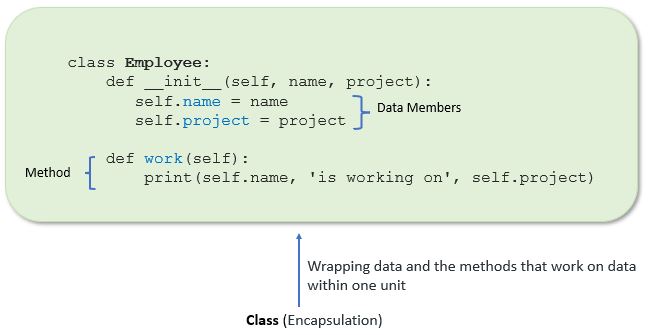
Encapsulation in Python describes the concept of bundling data and methods within a single unit. So, for example, when you create a class, it means you are implementing encapsulation. A class is an example of encapsulation as it binds all the data members (instance variables) and methods into a single unit.
Example:
In this example, we create an Employee class by defining employee attributes such as name and salary as an instance variable and implementing behavior using work() and show() instance methods.
Output:
Name:  Jessa Salary: 8000
Jessa is working on NLP
Using encapsulation, we can hide an object’s internal representation from the outside. This is called information hiding.
Also, encapsulation allows us to restrict accessing variables and methods directly and prevent accidental data modification by creating private data members and methods within a class.
Encapsulation is a way to can restrict access to methods and variables from outside of class. Whenever we are working with the class and dealing with sensitive data, providing access to all variables used within the class is not a good choice.
For example, Suppose you have an attribute that is not visible from the outside of an object and bundle it with methods that provide read or write access. In that case, you can hide specific information and control access to the object’s internal state. Encapsulation offers a way for us to access the required variable without providing the program full-fledged access to all variables of a class. This mechanism is used to protect the data of an object from other objects.
Access Modifiers in Python
Encapsulation can be achieved by declaring the data members and methods of a class either as private or protected. But In Python, we don’t have direct access modifiers like public, private, and protected. We can achieve this by using single underscore and double underscores.
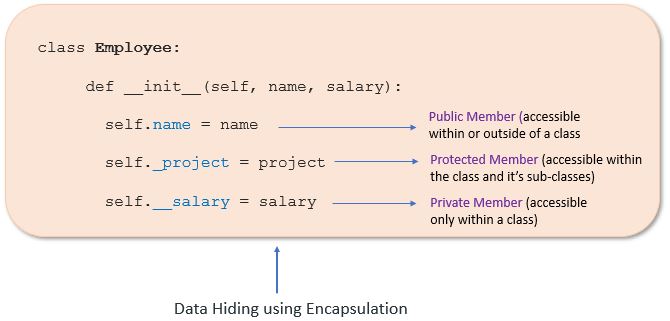
Access modifiers limit access to the variables and methods of a class. Python provides three types of access modifiers private, public, and protected.
- Public Member: Accessible anywhere from otside oclass.
- Private Member: Accessible within the class
- Protected Member: Accessible within the class and its sub-classes
Public Member
Public data members are accessible within and outside of a class. All member variables of the class are by default public.
Example:
Output
Name:  Jessa Salary: 10000
Name:  Jessa Salary: 10000
Private Member
We can protect variables in the class by marking them private. To define a private variable add two underscores as a prefix at the start of a variable name.
Private members are accessible only within the class, and we can’t access them directly from the class objects.
Example:
Output
AttributeError: 'Employee' object has no attribute '__salary'
In the above example, the salary is a private variable. As you know, we can’t access the private variable from the outside of that class.
We can access private members from outside of a class using the following two approaches
- Create public method to access private members
- Use name mangling
Let’s see each one by one
Public method to access private members
Example: Access Private member outside of a class using an instance method
Output:
Name: Jessa
Salary: 10000
Name Mangling to access private members
We can directly access private and protected variables from outside of a class through name mangling. The name mangling is created on an identifier by adding two leading underscores and one trailing underscore, like this _classname__dataMember, where classname is the current class, and data member is the private variable name.
Example: Access private member
Output
Name: Jessa Salary: 10000
Protected Member
Protected members are accessible within the class and also available to its sub-classes. To define a protected member, prefix the member name with a single underscore _.
Protected data members are used when you implement inheritance and want to allow data members access to only child classes.
Example: Proctecd member in inheritance.
Output
Employee name : Jessa
Working on project : NLP
Project: NLP
Getters and Setters in Python
To implement proper encapsulation in Python, we need to use setters and getters. The primary purpose of using getters and setters in object-oriented programs is to ensure data encapsulation. Use the getter method to access data members and the setter methods to modify the data members.
In Python, private variables are not hidden fields like in other programming languages. The getters and setters methods are often used when:
- When we want to avoid direct access to private variables
- To add validation logic for setting a value
Example
Output
Name: Jessa 14
Name: Jessa 16
Let’s take another example that shows how to use encapsulation to implement information hiding and apply additional validation before changing the values of your object attributes (data member).
Example: Information Hiding and conditional logic for setting an object attributes
Output:
Student Details: Jessa 10
Invalid roll no. Please set correct roll number

Student Details: Jessa 25
Advantages of Encapsulation
- Security: The main advantage of using encapsulation is the security of the data. Encapsulation protects an object from unauthorized access. It allows private and protected access levels to prevent accidental data modification.
- Data Hiding: The user would not be knowing what is going on behind the scene. They would only be knowing that to modify a data member, call the setter method. To read a data member, call the getter method. What these setter and getter methods are doing is hidden from them.
- Simplicity: It simplifies the maintenance of the application by keeping classes separated and preventing them from tightly coupling with each other.
- Aesthetics: Bundling data and methods within a class makes code more readable and maintainable


Very good article Vishal. It is easy to understand the concepts in fluent way. Appreciating your effort. Thank you…
Protected member example and private member accessing way is confusing.
The protected variable can be accessed from public , why ? it is quite confusing also the getter method for protected variable is also confusing when we can access private variable using instance method and name mangling then why we need getter method.
read the advantages of encapsulation data hiding one you’ll understand
Hello Disha,
Protected variable can be accessed from public, that is Python limitation. Python doesn’t provide purely protected variables. Even by using name mangling, private variables can be fetched from public. That is also a demerit. This is different from C++ or Java. Simply we can entertain that by saying, it is some additional feature. Actually this is caused, because internally private variable is stored in some other way.
About setters and getters (for private, protected or public variables) is the standard way of coding, when you are using Encapsulation and Data-hiding concept.
Refer to the first example under “Private Member”. If you insert a statement
emp.__salary = 20000 before printing print(‘Salary:’, emp.__salary), it shows NO AttributeError. This also means Pvt vars can be accessed from outside as I am able to assign a value and then print it!! So please explain how is this possible. If I do not assign first and print it, then it shows an AttributeError. Why is this behavior?
Hello BV,
“Actually you are creating a new variable from outside/public, and printing that only. The original private variable value is still same”.
Go through the below code, look into my comments in each line. You will understand easily. Even you can run this code and check by yourself.
class Employee:
# constructor
def __init__(self, name, salary):
# public data member
self.name = name
# private member
self.__salary = salary
def getSalary(self):
return self.__salary
# creating object of a class
emp = Employee(‘Jessa’, 1000)
# accessing private data members
emp.__salary = 2 # Once an object is made then also we can create some new variable inside that object
print(‘Salary:’, emp.__salary) # Output: 2 # This is some other variable and not the private variable “__salary”
print(‘Salary:’, emp.getSalary()) # Output: 1000 # This gives the original private variable “__salary”
print(‘Salary:’, emp._Employee__salary) # Output: 1000 # This gives the original private variable “__salary”
print(‘Salary:’, emp.__salary) # Output: 2 # Printed again for reconfirmation
emp.xyz = 7 # Once an object is made then also we can create some new variable inside that object
print(‘XYZ var:’, emp.xyz) # Output: 7 # Whatever variable created from outside, same is read from outside/public
emp2 = Employee(‘Satyam’, 99) # A new object is created which won’t have those new variables, what you created in object “emp”
#print(‘Salary:’, emp2.__salary) # AttributeError: ‘Employee’ object has no attribute ‘__salary’
#print(‘XYZ var:’, emp2.xyz) # AttributeError: ‘Employee’ object has no attribute ‘xyz’
This explanation is simply not true. underscores are just a convention. There is no such thing as true private or protected members in Python. That is why all these commenters are confused
a clear explanation.thankyou
Thank you for the detailed explanation.
But still I stuck with a question,
Even though we have a setter method to restrict the roll number, we are able to change the roll number with the statement “jessa._Student__roll_no=100”.
Please help me to understand is there anyway we can completely encapsulate the data in python.
Yes, this explanation is a bit confusing.
Unlike many other programming languages, Python does not have an elaborated visibility model. Basically everything is always public. There is no way to actually hide something. We are all consenting adults. 😉
The single underscore is used to mark something (attributes, properties, methods) as “not part of the public API”. But thats nothing more than a (very useful) convention.
The double leading underscore triggers name mangling, which adds the class name as prefix. The idea here is to avoid accidental overrides by subclasses. This allows subclasses to not care that much about the internals of its parent class. Use this responsibly. Name mangling often makes tests harder to read.
Also the explanation of getters and setters is a bit off. At least in Python3, it is considered more pythonic to use ordinary attributes as long as there is not need for additional code to be executed (eg. Verification-Code on a “set” operation) and switch over to properties once there is.
BR, Jan
Cool !!!
Top!
Hi bro, thank you very much for the explanation. one thing I didn’t understand is why a protected property can be accessed from a public scope. thank you!
Well understood!
Nice Explanation
The best , neat and perfect content that i have ever seen about OOPs. Thank you so much.
probably the best source to learn oop on internet
good explanation tq
Bro…… you’re demigod for us. Thank you so much❤️
You’re Welcome, Pradeep.
But the real fact is you can access protected variable and fn from literally anywhere,this package another package all…
So all are good except ur protected explanation seems not 100 percent correct
I am a beginner, fantastic….
Perfect Knowledge in a simple way..Thanks a lot, sr!!
Thanks a lot I am able to understand topics very comfortably
Thanks for this tutorials.
Thank you so much for these articles. I am really great full for all of them. They are helping me understand concepts thoroughly.
great