Object-Oriented Programming (OOP) has four essential characteristics: abstraction, encapsulation, inheritance, and polymorphism.
This lesson will cover what polymorphism is and how to implement them in Python. Also, you’ll learn how to implement polymorphism using function overloading, method overriding, and operator overloading.
Table of contents
What is Polymorphism in Python?
Polymorphism in Python is the ability of an object to take many forms. In simple words, polymorphism allows us to perform the same action in many different ways.
For example, Jessa acts as an employee when she is at the office. However, when she is at home, she acts like a wife. Also, she represents herself differently in different places. Therefore, the same person takes different forms as per the situation.
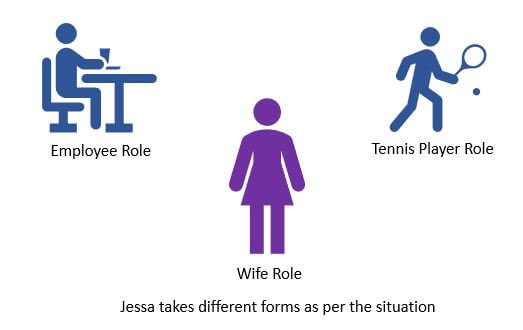
In polymorphism, a method can process objects differently depending on the class type or data type. Let’s see simple examples to understand it better.
Polymorphism in Built-in function len()
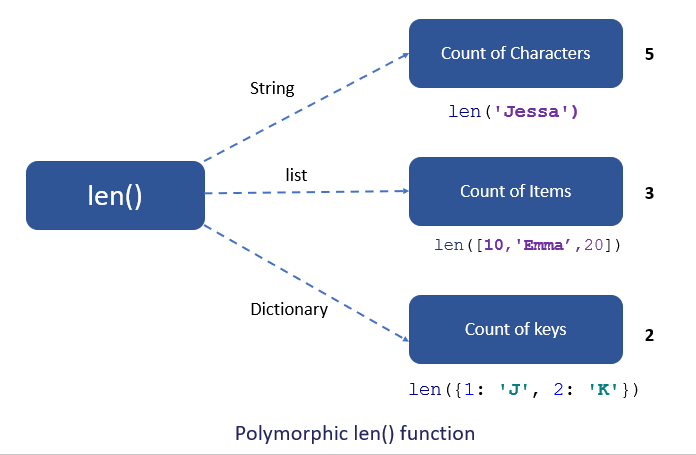
The built-in function len() calculates the length of an object depending upon its type. If an object is a string, it returns the count of characters, and If an object is a list, it returns the count of items in a list.
The len() method treats an object as per its class type.
Example:
Output
3
10
Polymorphism With Inheritance
Polymorphism is mainly used with inheritance. In inheritance, child class inherits the attributes and methods of a parent class. The existing class is called a base class or parent class, and the new class is called a subclass or child class or derived class.
Using method overriding polymorphism allows us to defines methods in the child class that have the same name as the methods in the parent class. This process of re-implementing the inherited method in the child class is known as Method Overriding.
Advantage of method overriding
- It is effective when we want to extend the functionality by altering the inherited method. Or the method inherited from the parent class doesn’t fulfill the need of a child class, so we need to re-implement the same method in the child class in a different way.
- Method overriding is useful when a parent class has multiple child classes, and one of that child class wants to redefine the method. The other child classes can use the parent class method. Due to this, we don’t need to modification the parent class code
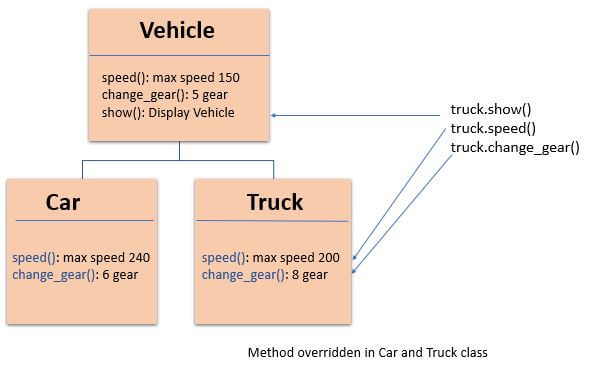
In polymorphism, Python first checks the object’s class type and executes the appropriate method when we call the method. For example, If you create the Car object, then Python calls the speed() method from a Car class.
Let’s see how it works with the help of an example.
Example: Method Overriding
In this example, we have a vehicle class as a parent and a ‘Car’ and ‘Truck’ as its sub-class. But each vehicle can have a different seating capacity, speed, etc., so we can have the same instance method name in each class but with a different implementation. Using this code can be extended and easily maintained over time.
Output:
Details: Car x1 Red 20000
Car max speed is 240
Car change 7 gear

Details: Truck x1 white 75000
Vehicle max speed is 150
Vehicle change 6 gear
As you can see, due to polymorphism, the Python interpreter recognizes that the max_speed() and change_gear() methods are overridden for the car object. So, it uses the one defined in the child class (Car)
On the other hand, the show() method isn’t overridden in the Car class, so it is used from the Vehicle class.
Overrride Built-in Functions
In Python, we can change the default behavior of the built-in functions. For example, we can change or extend the built-in functions such as len(), abs(), or divmod() by redefining them in our class. Let’s see the example.
Example
In this example, we will redefine the function len()
Output
Redefine length
4
Polymorphism In Class methods
Polymorphism with class methods is useful when we group different objects having the same method. we can add them to a list or a tuple, and we don’t need to check the object type before calling their methods. Instead, Python will check object type at runtime and call the correct method. Thus, we can call the methods without being concerned about which class type each object is. We assume that these methods exist in each class.
Python allows different classes to have methods with the same name.
- Let’s design a different class in the same way by adding the same methods in two or more classes.
- Next, create an object of each class
- Next, add all objects in a tuple.
- In the end, iterate the tuple using a for loop and call methods of a object without checking its class.
Example
In the below example, fuel_type() and max_speed() are the instance methods created in both classes.
Output
Petrol
Max speed 350

Diesel
Max speed is 240
As you can see, we have created two classes Ferrari and BMW. They have the same instance method names fuel_type() and max_speed(). However, we have not linked both the classes nor have we used inheritance.
We packed two different objects into a tuple and iterate through it using a car variable. It is possible due to polymorphism because we have added the same method in both classes Python first checks the object’s class type and executes the method present in its class.
Polymorphism with Function and Objects
We can create polymorphism with a function that can take any object as a parameter and execute its method without checking its class type. Using this, we can call object actions using the same function instead of repeating method calls.
Example
Output
Petrol
Max speed 350
Diesel
Max speed is 240
Polymorphism In Built-in Methods
The word polymorphism is taken from the Greek words poly (many) and morphism (forms). It means a method can process objects differently depending on the class type or data type.
The built-in function reversed(obj) returns the iterable by reversing the given object. For example, if you pass a string to it, it will reverse it. But if you pass a list of strings to it, it will return the iterable by reversing the order of elements (it will not reverse the individual string).
Let us see how a built-in method process objects having different data types.
Example:
Output:
Reverse string
e v i t a n Y P

Reverse list
Kelly Jessa Emma
Method Overloading
The process of calling the same method with different parameters is known as method overloading. Python does not support method overloading. Python considers only the latest defined method even if you overload the method. Python will raise a TypeError if you overload the method.
Example
To overcome the above problem, we can use different ways to achieve the method overloading. In Python, to overload the class method, we need to write the method’s logic so that different code executes inside the function depending on the parameter passes.
For example, the built-in function range() takes three parameters and produce different result depending upon the number of parameters passed to it.
Example:
Output:
0, 1, 2, 3, 4,
5, 6, 7, 8, 9,
2, 4, 6, 8, 10,
Let’s assume we have an area() method to calculate the area of a square and rectangle. The method will calculate the area depending upon the number of parameters passed to it.
- If one parameter is passed, then the area of a square is calculated
- If two parameters are passed, then the area of a rectangle is calculated.
Example: User-defined polymorphic method
Output:
Area of Square is: 25
Area of Rectangle is: 15
Operator Overloading in Python
Operator overloading means changing the default behavior of an operator depending on the operands (values) that we use. In other words, we can use the same operator for multiple purposes.
For example, the + operator will perform an arithmetic addition operation when used with numbers. Likewise, it will perform concatenation when used with strings.
The operator + is used to carry out different operations for distinct data types. This is one of the most simple occurrences of polymorphism in Python.
Example:
Output:
300
JessRoy
[10, 20, 30, 'jessa', 'emma', 'kelly']
Overloading + operator for custom objects
Suppose we have two objects, and we want to add these two objects with a binary + operator. However, it will throw an error if we perform addition because the compiler doesn’t add two objects. See the following example for more details.
Example:
Output
TypeError: unsupported operand type(s) for +: 'Book' and 'Book'
We can overload + operator to work with custom objects also. Python provides some special or magic function that is automatically invoked when associated with that particular operator.
For example, when we use the + operator, the magic method __add__() is automatically invoked. Internally + operator is implemented by using __add__() method. We have to override this method in our class if you want to add two custom objects.
Example:
Output
Total number of pages: 700
Overloading the * Operator
The * operator is used to perform the multiplication. Let’s see how to overload it to calculate the salary of an employee for a specific period. Internally * operator is implemented by using the __mul__() method.
Example:
Output
Wroked for 50 days
salary is:  40000
Magic Methods
In Python, there are different magic methods available to perform overloading operations. The below table shows the magic methods names to overload the mathematical operator, assignment operator, and relational operators in Python.
| Operator Name | Symbol | Magic method |
|---|---|---|
| Addition | + | __add__(self, other) |
| Subtraction | - | __sub__(self, other) |
| Multiplication | * | __mul__(self, other) |
| Division | / | __div__(self, other) |
| Floor Division | // | __floordiv__(self,other) |
| Modulus | % | __mod__(self, other) |
| Power | ** | __pow__(self, other) |
| Increment | += | __iadd__(self, other) |
| Decrement | -= | __isub__(self, other) |
| Product | *= | __imul__(self, other) |
| Division | /+ | __idiv__(self, other) |
| Modulus | %= | __imod__(self, other) |
| Power | **= | __ipow__(self, other) |
| Less than | < | __lt__(self, other) |
| Greater than | > | __gt__(self, other) |
| Less than or equal to | <= | __le__(self, other) |
| Greater than or equal to | >= | __ge__(self, other) |
| Equal to | == | __eq__(self, other) |
| Not equal | != | __ne__(self, other) |


There are some topics of OOP that are missing and i would like to learn those topics from this website as i am prepairing for my exams. such as ducktyping, exception handling , abstraction, etc
Hey Vishal,
just wondering why Jessa’s wife role is big and purple… more important than her others perhaps? and what does it mean to ‘act like a wife’? just curious…
Hi Tash, the creator forgot to change the purple color to blue.
The second line of the following example was probably there by accident
Can we use three books in this example?
It is just a typo in the Magic Methods.
Current: Greater than or equal to >= __gt__(self, other)
Correct: Greater than or equal to. >= __ge__(self, other)
I enjoy reading the compact, precise, and correct summary of Python programming topics in PYnative.
Thanks,
HC
Hey Hyuk Cho, Thank you for your observation. I have updated the article accordingly.
In the Section: “Example: Method Overriding”
After the code presentation, we have the following explanation:
“As you can see, due to polymorphism, the Python interpreter recognizes that the
max_speed()andfuel_type()methods are overridden for the car object. So, it uses the one defined in the child class (Car)”The method
fuel_type()is not yet in the presented code . Maybe it should bechange_gear().Thank you, Dias, for your observation.
Help me find the errors
which errors