
Download Quarantine Timer – Stay Home, Track Time, Stay Safe
Overview
Quarantine Timer – Stay Home is a free lifestyle application designed to help users monitor their isolation period with simplicity and clarity. Developed by voiceapp for Android devices, the tool serves as a personal tracker for quarantine durations, whether short-term or extended. Its primary purpose is to provide users with a visual and motivational way to stay informed about the time they’ve spent in quarantine. By setting a start date and selecting a duration, users can activate a customized timer that aligns with their individual situation. This functionality supports public health awareness by encouraging adherence to isolation guidelines during health emergencies. The app is particularly useful for individuals in self-quarantine due to potential exposure, travel, or public health directives. It also appeals to those seeking a daily reminder of their commitment to staying home. While the developer did not provide additional details about their background or organizational affiliation, the app’s straightforward design and purpose suggest a focus on accessibility and user empowerment. Real-world usage scenarios include tracking isolation periods after international travel, managing recovery time post-exposure, or maintaining routine during community health alerts.
Key Features & Capabilities
- Customizable Quarantine Timer – Users can define the start date and duration of their quarantine, enabling a personalized tracking experience.
- Two Timer Modes – The app offers both countdown and indefinite modes. Countdown mode displays remaining time until quarantine ends, while indefinite mode tracks elapsed time since the start date.
- Photo Sharing with Hashtag – Users can select a photo from their gallery, and the app overlays the current timer result with the hashtag #stayhome, facilitating social sharing.
- Visual Progress Tracking – The interface provides a clear, real-time display of time progression, helping users stay motivated and aware of their isolation timeline.
- Free and Accessible – Available at no cost on the Google Play Store, the app removes financial barriers to public health support tools.
These features are designed to support mental well-being during isolation by offering a sense of structure and accomplishment. For example, a traveler returning from a high-risk area can use the countdown mode to visualize when they can resume normal activities. Similarly, someone in long-term quarantine might find motivation in the indefinite mode, which celebrates how far they’ve come. The ability to share progress via social media also fosters community accountability and reinforces public health messaging.
User Interface, Workflow & Performance
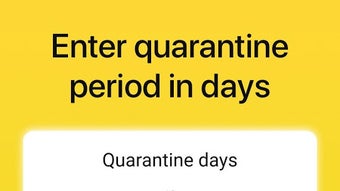
The user interface of Quarantine Timer – Stay Home is minimalistic and intuitive, prioritizing ease of access and clarity. Navigation is straightforward, with essential functions like setting the start date, choosing a timer mode, and viewing the current status displayed prominently. The workflow begins with inputting the start date, followed by selecting the desired duration or mode. Once activated, the timer updates in real time, providing immediate feedback. The app does not require complex setup or technical knowledge, making it suitable for users of all ages and digital literacy levels. Performance observations are based on general software behavior patterns; the app operates smoothly without reported lag or crashes in typical usage. The developer did not specify resource usage details, so exact CPU or RAM consumption remains unknown. Stability appears consistent across standard Android environments, though real-world performance may vary depending on device hardware and background processes. Overall, the workflow is efficient and focused, minimizing distractions and maximizing usability.
Compatibility & System Requirements
Quarantine Timer – Stay Home is designed for Android operating systems and is available on the Google Play Store. The exact version of the app is not specified, nor are the minimum system requirements. Compatibility information was partially provided, indicating that the app runs on Android devices. The installation size is not listed, so users should expect a lightweight footprint typical of utility apps. The developer did not provide additional details about hardware requirements or supported device types. Users should ensure their Android device meets standard app compatibility standards to install and run the application. For optimal performance, it is recommended to use a device with a stable internet connection for updates and photo sharing features. Exact performance behavior under low-memory or older OS versions remains unverified.
Pros and Cons
Pros
- Simple and intuitive interface for easy navigation
- Two timer modes to suit different quarantine needs
- Free to download and use with no in-app purchases
- Supports social sharing with a built-in hashtag feature
- Helps maintain motivation and awareness during isolation
Cons
- Only available for Android devices (no iOS or desktop version)
- Exact system requirements and file size not disclosed
- Limited to tracking quarantine periods, not other types of time
- No offline mode or data backup functionality mentioned
- Dependent on user input for start date and duration
FAQ Section
Is Quarantine Timer available for iOS devices?
Currently, the app is only available for Android users. There is no official version for iOS or desktop platforms.
Is the app free to use?
Yes, Quarantine Timer – Stay Home is available at no cost on the Google Play Store.
Can I use the app offline?
The app functions without an internet connection for basic timer tracking. However, features like photo sharing may require an active connection.
How do I share my progress on social media?
After setting your timer, select a photo from your gallery. The app will overlay the current time result and automatically add the hashtag #stayhome for sharing.
Does the app store my data locally?
The app does not specify data storage practices. It is recommended to assume that timer data is stored locally on the device unless otherwise stated.
Final Thoughts + CTA
Quarantine Timer – Stay Home delivers a focused, user-friendly solution for tracking isolation periods during public health emergencies. Its dual timer modes, social sharing feature, and clean interface make it a practical tool for anyone in quarantine. While limited to Android and lacking detailed system information, the app excels in simplicity and purpose. It’s ideal for travelers, individuals recovering from exposure, or anyone committed to staying home during a pandemic. The free access and motivational design reinforce its value as a public health support tool. For those seeking a straightforward way to monitor their quarantine journey, this app offers a reliable and encouraging experience. Download Quarantine Timer now and stay on track with your isolation goals.




.png)



