
Screenshots
App details
- Updated
- April 7, 2025
- Requires
- Chrome
- License
- Subscription
- Developer
- quickca
- Category
- Web Apps
About QuickCare
Download QuickCare – AI Customer Support Chatbot for E‑commerce
QuickCare Overview: A Smart, 24/7 Customer Support Solution
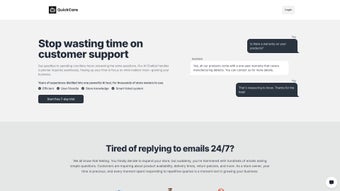
QuickCare is an AI‑powered chatbot built specifically for webstores that want to streamline their customer support operations. By leveraging data‑driven algorithms, QuickCare can automatically answer routine inquiries, route complex tickets, and even suggest products that match a shopper’s preferences. The tool works around the clock, meaning your customers receive instant, personalized help whether it’s 9 am or 9 pm in their timezone. For business owners, this translates into less time spent monitoring inboxes and more focus on core activities such as inventory management, marketing, and strategic growth. QuickCare’s integration is remarkably simple: a single code snippet placed in the layout page of your store activates the chatbot across all pages. Once live, the bot pulls store‑specific data—like product catalogs, order histories, and FAQs—to craft responses that feel uniquely tailored to each visitor. The platform also supports over 28 fully customizable themes, ensuring the chatbot blends seamlessly with any brand aesthetic, and offers multilingual capabilities that make it a solid choice for global e‑commerce operations. New users can explore all features risk‑free through a 7‑day free trial, after which flexible pricing plans are available. Whether you run a boutique Shopify shop or a large‑scale Magento marketplace, QuickCare promises a secure, scalable, and constantly updated solution that can evolve alongside your business needs.
Key Features that Set QuickCare Apart
- 24/7 AI‑Driven Support: Handles common questions instantly, reducing wait times.
- Data‑Powered Personalization: Uses store inventory and customer behavior to craft relevant answers.
- Automated Ticket Prioritization: Flags urgent issues and escalates them to human agents.
- Product Recommendation Engine: Suggests complementary items based on browsing history.
- 28+ Customizable Themes: Matches the chatbot’s look to any brand style.
- Multilingual Support: Communicates in multiple languages, ideal for international shoppers.
- One‑Line Integration: Add a single JavaScript snippet to enable the bot instantly.
- Secure Data Handling: End‑to‑end encryption and compliance with GDPR standards.
- Analytics Dashboard: Real‑time insights into chat volume, satisfaction scores, and conversion impact.
- Scalable Architecture: Grows with your traffic, from a few dozen daily chats to thousands.
Each of these features is designed to reduce the operational overhead of customer service while simultaneously boosting sales through intelligent upselling. The analytics dashboard, for instance, not only tracks the number of interactions but also measures key performance indicators such as first‑response time, resolution rate, and revenue generated from chatbot‑initiated purchases. This data empowers store owners to fine‑tune their support strategy and demonstrate ROI to stakeholders. Moreover, the multilingual engine is powered by neural‑network translation models that maintain tone and context, ensuring that non‑English speakers receive the same high‑quality assistance as native users. QuickCare’s emphasis on security means that all chat logs are stored in encrypted databases, and the platform adheres to industry‑standard privacy policies, giving both merchants and customers peace of mind.
Installation, Usage & Compatibility: Get Started in Minutes
Simple One‑Step Installation
Getting QuickCare up and running is intentionally frictionless. After signing up for the free trial, you receive a unique JavaScript snippet from the QuickCare dashboard. Copy this snippet and paste it just before the closing tag of your store’s main layout file (e.g., theme.liquid for Shopify or header.phtml for Magento). Save the changes, clear your cache, and refresh your storefront. The chatbot widget will appear instantly, ready to greet visitors. No additional plugins, SDKs, or server‑side configurations are required, which means you can avoid complex deployment pipelines and focus on customizing the experience instead.
Configuration & Customization
Once the widget is live, head back to the QuickCare admin panel to choose a theme, set your brand colors, and configure language preferences. The panel offers a drag‑and‑drop interface for arranging quick‑reply buttons, FAQ categories, and escalation rules. You can also upload a custom logo to reinforce brand identity. For product recommendations, simply map your product catalog to the bot’s recommendation engine by enabling the “Product Sync” toggle; QuickCare will automatically pull SKUs, pricing, and stock levels via API calls.
Cross‑Platform Compatibility
QuickCare is built as a web‑based solution, making it compatible with any modern browser on Windows, macOS, Linux, as well as mobile platforms like Android and iOS. Because the chatbot runs entirely client‑side via JavaScript, there’s no need for server‑side dependencies, which simplifies maintenance and ensures fast load times. Whether your customers browse from a desktop Chrome window or a mobile Safari app, the chatbot adjusts its layout responsively, preserving usability across screen sizes.
Day‑to‑Day Usage
After the initial setup, the bot operates autonomously. It monitors incoming chats, parses user intent, and pulls relevant data from your store’s backend to generate answers. When a conversation requires human intervention—such as a refund request—the bot escalates the ticket to your support team, tagging it with priority based on predefined keywords. Support agents can view escalated tickets in the QuickCare dashboard or receive email notifications, ensuring no urgent issue slips through the cracks. The system also supports live hand‑over, allowing agents to join an ongoing chat without disrupting the user experience.
Pros & Cons – Balanced Insight for Decision‑Makers
Pros
- Instant 24/7 support reduces response time and improves customer satisfaction.
- Data‑driven personalization boosts conversion rates through targeted product suggestions.
- One‑line integration eliminates complex setup and reduces development costs.
- Multilingual capabilities expand reach to global markets.
- Comprehensive analytics provide clear ROI measurement.
- Secure, GDPR‑compliant data handling protects both merchant and shopper information.
Cons
- Advanced customization (beyond themes) may require basic coding knowledge.
- Initial learning curve for configuring escalation rules and recommendation logic.
- Performance depends on client‑side rendering; very slow connections may affect load time.
- Free trial is limited to 7 days, after which a paid plan is required for continued use.
Frequently Asked Questions about QuickCare
Can QuickCare handle multiple languages simultaneously?
Yes. QuickCare includes a built‑in multilingual engine that detects the visitor’s browser language and automatically switches the chatbot’s responses. You can enable or disable specific languages in the dashboard and even provide custom translations for key phrases.
Is there a limit to the number of chats per month?
During the 7‑day free trial, chats are unlimited. After upgrading to a paid plan, the limit depends on the tier you choose; higher tiers offer unlimited chats and additional premium features such as advanced analytics and priority support.
How does QuickCare protect customer data?
All communications between the chatbot and your server are encrypted using TLS 1.2+. Chat logs are stored in encrypted databases, and the platform complies with GDPR, CCPA, and other regional privacy regulations. You can also configure data retention policies in the admin panel.
Can QuickCare integrate with existing help‑desk systems?
Yes. QuickCare provides webhooks and API endpoints that allow you to push escalated tickets to popular help‑desk platforms like Zendesk, Freshdesk, or custom in‑house solutions. The integration setup is straightforward and documented in the developer portal.
What kind of support does QuickCare offer after purchase?
Subscribers receive email support, live chat assistance during business hours, and access to a knowledge base with tutorials, best‑practice guides, and community forums. Premium plans include priority response times and a dedicated account manager.
Final Verdict – Is QuickCare the Right Choice for Your Store?
QuickCare delivers a compelling blend of AI‑driven automation, personalization, and ease of integration that makes it a strong contender for any e‑commerce business looking to upgrade its customer service. The 24/7 availability ensures that shoppers never wait for help, while the recommendation engine can subtly increase average order value without feeling pushy. Although some advanced customizations may require a bit of technical know‑how, the overall setup process is designed for non‑technical merchants, and the extensive theme library guarantees visual harmony with any brand. Security and compliance are baked into the platform, addressing growing concerns over data privacy. The modest list of cons—such as the need for a paid plan after the trial and potential performance considerations on very slow networks—are outweighed by the tangible benefits of reduced support workload and higher conversion rates. If you’re ready to free up your team’s time and give customers the instant, personalized assistance they expect, QuickCare is worth a test run. Click the download button below, start your free trial, and see how a smart chatbot can transform your store’s support experience.
Rating: 4.6/5
Pros:
- 24/7 instant support
- Data‑driven product recommendations
- One‑line integration
- Multilingual and customizable themes
Cons:
- Advanced tweaks need basic coding
- Paid plans after trial
Guides & Tutorials
How to install QuickCare
- Click the Download button above.
- Once redirected, accept the terms and click Install.
- Wait for the QuickCare download to finish on your device.
How to use QuickCare
This software is primarily used for its core features described above. Open the app after installation to explore its capabilities.
User Reviews
No reviews yet. Be the first to share your experience.
You may also like
more
3D AI Studio
3D AI Studio Overview 3D AI Studio is a web-based AI-powered tool developed by S...

3D textures by Polycam
Generate Realistic 3D Textures Effortlessly 3D Textures by Polycam is an innovat...

3DAiLY
Customizable 3D Modeling Tool: 3DAiLY 3DAiLY is an online platform that harnesse...

3DFY
Revolutionizing 3D Model Creation: 3DFY Review 3DFY is an AI-powered service, de...

AI Dungeon
AI Dungeon: Deep Learning Text Adventure AI Dungeon is an artificial intelligenc...

Alpha3D
A subscription-based program for Web apps, by alpha3d. Alpha3D is a subscription...
