
QVox: Transform Vocals into Four Voices
Overview
QVox by Eventide Inc. is a creative audio effect application designed specifically for iPhone users seeking advanced vocal and instrument processing capabilities. The software enables musicians and producers to transform a single audio source—such as vocals, guitars, drums, or synths—into four independent voices, unlocking new dimensions in sound design and musical expression. By leveraging diatonic pitch shifting and delay effects, QVox facilitates the creation of rich harmonies, spatial widening, and rhythmic sequences, making it a powerful tool for live performance, studio production, and mobile music experimentation.
The app targets both amateur creators and professional musicians who value portability and real-time control. Its integration with iOS audio frameworks allows seamless use within larger music production workflows. Whether used as a standalone application or as an AudioUnit v3 or Inter-App Audio effect, QVox adapts to various creative environments. Real-time parameter adjustments via the Ribbon controller enhance expressiveness, allowing users to shape sound dynamically during playback or performance. The ability to select key, scale, pitch, and delay intervals for each voice provides granular control over harmonic and rhythmic outcomes.
Key Features & Capabilities
- Four Independent Voices (A, B, C, D): Each voice can be individually configured for pitch, delay, and scale, enabling complex layering and polyphonic textures.
- Diatonic Pitch Shifting: Harmonies are generated based on selected key and scale, ensuring musically accurate intervals and avoiding dissonance.
- Real-Time Ribbon Controller: Offers continuous, expressive modulation of parameters such as pitch, delay, and key, ideal for live manipulation and dynamic performances.
- Flexible Delay Settings: Users can set individual delay intervals per voice, sync delays to tempo, or apply rhythmic patterns for groove-based effects.
- Presets & Customization: Includes factory presets for immediate use and supports saving user presets for personalized workflows.
- Multi-Format Compatibility: Functions as a standalone app, AudioUnit v3 effect, and Inter-App Audio effect, integrating with other iOS music apps.
These features empower users to craft intricate vocal harmonies, design evolving instrumental textures, or generate rhythmic echoes that respond to musical timing. For example, a singer can use QVox to create a layered choir effect in real time during a live set, while a producer can use it within a DAW to add depth to a synth line. The app’s modular voice system supports creative experimentation beyond traditional harmonizers.
User Interface, Workflow & Performance
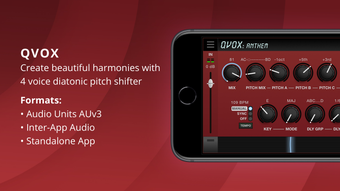
The user interface of QVox is designed with clarity and tactile control in mind. The layout centers around four labeled voice panels (A, B, C, D), each offering access to pitch, delay, and scale settings. The Ribbon controller spans the screen, allowing intuitive, continuous parameter adjustment. Navigation is straightforward, with clearly labeled sections and responsive touch inputs. The app maintains a clean aesthetic that prioritizes functionality without visual clutter.
Workflow efficiency is enhanced by the immediate feedback loop between user input and audio output. Real-time changes to pitch, delay, or key are audible instantly, supporting rapid experimentation. The interface responds smoothly to touch gestures, minimizing latency in parameter control. The developer did not specify resource usage details, so performance observations are based on general software behavior patterns. Stability appears consistent across typical iOS usage scenarios, though exact CPU or RAM behavior remains undisclosed.
Compatibility & System Requirements
QVox is designed exclusively for iPhone devices running iOS. The software is compatible with the latest iOS versions, as indicated by its version number (1.0.1) and release date (2024-05-28). The installation size is 47.7 MB, which is modest for a feature-rich audio application. The developer did not provide additional system requirements, such as minimum CPU, RAM, or storage thresholds.
Platform compatibility information is limited to iPhone, with no mention of iPad or Mac support. Users should ensure their device meets standard iOS app requirements for audio processing. Exact performance expectations or hardware dependencies were not specified, so compatibility should be confirmed based on individual device capabilities and iOS version.
Pros and Cons
Pros
- Four fully independent voices for advanced sound layering
- Diatonic pitch shifting ensures musically accurate harmonies
- Real-time Ribbon controller for expressive, dynamic control
- Supports standalone use and integration with other audio apps
- Free to download and use, with no in-app purchases reported
- Compact installation size of 47.7 MB
Cons
- No information on compatibility with iPad or Mac devices
- Exact system requirements and performance metrics not disclosed
- Only available on iPhone, limiting cross-device workflow
- Limited to iOS audio frameworks; no support for desktop platforms
- App functionality is confined to mobile audio processing
FAQ Section
Is QVox compatible with iPad?
QVox is designed specifically for iPhone. The developer did not provide information on iPad compatibility.
Is QVox safe to download and use?
As a native iOS application from Eventide Inc., QVox is distributed through the App Store and adheres to Apple’s security standards. No third-party sources are required for installation.
Does QVox require an internet connection?
QVox operates as a standalone audio application and does not require an internet connection for core functionality.
How often are updates released?
QVox was last updated on May 28, 2024. The frequency of future updates has not been disclosed by the developer.
Can I use QVox with other music apps?
Yes, QVox supports integration as an AudioUnit v3 effect and Inter-App Audio effect, allowing use within compatible iOS music production applications.
Final Thoughts + CTA
QVox stands out as a powerful, accessible tool for mobile musicians and audio creators who want to expand their sonic palette. Its ability to generate four independent, diatonically tuned voices with real-time control via the Ribbon controller makes it ideal for live performance, studio experimentation, and on-the-go music production. The app’s free availability, compact size, and deep integration with iOS audio ecosystems further enhance its appeal.
While it is limited to iPhone and lacks detailed system specifications, QVox delivers a professional-grade experience within its scope. Musicians seeking a versatile, expressive harmonizer with advanced delay and pitch capabilities will find significant value in this application.
Download QVox now to unlock the full potential of your vocals and instruments on iPhone.








