
Download RD3 – groovebox, drum machine, electronic music, synthesizer, music production, android app, music maker, loop creation, 303 synth, 808 drum, 909 drum, music app, android music, beat maker
Overview
RD3 – Groovebox is an Android-based music production application developed by mikrosonic, designed to empower users to create custom grooves, drum loops, and electronic music tracks directly from their mobile devices. The app transforms Android smartphones and tablets into fully functional music-making instruments, offering a portable solution for beat creation and live performance. Targeted at both novice producers and experienced musicians, RD3 provides a hands-on environment for composing, layering, and manipulating rhythmic patterns in real time. Its core purpose lies in simplifying the process of electronic music production through intuitive controls and rich sonic capabilities. The app is particularly suited for users interested in genres such as house, techno, and experimental electronic music, where rhythmic precision and synth textures are essential. Real-world applications include on-the-go composition, live DJ sets, sound design, and collaborative music sketching. The integration with mikrosonic’s SPC – Music Sketchpad further extends its utility by enabling seamless workflow between loop creation and full-track mixing. The developer did not provide additional details about the company’s background beyond the app’s name and functionality.
Key Features & Capabilities
- Two Virtual Analog Synthesizers: Modeled after the iconic Roland 303, these synthesizers deliver warm, resonant basslines and melodic textures ideal for electronic music. Users can shape waveforms, adjust filters, and modulate parameters in real time.
- Drum Machine with 10 Kits: Includes classic drum sounds such as the 808 and 909, along with additional kits for diverse rhythmic experimentation. Each kit supports individual level and effect control per pad.
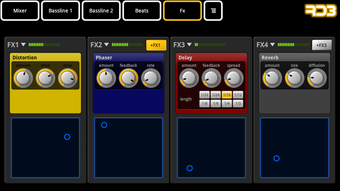
- Real-Time Audio Effects: Built-in effects like reverb, distortion, filter, phaser, and delay allow for dynamic sound shaping during live performance or composition.
- Multi-Touch Interface: Designed for touch interaction, enabling users to trigger, loop, and manipulate sounds with gestures, enhancing creative freedom and responsiveness.
- Adaptive Display Modes: Optimized for different screen sizes—landscape mode for phones and 7-inch tablets, and a specialized rack view for 10-inch tablets in portrait orientation.
- Integration with SPC – Music Sketchpad: Loops created in RD3 can be exported and used within mikrosonic’s audio mixer app, supporting a modular approach to music production.
These features collectively enable users to craft complex rhythmic patterns, layer synth lines, and apply professional-grade effects—all from a mobile device. The app’s real-time control system makes it ideal for live improvisation and dynamic performance setups.
User Interface, Workflow & Performance
The user interface of RD3 – Groovebox is structured around a clean, tactile layout that prioritizes accessibility and responsiveness. Navigation is based on touch gestures, with clearly labeled pads, sliders, and effect controls arranged in a logical flow. The multi-touch capability allows simultaneous manipulation of multiple elements, such as triggering drum hits while adjusting filter cutoffs or applying delay feedback. Workflow efficiency is enhanced by the app’s intuitive design, enabling users to create and edit loops with minimal latency. The interface adapts to different screen sizes, ensuring consistent usability across devices. Performance observations are based on general software behavior patterns, as specific CPU or RAM usage data was not provided. The developer did not specify resource usage details, so actual performance may vary depending on device hardware. Stability during extended use or live performance was not independently verified. However, the app’s optimization for Android devices suggests it is designed to maintain smooth operation under typical usage conditions.
Compatibility & System Requirements
RD3 – Groovebox is designed exclusively for Android devices. It is compatible with smartphones and tablets running the supported Android version, though the exact OS version range was not specified. The app has a file size of 100MB, indicating a moderate installation footprint suitable for most modern Android devices. The developer did not provide detailed hardware requirements, such as minimum RAM, processor speed, or GPU specifications. Compatibility information was partially provided, with known optimizations for landscape mode on phones and 7-inch tablets, and a dedicated rack view for 10-inch tablets in portrait mode. Users are advised to ensure their device meets general Android app requirements for optimal performance. The developer did not specify whether the app supports external MIDI controllers or audio interfaces.
Pros and Cons
Pros
- Intuitive multi-touch interface ideal for on-the-go music creation
- Includes two 303-style virtual analog synthesizers for authentic electronic tones
- 10 drum kits with iconic sounds like 808 and 909 for versatile rhythm design
- Real-time audio effects for dynamic sound manipulation
- Adaptive display modes for different Android device sizes
- Seamless integration with SPC – Music Sketchpad for extended workflow
Cons
- Exact system requirements and performance benchmarks not publicly listed
- Limited availability to Android only; no support for iOS or desktop platforms
- Price point of $9.99 may be considered high for a mobile app with no free version
- No information on cloud sync, backup, or project sharing features
- Functionality restricted to loop-based composition without full DAW features
FAQ Section
Is RD3 compatible with all Android devices?
RD3 – Groovebox is optimized for Android phones and tablets, with specific support for landscape mode on phones and 7-inch tablets, and a rack view for 10-inch tablets in portrait mode. The exact list of compatible devices was not provided by the developer.
Can I use RD3 offline?
Yes, RD3 functions fully offline. No internet connection is required for loop creation, sound playback, or real-time effect processing.
Does RD3 support external MIDI controllers?
The developer did not specify whether RD3 supports external MIDI controllers or audio interfaces.
What is the license type for RD3?
RD3 is a one-time purchase app priced at $9.99. The license allows use on personal devices, but details on multi-device usage were not disclosed.
How often are updates released?
Information on update frequency was not provided. Users are advised to check the app store for new versions and feature improvements.
Final Thoughts + CTA
RD3 – Groovebox stands out as a powerful, mobile-first solution for electronic music creators seeking a portable and expressive tool for beat-making and loop-based composition. With its authentic 303-style synths, diverse drum kits, and real-time effects, the app delivers professional-grade sound design capabilities directly from an Android device. The intuitive interface and adaptive layout ensure a smooth experience across various screen sizes, while integration with SPC – Music Sketchpad enhances its utility in a broader music production workflow. Although the lack of detailed system requirements and limited platform availability are notable drawbacks, the app’s focus on creativity and performance remains strong. For musicians, producers, and hobbyists who value mobility and hands-on control, RD3 offers a compelling entry into electronic music production. Download RD3 now and start crafting your own unique grooves today.




.png)



