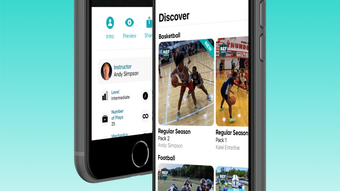

Experience the Game Through Officials' Eyes
Overview
RefReps is a lifestyle application designed for iPhone users seeking to deepen their understanding of sports officiating. Developed by Ref Reps LLC, the app delivers a unique training experience by placing users in the role of game officials. By offering hundreds of real-game plays captured from the officials’ perspective, RefReps enables users to make calls in real time and receive immediate feedback from certified officiating instructors. This immersive approach helps refine decision-making skills, improve situational awareness, and enhance overall officiating competence.
The app is tailored for individuals at all levels of experience—beginners learning the fundamentals and seasoned referees aiming to sharpen their judgment. It serves as a practical tool for personal development, association meetings, pre- and post-game reviews, clinics, and training camps. With a focus on basketball, football, baseball, softball, and wrestling, RefReps provides sport-specific scenarios that mirror real-world conditions. The developer did not provide additional system requirements beyond iPhone compatibility.
Key Features & Capabilities
- Official Perspective Video Training – Users experience games exactly as referees do, using footage shot from the officials’ vantage points.
- Interactive Decision-Making – After viewing a play, users make a call and receive instant feedback from expert instructors.
- Multi-Angle HD Footage – Each play is recorded from three to ten camera angles, ensuring full visibility of critical game moments.
- Sport-Specific Content – Training modules are available for basketball, football, baseball, softball, and wrestling.
- Flexible Use Cases – Ideal for individual study, team training sessions, clinics, and coaching education.
These features support both skill development and professional growth. For example, a high school basketball official can review a disputed foul in slow motion from multiple angles, test their judgment, and learn why a call was correct or incorrect. Similarly, a youth league coordinator might use RefReps during a pre-season meeting to standardize officiating standards across a group of new referees.
User Interface, Workflow & Performance
The user interface is designed for intuitive navigation on iPhone devices, with a clean layout focused on video playback and decision input. Users can easily access training plays, switch between camera angles, and submit their calls with minimal steps. The workflow emphasizes immediacy—after watching a play, users are prompted to make a decision, followed by instant feedback.
Performance observations are based on general software behavior patterns. The app is optimized for mobile use, with smooth playback expected on compatible iPhone models. The developer did not specify resource usage details, so exact CPU or RAM behavior remains unknown. Stability is assumed to be consistent with standard iOS applications, though no real-world testing data was provided. Users should expect minimal lag during video playback, especially when switching between angles.
Compatibility & System Requirements
RefReps is available exclusively for iPhone devices. The software version is 1.0, with an installation size of 250 MB. The developer did not specify minimum hardware requirements or iOS version compatibility beyond the platform. Compatibility information was partially provided, leaving room for uncertainty regarding older or newer iPhone models.
Users should ensure their device meets general iOS app requirements for smooth operation. The app’s performance may vary depending on device age, storage availability, and background processes. No additional system requirements were listed, and the developer did not provide information on network dependencies or offline functionality.
Pros and Cons
Pros
- Unique perspective from the officials’ point of view
- Interactive training with instant expert feedback
- High-quality HD video with multiple camera angles
- Supports multiple sports including basketball, football, and wrestling
- Free to download and use
Cons
- Available only on iPhone, limiting cross-platform access
- No information on offline functionality or data usage
- Unknown compatibility with older or newer iOS versions
- Limited to five sports at launch
FAQ Section
Is RefReps available for Android devices?
RefReps is currently available only for iPhone users. There is no information about Android compatibility at this time.
Can I use RefReps without an internet connection?
The developer did not specify whether the app supports offline use. Users may need an active internet connection to access training content.
Are the training videos updated regularly?
While the app currently includes hundreds of training plays, the frequency of updates was not disclosed by the developer.
What sports are currently supported?
RefReps currently offers training content for basketball, football, baseball, softball, and wrestling.
Is RefReps free to use?
Yes, RefReps is available at no cost to download and use.
Final Thoughts + CTA
RefReps stands out as a groundbreaking tool for anyone involved in sports officiating. Its immersive video training, combined with expert feedback and multi-angle HD footage, offers a rare and valuable learning experience. The app effectively bridges the gap between theory and real-game judgment, making it ideal for both novice and experienced referees. While platform exclusivity and lack of detailed compatibility data are limitations, the app’s core functionality is robust and purpose-built.
For those looking to improve their officiating skills through realistic, interactive training, RefReps delivers a compelling solution. Its focus on real-world scenarios and immediate feedback sets it apart from traditional training methods. Download RefReps now.








