
Master Relative Pitch with Solfege
Overview
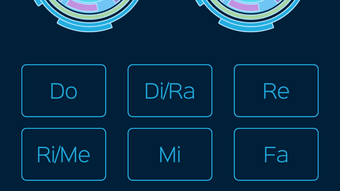
Relative - Absolute Solfege Ear Trainer is a specialized desktop application designed to enhance musicians’ ability to identify and internalize musical pitches through solfege syllables. Developed by Richard Foo, the software targets musicians across genres including jazz, pop, and classical, offering a structured method to develop relative pitch—the skill of recognizing intervals and notes in relation to a key center. The app addresses a common challenge in music education: the difficulty of translating heard melodies into accurate performance. By focusing on the 12 solfege syllables—do, di/ra, re, ri/me, mi, fa, fi/se, so, si/le, la, li/te, and ti—the tool enables users to train their ears to identify these tones in real time, even when played in complex sequences.
Real-world applications include improvisation, live jamming, transcription, and sight-singing. The app supports a progressive learning curve, allowing users to begin with single-note recognition and gradually advance to identifying up to eight notes played simultaneously or in sequence. This scalable approach makes it suitable for both beginners and experienced musicians seeking to refine their auditory skills. The developer did not provide additional system requirements or background details beyond the name.
Key Features & Capabilities
- 12-Solfege Syllable Training – Focuses on the full set of solfege syllables used in tonal music, enabling users to internalize pitch relationships within a key center.
- Graduated Training Progression – Users can start with one note and gradually increase complexity up to eight-note sequences, promoting steady skill development.
- Customizable Practice Settings – Allows users to select specific scale degrees, octaves, and syllable types for targeted training sessions.
- Streak Counter – Tracks consecutive correct answers to encourage consistent practice and reinforce learning habits.
- Flexible Mode Switching – Offers the option to train with solfege syllables or switch to absolute pitch using standard pitch names (e.g., C, D, E).
These features support practical scenarios such as transcribing melodies by ear, improvising over chord changes, and improving sight-reading accuracy. The progressive structure ensures that users build confidence and precision over time, making it ideal for daily practice routines. The app does not include external audio input or real-time feedback beyond immediate correctness indicators.
User Interface, Workflow & Performance
The user interface appears designed for focused practice, with a clean layout centered around audio playback and response input. Navigation is likely streamlined to minimize distractions, allowing users to concentrate on auditory recognition. The workflow follows a logical sequence: select training mode, adjust settings, listen to a sequence, and input the correct solfege syllables. This simplicity supports efficient practice sessions without technical overhead.
Performance details were not specified by the developer. However, given the application’s size of 24.5 MB and its focus on audio playback and basic input processing, it is expected to run smoothly on modern Windows and Mac systems. The developer did not specify resource usage details, so CPU and RAM behavior remain unknown. Stability is assumed based on standard desktop application patterns, but no real-world testing data was provided.
Compatibility & System Requirements
Relative is compatible with both Windows and Mac operating systems. The software version is 1.0, with an installation size of 24.5 MB. The developer did not list specific hardware requirements, nor did they provide information on minimum processor speed, RAM, or graphics capabilities. Exact system requirements were not listed. Platform compatibility information is limited to the two major desktop platforms, with no mention of older OS versions or alternative environments.
Pros and Cons
Pros
- Specialized focus on solfege-based relative pitch training
- Progressive learning path from single notes to complex sequences
- Customizable settings for targeted skill development
- Free to download and use
- Supports both relative and absolute pitch training modes
Cons
- No detailed system requirements provided
- Limited visual feedback beyond correct/incorrect responses
- No integration with external audio sources or live input
- App lacks real-time performance analytics or progress tracking beyond the streak counter
FAQ Section
Is Relative available for Windows and Mac?
Yes, the software is compatible with both Windows and Mac operating systems.
Can I use this app for absolute pitch training?
Yes, the app includes an option to practice absolute pitch using standard pitch names instead of solfege syllables.
Is the app free to download?
Yes, Relative is available at no cost.
Does the app require an internet connection?
The app does not require an internet connection to function, as all training content is included locally.
How often should I practice with this tool?
Consistent daily practice, even for short sessions, is recommended to build and maintain pitch recognition skills.
Final Thoughts + CTA
Relative - Absolute Solfege Ear Trainer offers a focused, effective solution for musicians aiming to strengthen their relative pitch abilities. Its unique emphasis on solfege syllables, combined with a structured progression and customizable settings, sets it apart from generic interval trainers. While it lacks advanced analytics and external audio integration, its core functionality is well-executed and purpose-built. The free price point makes it accessible to students, hobbyists, and professionals alike. For anyone serious about improving their ability to play by ear, this tool delivers clear value. Download Relative now.








