

Download RemoteObserver – classroom monitoring, PC monitoring, remote monitoring, employee monitoring, network management, activity recording, application management, client-server setup
Overview
RemoteObserver is a specialized monitoring solution tailored for educational institutions and small business environments. Designed to oversee multiple PCs within a shared network, it supports real-time observation and management of user activities across up to 64 connected devices. The app serves as a central tool for administrators seeking to enhance productivity, enforce digital discipline, and maintain network integrity. Its primary use cases include monitoring student behavior in computer labs, supervising employee activity during work hours, and managing shared workstations in office settings. The software operates in a client-server architecture, ensuring secure data transmission and privacy protection through optional password encryption. This setup allows supervisors to maintain oversight without compromising sensitive network information. While the developer did not provide additional background on RemoteObserver’s origins or development history, the app has been in use since its release on March 13, 2012, indicating a long-standing presence in the productivity and network management space. Its continued relevance suggests a stable and functional design, particularly for environments requiring consistent, centralized control over multiple workstations. The app fills a niche in the digital oversight ecosystem by offering a dedicated tool for network-based monitoring without relying on cloud infrastructure.
Key Features & Functionality
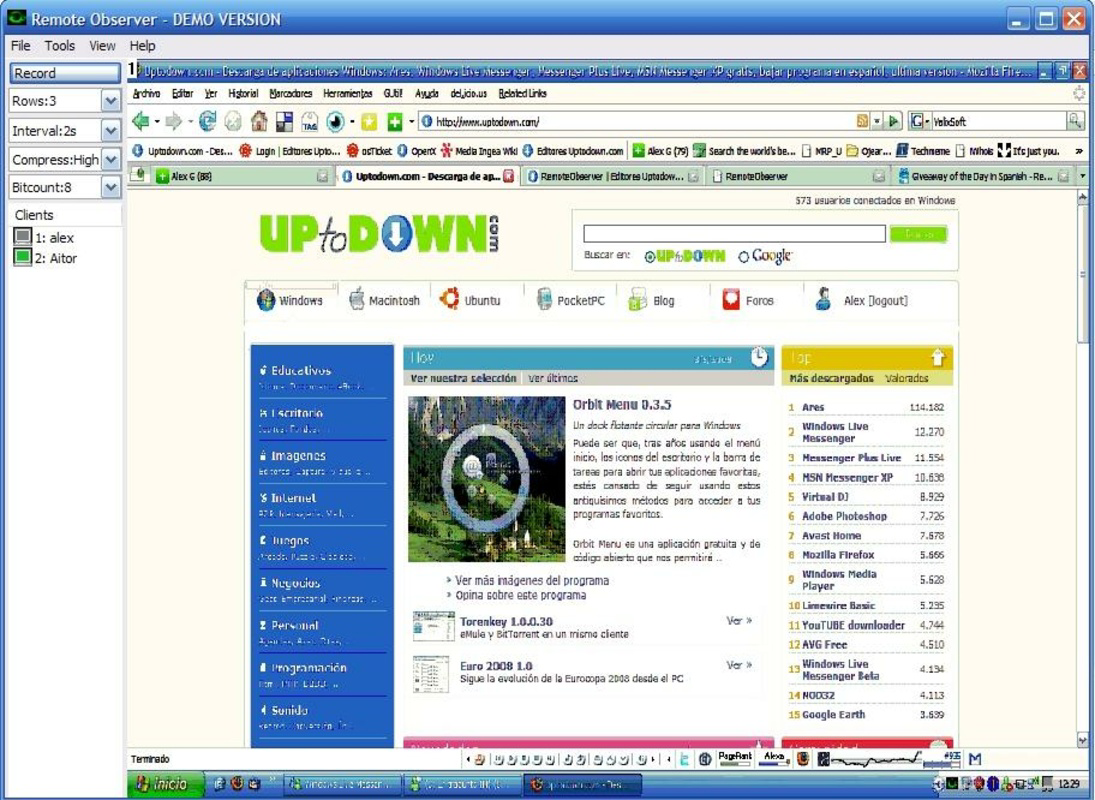
- Monitor Multiple PCs: RemoteObserver enables real-time monitoring of up to 64 PCs on the same network, ideal for large classrooms or office workspaces where multiple users are active simultaneously. Administrators can view live screen activity across all devices from a single interface, simplifying oversight and reducing the need for physical supervision.
- Client-Server Mode: The app operates in a secure client-server configuration, ensuring that all monitoring data remains local to the network. This setup enhances privacy and reduces dependency on external servers, making it suitable for environments with strict data protection requirements.
- Activity Recording: Users can capture screen activity either as video files or static screenshots. This feature supports retrospective analysis, allowing supervisors to review past behavior for training, compliance, or performance evaluation purposes.
- Application Management: Administrators can remotely launch applications, send messages to connected PCs, and restart devices. This functionality streamlines technical support and enables quick interventions during critical tasks or disruptions.
- User-Friendly Installation: Setup requires only the server component to be installed on one machine, with client software deployed on target PCs. The process is designed to be accessible even to non-technical users, minimizing deployment time and complexity.
These features collectively support efficient network management, particularly in controlled environments where accountability and productivity are priorities. For example, a teacher can monitor student progress during a digital exam, while an office manager can ensure employees are using approved software during work hours.
Interface, UX & Performance
RemoteObserver features a streamlined interface designed for clarity and ease of use in high-visibility monitoring scenarios. The layout organizes connected devices in a grid or list format, allowing administrators to quickly identify and select specific PCs for observation. Navigation is intuitive, with clearly labeled controls for viewing screens, initiating recordings, and sending messages. Visual feedback is immediate, supporting responsive interaction during live monitoring sessions. Although the developer did not list formal performance metrics, the app’s lightweight size of 15.2 MB suggests efficient resource utilization. It is expected to operate smoothly on modern Windows systems, though performance may vary depending on network speed and the number of concurrent monitored devices. Stability is likely maintained through its long-standing presence and client-server design, which avoids heavy cloud dependencies. Responsiveness across different device categories—such as desktops, laptops, and thin clients—is not explicitly detailed, but the app’s architecture suggests compatibility with standard Windows workstations. The user experience is optimized for focused administrative tasks, minimizing distractions and ensuring that core monitoring functions remain accessible at all times.
Platform Compatibility & Technical Requirements
RemoteObserver is designed for the Windows platform and requires a Windows-based operating system. The current version is 1.0.1, with a file size of 15.2 MB. The developer did not specify minimum OS requirements or compatibility details for different Windows versions. As such, users should verify whether the app supports their specific Windows release, including potential limitations on newer or older systems. No information was provided about hardware requirements, such as RAM or processor specifications. Similarly, there is no mention of whether the app supports 32-bit or 64-bit architectures. The developer did not disclose any additional technical dependencies or installation prerequisites. Compatibility information was not fully disclosed, so users are advised to test the software in their intended environment before full deployment.
Pros and Cons
Pros
- Supports monitoring of up to 64 PCs simultaneously, ideal for large-scale classroom or office setups.
- Client-server architecture ensures secure, local monitoring with optional encrypted passwords.
- Offers both video and screenshot recording for detailed activity tracking.
- Remote application launching and message sending enhance administrative control and support.
- Simple installation process with minimal technical setup required.
Cons
- Platform is limited to Windows; no information available on iOS or Android compatibility.
- Specific OS requirements were not listed, which may affect installation on newer systems.
- Developer did not provide performance benchmarks or resource usage details.
- Limited public information about updates or ongoing development.
- Price point of $15.00 may be considered high for standalone utility tools without cloud features.
FAQ
Is RemoteObserver compatible with Windows 10 and Windows 11?
The developer did not specify compatibility with Windows 10 or Windows 11. Users are advised to test the app in their environment to confirm functionality.
Can I monitor Mac or Linux computers using RemoteObserver?
RemoteObserver is designed exclusively for Windows-based systems. There is no official support for Mac or Linux devices.
Does RemoteObserver require an internet connection to function?
RemoteObserver operates in a client-server mode on a local network, so it does not require an internet connection for basic monitoring functions.
How secure is the monitoring data?
Data remains on the local network. The app supports optional encrypted passwords, enhancing security during access and communication.
Is RemoteObserver regularly updated?
There is no public information about update frequency. The app’s release date is March 13, 2012, but no details were provided about current development or maintenance.
Final Thoughts
RemoteObserver remains a functional tool for organizations that need centralized control over multiple Windows workstations. Its ability to monitor, record, and manage networked PCs makes it a practical solution for classrooms and small businesses focused on productivity and accountability. While its age and lack of detailed technical documentation are notable limitations, the app delivers core functionality with a straightforward interface and secure local operation. It stands out in a niche market where privacy and offline control are priorities. For administrators managing shared computer environments, RemoteObserver offers a reliable, on-premise alternative to cloud-based monitoring tools. Despite its dated release date, its continued availability suggests ongoing utility. If your organization relies on Windows systems and requires hands-on network oversight, this tool may be worth considering. Download RemoteObserver now.


