
Screenshots
App details
- Updated
- June 12, 2025
- Requires
- Chrome
- License
- Subscription
- Developer
- Category
- Web Apps
About ReplyAssistant
Download ReplyAssistant – AI‑Powered Email Reply Generator
Introduction: Why ReplyAssistant Is Changing the Way We Write Emails
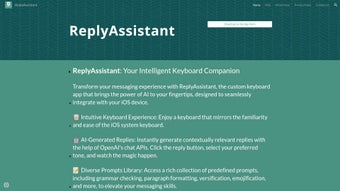
In today’s fast‑paced professional environment, the average worker spends up to three hours a day just reading and drafting emails. ReplyAssistant steps in as an AI‑driven solution that transforms that time‑consuming chore into a quick, almost effortless activity. Built on OpenAI’s latest chat API, this web‑based application can understand the context of an incoming message and generate a polished, personalized reply in real time. Whether you’re a busy executive, a sales professional, or a customer‑support agent, ReplyAssistant’s three‑fold response generation—directly inside the app, via the share‑menu option, or through a dedicated keyboard—means you never have to stare at a blank screen again.
The service is subscription‑based, offering a secure cloud‑hosted platform that guarantees data privacy while continuously updating its language models for the most accurate and up‑to‑date suggestions. By automating routine correspondence, ReplyAssistant not only cuts down on reply latency but also helps maintain a consistent tone across all communications, reinforcing brand voice and professionalism.
Beyond email, the tool works equally well with instant messaging platforms, making it a versatile companion for any text‑based interaction. Its ability to adapt to industry‑specific jargon, multilingual contexts, and even informal conversational styles means you get a truly customized experience. In short, ReplyAssistant is designed to streamline your communication workflow, reduce mental fatigue, and let you focus on higher‑value tasks.
Key Features That Set ReplyAssistant Apart
- Real‑time AI response generation – Instantly creates replies that match the tone and context of the original message.
- Three access points – In‑app composer, share‑menu shortcut, and a dedicated ReplyAssistant keyboard for ultra‑quick usage.
- OpenAI chat API integration – Leverages the most advanced language models for accuracy and relevance.
- Multi‑platform support – Works seamlessly on web browsers, Windows, macOS, Android, and iOS devices.
- Customizable tone settings – Choose from formal, friendly, concise, or detailed styles to match your brand voice.
- Secure data handling – End‑to‑end encryption ensures that your email content never leaves your control.
- Continuous learning – The system refines its suggestions based on your feedback, making future replies even more precise.
- Multilingual capability – Supports major languages, allowing you to reply in the language of the sender without extra effort.
- Analytics dashboard – Track response time, usage frequency, and sentiment trends to optimize your communication strategy.
- Subscription flexibility – Tiered pricing plans cater to freelancers, small teams, and large enterprises.
Each of these features is purpose‑built to eliminate the friction points that traditionally plague email management. For example, the dedicated keyboard removes the need to switch apps, while the analytics dashboard provides actionable insights that can improve overall productivity. The combination of real‑time AI, secure cloud infrastructure, and cross‑device compatibility makes ReplyAssistant a robust tool for anyone who relies heavily on written correspondence.
Moreover, the platform’s emphasis on customization—through tone presets and language options—means you won’t lose the personal touch that distinguishes great communication. Whether you’re drafting a quick acknowledgment or a detailed proposal, ReplyAssistant adapts to the complexity of the task, ensuring the output feels authentic and appropriate.
Installation, Usage Instructions, and Compatibility
Getting started with ReplyAssistant is straightforward, whether you prefer a desktop setup or a mobile workflow. Follow these steps to install and begin generating AI‑enhanced replies:
- Create an account on the official ReplyAssistant website using your work email or Google credentials.
- Select a subscription plan that matches your usage needs. A 14‑day free trial is available for new users.
- Download the appropriate client:
- For Windows (10/11) and macOS, download the desktop installer from the “Downloads” page. The installer automatically adds the ReplyAssistant keyboard extension to supported email clients (Outlook, Gmail, Apple Mail).
- For Android and iOS, install the mobile app from Google Play Store or Apple App Store. The app includes the dedicated keyboard that can be enabled in your device’s keyboard settings.
- Log in within the app using the credentials created in step 1. The application will sync with the cloud, loading your preferences and tone settings.
- Enable the share‑menu shortcut (optional). On desktop, right‑click any selected email text and choose “Generate Reply with ReplyAssistant.” On mobile, use the “Share” button to invoke the AI generator.
- Start composing. Highlight the incoming message, select your desired tone, and click “Generate.” The AI will produce a draft in seconds, which you can edit or send directly.
ReplyAssistant is compatible with the following operating systems: Windows 10/11, macOS 10.15 and later, Android 8.0 and later, iOS 13 and later, as well as any modern web browser (Chrome, Edge, Safari, Firefox). The web version requires no installation and works on any device with an internet connection, making it ideal for travelers or remote workers who switch between hardware.
Once installed, the tool runs as a background service that listens for clipboard events or keyboard triggers, ensuring the AI is always ready when you need it. Regular updates are pushed automatically through the subscription, so you benefit from the latest model improvements without manual intervention.
For teams, an admin console allows centralized management of user licenses, tone presets, and security policies. This makes ReplyAssistant a scalable solution that can grow from a solo freelancer to a multinational corporation without sacrificing performance or data protection.
Pros and Cons: A Balanced Look at ReplyAssistant
Pros
- Generates high‑quality replies in seconds, dramatically reducing response time.
- Multiple access points (in‑app, share menu, keyboard) suit different workflow preferences.
- Secure, encrypted data handling protects confidential correspondence.
- Customizable tone and language options keep communications on brand.
- Cross‑platform support ensures seamless experience on Windows, macOS, Android, and iOS.
- Continuous learning from user feedback improves accuracy over time.
- Analytics dashboard provides insights for productivity optimization.
- Free trial and tiered pricing accommodate freelancers to large enterprises.
Cons
- Subscription cost may be a barrier for very small businesses or occasional users.
- Reliance on internet connectivity; offline functionality is limited.
- AI-generated content occasionally requires manual tweaking for niche industry terminology.
- Initial setup of the dedicated keyboard can be confusing for non‑technical users.
- While privacy is emphasized, some organizations with strict compliance requirements may need additional audits.
This review highlights that the strengths of ReplyAssistant—speed, flexibility, and security—outweigh its few drawbacks, making it a compelling choice for professionals who value efficient email management.
Frequently Asked Questions
Is ReplyAssistant safe for handling confidential business emails?
Yes. ReplyAssistant uses end‑to‑end encryption and does not store raw email content on its servers. All processing occurs within a secure, isolated environment, complying with GDPR and CCPA standards.
Can I use ReplyAssistant on a Mac without installing additional software?
Absolutely. The web version works in any modern browser on macOS, offering the same AI capabilities without a separate download. For deeper integration (keyboard shortcut), you can install the optional macOS helper app.
How does the pricing structure work for teams?
ReplyAssistant offers tiered plans: Individual, Small Team (up to 10 users), Business (11‑50 users), and Enterprise (51+ users). Each tier includes a set number of generated replies per month, with the option to purchase additional credits.
What languages does ReplyAssistant support?
The platform currently supports English, Spanish, French, German, Portuguese, Italian, Dutch, Mandarin, and Japanese. Additional languages are being added as the underlying AI model expands.
Is there a free trial or a money‑back guarantee?
Yes. New users receive a 14‑day free trial with full feature access. After the trial, a 30‑day money‑back guarantee is offered for the first paid subscription.
Conclusion: Boost Your Email Efficiency Today
If you spend more time crafting replies than focusing on core work, ReplyAssistant offers a secure, AI‑powered shortcut that can cut your email drafting time by up to 70 %. Its flexible access methods, robust language support, and enterprise‑grade security make it a practical addition to any professional’s toolkit. Ready to experience faster, more consistent communication? Download ReplyAssistant now and start your free trial—your inbox will thank you.
Guides & Tutorials
How to install ReplyAssistant
- Click the Download button above.
- Once redirected, accept the terms and click Install.
- Wait for the ReplyAssistant download to finish on your device.
How to use ReplyAssistant
This software is primarily used for its core features described above. Open the app after installation to explore its capabilities.
User Reviews
No reviews yet. Be the first to share your experience.
You may also like
more
3D AI Studio
3D AI Studio Overview 3D AI Studio is a web-based AI-powered tool developed by S...

3D textures by Polycam
Generate Realistic 3D Textures Effortlessly 3D Textures by Polycam is an innovat...

3DAiLY
Customizable 3D Modeling Tool: 3DAiLY 3DAiLY is an online platform that harnesse...

3DFY
Revolutionizing 3D Model Creation: 3DFY Review 3DFY is an AI-powered service, de...

AI Dungeon
AI Dungeon: Deep Learning Text Adventure AI Dungeon is an artificial intelligenc...

Alpha3D
A subscription-based program for Web apps, by alpha3d. Alpha3D is a subscription...
