
Reverb - FDN: Immersive Soundscapes on iPhone
Overview
Reverb - FDN by ConTempoNet S.A.S. di Maurizio Refice C. is a specialized audio effect application designed for iPhone users seeking advanced reverb capabilities. Built around the Feedback Delay Network (FDN) architecture, the software enables users to generate rich, spatially complex reverberations suitable for both conventional and experimental music production. It addresses the need for dynamic, expressive reverb effects that go beyond standard presets, allowing creators to shape immersive sound environments—from intimate spaces to vast, surreal soundscapes. The app is tailored for musicians, sound designers, and audio hobbyists who require precise control over ambient textures in real time. Its integration with iOS audio frameworks suggests a focus on professional-grade audio workflows within a mobile environment. Real-world applications include live performance processing, studio composition, and field recording enhancement. The developer did not provide additional details about their background or prior projects. Platform compatibility is confirmed for iPhone, though specific model requirements were not specified.
Key Features & Capabilities
- Feedback Delay Network (FDN) Engine: Utilizes a digital signal processing technique that creates dense, natural-sounding reverberations by routing audio through multiple delay lines with feedback loops, enabling complex spatial simulations.
- Space Morphing: Allows real-time manipulation of reverb characteristics to transition smoothly between different acoustic environments, such as small rooms, large halls, or abstract, otherworldly spaces.
- Endless Reverberation: Offers sustained decay that can be extended indefinitely, useful for ambient music and experimental sound design where traditional decay limits are restrictive.
- Twisting Parameters: Includes unique controls like Reactive Walls (which respond dynamically to input signal), Random LFO (for automated modulation), and Echoes (for layered delay effects).
- AudioUnit V3, Audiobus, Inter-App Audio Support: Enables seamless integration with other iOS music apps and DAWs, allowing Reverb - FDN to function as a plugin within larger audio workflows.
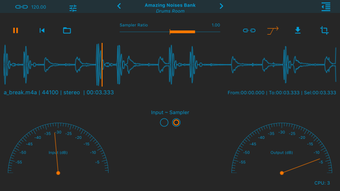
- Built-in Stereo Sampler with Varispeed: Provides a simple yet effective tool for capturing and manipulating audio snippets, with speed control for pitch and time manipulation.
- Control Manager LFO for Parameters: Allows users to assign LFOs to modulate any parameter, enabling automated, evolving changes in reverb behavior.
- Midibus, Virtual Midi, and Network Support for 14-bit NRPN: Facilitates advanced MIDI control, including high-resolution parameter adjustments via external controllers.
- Post Fx Chain Tools: Includes Low-shelf Filter, High-shelf Filter, and Compressor to shape the final output, offering fine-tuning capabilities after reverb processing.
- File Management & Sharing: Supports exporting and importing audio via iTunes, Dropbox, and AudioCopy, enhancing workflow flexibility across devices and platforms.
User Interface, Workflow & Performance
The user interface of Reverb - FDN is designed for intuitive access to its advanced features, with a layout optimized for touch interaction on iPhone screens. Controls are logically grouped, and parameter adjustments are responsive, allowing for precise manipulation during live performance or studio use. Navigation is streamlined, with clear visual feedback on parameter changes and real-time audio processing. The workflow supports rapid setup and adjustment, making it suitable for both quick experimentation and detailed sound design. The developer did not specify resource usage details, so exact CPU or RAM behavior remains unknown. Performance observations are based on general software behavior patterns for iOS audio applications. Stability is expected to be consistent with standard AudioUnit V3 implementations, but no specific reports on crashes or latency were provided. The app runs as a standalone tool and integrates with other audio apps via supported protocols, maintaining a clean and focused user experience.
Compatibility & System Requirements
Reverb - FDN is designed for iPhone and operates on iOS. The software version is 1.0.1, with a file size of 42.1 MB. Compatibility information was partially provided, confirming support for iPhone devices. The developer did not specify exact hardware requirements or minimum iOS version. No additional system specifications were listed, including details about processor, RAM, or storage needs. Users should ensure their device meets standard requirements for running audio-intensive applications. The app does not require external hardware beyond standard iPhone audio input/output capabilities. Installation is straightforward, with no known prerequisites beyond a compatible iOS device.
Pros and Cons
Pros
- Advanced FDN-based reverb engine for high-quality spatial effects
- Extensive integration with iOS audio frameworks (AudioUnit V3, Audiobus, Inter-App Audio)
- Unique features like Space Morphing and Endless Reverberation for creative sound design
- Support for external MIDI control via Midibus, Virtual Midi, and 14-bit NRPN
- Built-in Post Fx Chain tools for final output shaping
- Flexible file sharing via iTunes, Dropbox, and AudioCopy
- Free to download and use, with no in-app purchases reported
Cons
- Exact system requirements and iOS version compatibility were not specified
- No information on CPU or memory usage under load
- Limited to iPhone platform—no support for iPad or Mac
- Advanced features may have a steep learning curve for beginners
- Stability and performance under prolonged use not publicly documented
FAQ Section
Is Reverb - FDN compatible with all iPhone models?
Reverb - FDN is designed for iPhone, but the developer did not specify which models are supported. Users should ensure their device runs a compatible version of iOS.
Can I use Reverb - FDN offline?
Yes, the app functions fully offline. No internet connection is required for operation or audio processing.
Is Reverb - FDN safe to download and install?
As a free app available through the App Store, Reverb - FDN is subject to Apple’s security review process. No malicious behavior has been reported.
Does Reverb - FDN support external MIDI controllers?
Yes, the app supports Midibus, Virtual Midi, and Network protocols for 14-bit NRPN controllers, enabling advanced external control.
How do I share audio files processed with Reverb - FDN?
Processed audio can be shared via iTunes, Dropbox, or AudioCopy, allowing easy transfer to other apps or devices.
Final Thoughts
Reverb - FDN stands out as a powerful and creative tool for iPhone-based music production, offering a sophisticated approach to reverb generation through its FDN architecture. Its combination of Space Morphing, endless decay, and customizable parameters opens new avenues for sound design and ambient music creation. The integration with major iOS audio ecosystems ensures it fits seamlessly into professional and hobbyist workflows. While system requirements and performance data are not fully disclosed, the app’s feature set and free availability make it a compelling choice for iOS audio enthusiasts. For musicians and producers who value expressive, evolving reverb textures, Reverb - FDN delivers a unique and immersive experience. Download Reverb - FDN now.








