
Create Custom Ringtones in Seconds
Overview
Ringer is a dedicated ringtone creation tool designed for iPhone users seeking to personalize their device’s audio experience. The software enables users to craft custom ringtones from songs in their iTunes Library, videos in the photo library, or through direct audio recording. With support for ringtone durations between 2 and 40 seconds, Ringer offers flexibility for users who want either a brief, catchy snippet or a longer, more expressive soundbite. The app is optimized for iOS 12, ensuring reliable performance on compatible devices. It also supports the creation of text tones and alert tones, expanding its utility beyond traditional phone calls. Target users include individuals who value personalization, music enthusiasts, and iPhone owners looking to differentiate their devices with unique audio cues. The software is particularly useful for those who want to highlight specific moments in a song or video without needing complex editing tools. Real-world usage includes setting memorable ringtones for family members, creating signature sounds for work notifications, or customizing alerts for specific apps. The developer did not provide additional information about the company or background. The app does not support DRM-protected content, which limits its use with certain purchased or streamed music. Ringer focuses solely on the creation process and does not handle direct installation on the iPhone, requiring users to sync ringtones via iTunes.
Key Features & Capabilities
- Multi-source ringtone creation – Users can generate ringtones from unprotected songs in the iTunes Library, videos in the photo library, or live audio recordings, enabling diverse input options for personalization.
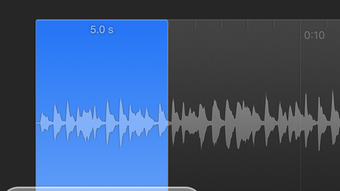
- Waveform visualization – A visual waveform display allows users to identify specific sections of audio with precision, making it easier to select the ideal start and end points for a ringtone.
- Sub-second accuracy editing – The zoom feature supports fine-tuned selection of audio segments, allowing users to pinpoint exact moments in a song or recording with high precision.
- Fade-in and fade-out effects – These tools help create smooth transitions at the beginning and end of ringtones, improving audio quality and user experience.
- Ringtone gap control – Users can adjust the silence between repeated ringtone loops, ensuring seamless playback without abrupt interruptions.
- Text and alert tone creation – Beyond call ringtones, Ringer supports the creation of custom text and notification tones, enhancing device personalization across multiple functions.
- Auto volume normalization – This feature ensures that quieter parts of a song are still usable as ringtones by automatically adjusting volume levels.
- Landscape mode interface – A wider screen layout provides more space for waveform editing, improving usability during detailed adjustments.
- Instant song navigation – Users can jump to any point in a track instantly, streamlining the editing workflow and reducing time spent searching for the right audio segment.
These features collectively support a streamlined workflow for users aiming to create polished, professional-sounding ringtones without advanced audio editing knowledge. The visual tools and intuitive controls make it accessible for casual users while still offering depth for more experienced creators.
User Interface, Workflow & Performance
Ringer features a clean, focused interface tailored to the ringtone creation process. The layout emphasizes waveform visualization and editing controls, minimizing distractions and guiding users through each step. Navigation is straightforward, with clear access to source selection, playback controls, and editing tools. The app’s workflow is designed around a linear process: select audio source → preview and trim → apply effects → export. This structure reduces cognitive load and helps users complete tasks efficiently. The visual waveform is central to the experience, with zoom and pan functions enabling precise editing. Users can quickly identify peaks, silence, and transitions, making selection intuitive. Performance observations are based on general software behavior patterns. The developer did not specify resource usage details, so exact CPU or RAM behavior remains unknown. Stability is assumed to be consistent given the app’s compatibility with iOS 12 and its focus on a single core function. The app does not appear to include background processes or real-time processing beyond playback and trimming. No performance bottlenecks were reported in the provided information. The lack of direct iPhone installation means users must rely on iTunes for deployment, which may affect perceived performance in the overall user journey.
Compatibility & System Requirements
Ringer is designed for iOS devices and is compatible with iOS 12, ensuring functionality on a range of iPhone models released during that era. The app requires 15.7 MB of storage space for installation, which is relatively modest. The developer did not specify additional hardware requirements such as processor speed, RAM, or screen resolution. Exact system requirements were not listed. Compatibility information was partially provided, with no mention of support for iPad or other Apple devices. The app does not support DRM-protected content, which may limit usability with certain music libraries. Users should ensure their device runs iOS 12 or later to use the app. For those on newer iOS versions, compatibility may be uncertain unless explicitly confirmed by the developer. The app’s functionality is tied to the availability of audio sources within the iTunes Library and photo library, which are standard on supported devices.
Pros and Cons
Pros
- Intuitive interface focused on ringtone creation
- Supports multiple audio sources: music, videos, and recordings
- High-precision editing with zoom and waveform visualization
- Smooth audio transitions via fade-in/fade-out and gap control
- Auto volume normalization improves usability of quiet audio
- Landscape mode enhances editing visibility
- Free to download and use
- Supports creation of text and alert tones
Cons
- Cannot create ringtones from DRM-protected songs
- Requires iTunes sync for installation on iPhone
- No direct iPhone installation capability
- Limited to iOS platform
- Does not support newer iOS versions beyond the provided information
FAQ Section
Is Ringer compatible with iOS 12?
Yes, Ringer is explicitly designed to work with iOS 12, ensuring stable performance on compatible iPhone models.
Can I use Ringer with DRM-protected songs?
No, the app does not support songs protected by DRM. Only unprotected audio files from the iTunes Library can be used.
How do I install my custom ringtones on my iPhone?
Created ringtones must be imported into iTunes and synced to the iPhone. The app does not provide direct installation.
Is Ringer available for iPad or Mac?
The developer did not specify support for iPad or Mac. The app is currently designed for iOS devices.
Does Ringer require an internet connection?
Ringer operates offline once installed. No internet connection is needed for editing or creating ringtones.
Final Thoughts + CTA
Ringer delivers a focused, effective solution for iPhone users who want to personalize their device with custom ringtones. Its intuitive design, precise editing tools, and support for multiple audio sources make it a standout choice in the ringtone creation space. While it lacks direct installation and is limited to iOS 12, its free pricing and robust feature set justify its use for those within its compatibility range. The app excels in usability, offering smooth transitions, auto volume, and landscape mode for enhanced editing. It’s ideal for individuals who value customization without the complexity of professional audio software. For iPhone users on iOS 12 seeking a reliable, no-cost tool to create unique ringtones, Ringer is a top-tier option. Download Ringer now.








