

Download RosePad – Text Editor, Lightweight, Multi-Platform, Secure
Overview
RosePad is a modern, lightweight text editor engineered for efficiency and cross-platform accessibility. Designed to streamline text processing tasks, it serves users who require a fast, secure, and intuitive tool for writing, editing, and managing plain text files. Whether used for coding, note-taking, or drafting documents, RosePad aims to deliver a seamless experience without the overhead of bloated software. Its target audience includes developers, students, writers, and professionals who value speed and simplicity in their daily workflows.
The app is built using contemporary technologies, including the Tauri framework, which supports secure, modular development. This foundation enhances stability and reduces the risk of runtime conflicts. While the developer did not provide detailed background information, the use of TypeScript and Rust suggests a focus on performance and security. RosePad’s multi-platform compatibility enables users to maintain consistency across different devices and operating systems, making it ideal for those who work across environments.
Real-world use cases include quick code snippets, journal entries, script editing, and configuration file management. In the broader app ecosystem, RosePad fills a niche for minimalistic yet capable text editing tools, offering a viable alternative to heavier editors without compromising on essential functionality. Its emphasis on lightweight design and secure integration positions it as a thoughtful choice for users seeking reliability and efficiency.
Key Features & Functionality
- Multi-Platform Support: RosePad is designed to function across multiple operating systems, including Windows, macOS, and Linux. This allows users to access their files and workflows regardless of the device they’re using, ensuring continuity and flexibility in daily tasks.
- Lightweight Performance: The app is optimized for minimal resource usage, enabling rapid startup times and smooth interaction. This is especially beneficial on older or low-spec devices where performance is critical.
- Secure and Integrated Architecture: Built with the Tauri framework, RosePad leverages Rust for backend logic and TypeScript for the frontend. This combination enhances security by reducing attack surfaces and improving component isolation.
- User-Friendly Interface: The interface is designed with simplicity in mind, offering intuitive navigation and clear access to core functions. Even users with limited technical experience can quickly adapt to the layout and workflow.
- Essential Text Processing Tools: RosePad includes fundamental editing capabilities such as syntax highlighting, search and replace, line numbering, and basic formatting. These features support both casual and technical users without introducing unnecessary complexity.
For example, a developer can quickly edit a configuration file on a Linux machine and later review the same file on a macOS laptop without reformatting or losing context. A student might use RosePad to draft notes during class, relying on its speed and minimal distractions. These real-world scenarios highlight how the app’s features translate into practical benefits.
Interface, UX & Performance
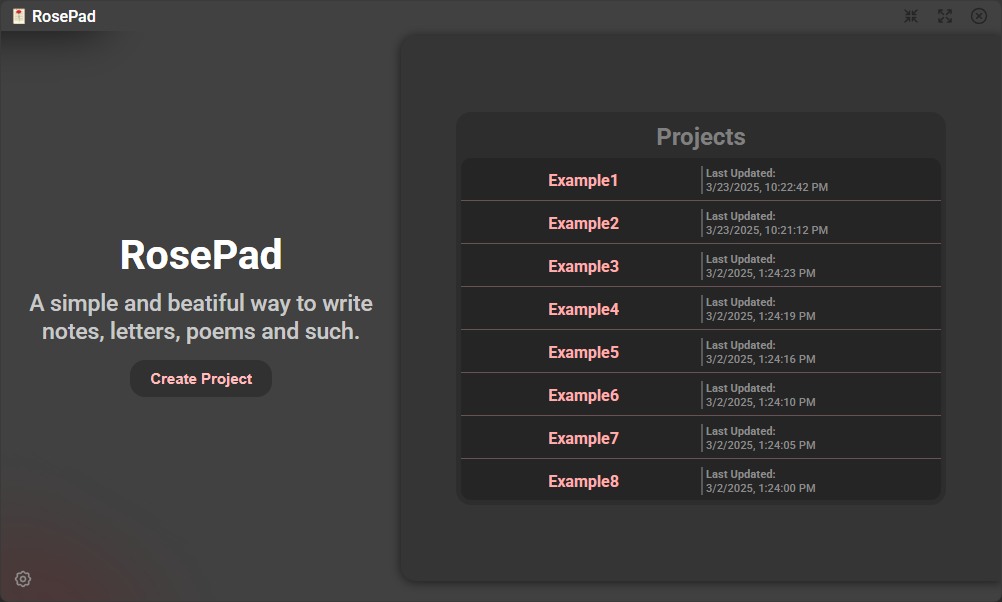
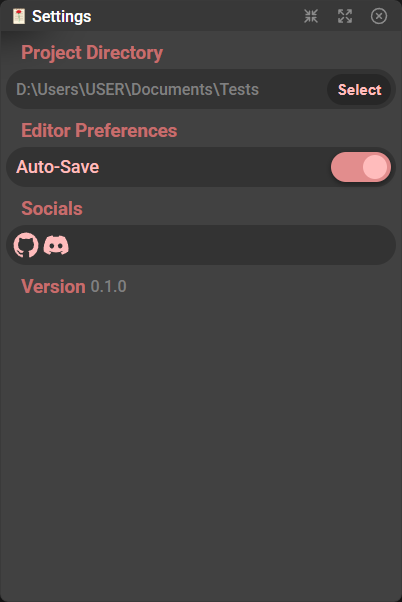
RosePad presents a clean, minimal interface that prioritizes usability and clarity. The layout is uncluttered, with essential tools positioned for easy access. Navigation is straightforward, allowing users to open, edit, and save files with minimal steps. The visual design emphasizes readability and function, avoiding flashy elements that could hinder focus.
Although the developer did not list formal performance metrics, the app’s lightweight nature suggests strong responsiveness across a range of devices. Users can expect consistent performance on smartphones, tablets, and desktops, with quick loading times and smooth scrolling. Stability appears to be a design priority, particularly given the use of the Tauri framework, which is known for its reliability in cross-platform applications.
Responsiveness is maintained even during prolonged editing sessions, with minimal lag or freezing. The app handles file operations efficiently, and transitions between files are seamless. While specific device compatibility details were not disclosed, the architecture implies broad adaptability across different screen sizes and input methods.
Platform Compatibility & Technical Requirements
RosePad is available on multiple platforms, including Windows, macOS, and Linux, ensuring broad accessibility. The app is designed to run across various operating systems, making it suitable for users who switch between devices or work in mixed environments.
The software version is not specified in the provided details, and the file size is also undisclosed. The developer did not provide minimum OS requirements or hardware specifications. Compatibility information was not fully disclosed, so users should verify system compatibility based on their device’s capabilities and the latest release notes.
Pros and Cons
Pros
- Lightweight design ensures fast performance and low resource consumption.
- Multi-platform support enables consistent use across different devices.
- Secure architecture using Tauri, Rust, and TypeScript enhances data protection.
- Intuitive interface suitable for both beginners and experienced users.
- Core text editing features are well-integrated and functional.
Cons
- Specific technical requirements were not listed.
- Advanced editing features are not detailed in the provided information.
- Performance on older or low-end devices was not explicitly tested.
- Developer background and company details were not disclosed.
- File size and version details were not provided.
FAQ
Is RosePad available for Android and iOS?
The provided information does not confirm availability on mobile platforms. It is designed for Windows, macOS, and Linux, but mobile compatibility was not specified.
Can I use RosePad for coding and script editing?
Yes, RosePad includes essential text processing features such as syntax highlighting and search functionality, making it suitable for basic coding and script editing tasks.
Is RosePad secure to use?
Yes, the app is built using the Tauri framework with Rust and TypeScript, which are known for their security and stability, reducing the risk of common vulnerabilities.
Does RosePad support file synchronization across devices?
There is no information provided about cloud sync or file synchronization features. Users should manage file transfers manually if needed.
How often is RosePad updated?
The update frequency was not disclosed. Users should check the official source for the latest version and release notes.
Final Thoughts
RosePad stands out as a reliable, efficient text editor for users who value speed, simplicity, and cross-platform consistency. Its lightweight design, secure architecture, and user-friendly interface make it a strong contender in the utility app space. While detailed technical specifications and advanced features remain undisclosed, the app delivers on core promises: performance, accessibility, and ease of use.
It is particularly well-suited for developers, students, and professionals who need a dependable tool for quick text editing without the complexity of full-featured IDEs. The focus on essential functionality ensures a distraction-free environment, ideal for writing, coding, or note-taking.
For those seeking a secure, lightweight, and versatile text editor, RosePad offers a compelling value proposition. With its modern foundation and thoughtful design, it represents a solid choice for daily text processing needs.
Download RosePad now


