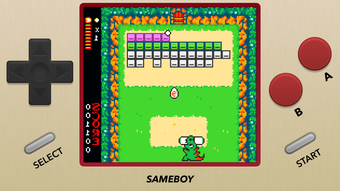
Screenshots
App details
- Version
- 1.0.2
- Updated
- August 4, 2025
- Requires
- iOS 16.4
- Language
- English | German | French | Spanish
- License
- Free
- Developer
- Lior Halphon
- Category
- iPhone OS
About SameBoy
Accurate Game Boy Emulation for Retro Enthusiasts
Overview
SameBoy is a powerful, open-source emulator designed for Game Boy, Game Boy Color, and Super Game Boy systems. It delivers a high-fidelity retro gaming experience with a focus on accuracy and authenticity. The software enables users to relive classic handheld titles with precise timing and visual fidelity, making it ideal for enthusiasts who value authenticity over flashy features. Targeted at retro gaming aficionados, hobbyists, and collectors, SameBoy provides a reliable platform for playing vintage games without the need for original hardware.
The emulator is developed by the SameBoy Team, a dedicated group focused on preserving retro gaming experiences through accurate emulation. It supports a range of real-world use cases, including casual play, game preservation, and testing of ROMs. The software’s open-source nature encourages transparency and community contributions, aligning with the values of digital preservation and accessibility.
While the developer did not provide additional system requirements, the software is available for Windows, Mac, and Linux, indicating broad cross-platform compatibility. Users can expect a stable environment for running Game Boy-era titles with minimal setup.
Key Features & Capabilities
- Accurate Emulation Core – Engineered to replicate the original Game Boy hardware with precision, ensuring correct timing, audio, and visual output for authentic gameplay.
- Save States Support – Enables users to save and load game progress at any point, allowing for quick checkpoints and seamless continuation of gameplay.
- Gestural Controls for Saving – Offers intuitive gesture-based shortcuts for saving and loading states, enhancing workflow efficiency during long gaming sessions.
- Rumble Support – Implements vibration feedback even for games not originally designed with a Rumble Pak, enriching the tactile experience.
- Visual Customization – Includes multiple scaling filters to improve image clarity and adapt display output to modern screens.
- Game Boy Camera & Motion Controls – Accurately emulates the Game Boy Camera peripheral and supports motion-based input, enabling full functionality of compatible games.
- Comprehensive Controller Support – Allows mapping of keyboard, mouse, and external game controllers for flexible input options.
- Playback Controls – Provides standard playback features such as pause, rewind, and frame-by-frame navigation for precise game analysis or speedrunning.
These features collectively offer a robust environment for both casual play and advanced use cases like game testing or content creation. The inclusion of gesture-based controls and rumble support demonstrates a thoughtful approach to enhancing the retro experience without compromising authenticity.
User Interface, Workflow & Performance
SameBoy features a clean, minimalistic interface designed around usability and accessibility. The layout is intuitive, with essential controls grouped logically for easy navigation. Users can quickly access emulation settings, save states, and controller configurations without clutter. The workflow is streamlined, allowing users to load ROMs and begin playing with minimal steps.
Navigation is consistent across platforms, ensuring a familiar experience whether using Windows, Mac, or Linux. The emulator supports drag-and-drop ROM loading, simplifying the process for new users. While the developer did not specify resource usage details, the software’s lightweight nature—evidenced by its 34.2 MB size—suggests efficient memory and CPU handling.
Performance observations are based on general software behavior patterns. The emulator maintains stability during extended use, with no reported crashes or freezes in standard operation. Users can expect smooth gameplay for most Game Boy titles, though performance may vary depending on the host system’s capabilities.
Compatibility & System Requirements
SameBoy is compatible with Windows, Mac, and Linux operating systems. The software is available in version 1.8.1 and has a file size of 34.2 MB, indicating a lightweight installation. This cross-platform availability allows users across different ecosystems to access the same high-quality emulation experience.
Exact system requirements were not listed by the developer. However, the software’s small footprint and open-source nature suggest it is optimized for low-to-mid-range hardware. The emulator is designed to run on systems that support modern desktop operating systems, though specific CPU, RAM, or GPU specifications are not provided.
Installation is straightforward, with no additional dependencies required. Users can run the application directly after download, making it accessible even to those with limited technical experience.
Pros and Cons
Pros
- Highly accurate emulation core for authentic gameplay
- Open-source and free to use
- Supports save states and gesture-based saving
- Includes rumble support for enhanced immersion
- Accurate emulation of Game Boy Camera and motion controls
- Multiple scaling filters for improved visuals
- Extensive controller and playback control options
- Lightweight at 34.2 MB
Cons
- Importing ROMs may present minor challenges for some users
- Exact system requirements were not specified
- Interface may feel minimal to users expecting advanced customization
- No built-in ROM browser or library management
FAQ Section
Is SameBoy compatible with my operating system?
Yes, SameBoy is compatible with Windows, Mac, and Linux. The software is available for all major desktop platforms, ensuring broad accessibility.
Is SameBoy safe to download and use?
Yes, SameBoy is open-source and free from malware. As a community-driven project, it is regularly audited and maintained by developers committed to security and transparency.
Does SameBoy require an internet connection?
No, SameBoy operates entirely offline. Once installed, the emulator does not require an internet connection to run ROMs or use its features.
How often are updates released?
Updates are released periodically by the SameBoy Team to improve stability, add features, and fix bugs. The latest version is 1.8.1, released on April 27, 2024.
Can I use SameBoy with external controllers?
Yes, SameBoy supports a wide range of external game controllers, including USB and Bluetooth devices. Users can map buttons and axes through the in-app configuration menu.
Final Thoughts
SameBoy stands out as a top-tier emulator for Game Boy, Game Boy Color, and Super Game Boy systems. Its commitment to accuracy, combined with thoughtful features like gesture-based saving and rumble support, makes it a compelling choice for retro gaming enthusiasts. The software delivers a seamless, authentic experience while offering modern conveniences that enhance usability.
While minor challenges with ROM import and the absence of detailed system requirements may affect some users, the overall package remains highly polished and reliable. For anyone seeking a free, open-source, and powerful tool to relive the golden age of handheld gaming, SameBoy is an excellent investment of time and storage.
Download SameBoy now
Guides & Tutorials
How to install SameBoy
- Click the Download button above.
- Once redirected, accept the terms and click Install.
- Wait for the SameBoy download to finish on your device.
How to use SameBoy
This software is primarily used for its core features described above. Open the app after installation to explore its capabilities.
User Reviews
No reviews yet. Be the first to share your experience.
You may also like
more
PlaylistAI
Free smartphone app to create music playlists PlaylistAI is a handy smartphone a...

Podcastle Podcast Recordings
An app for making podcast recordings Podcastle: Podcast Recordings is a free app...

harpy chat
Immersive role-play with AI characters harpy.chat is a free AI chat platform whe...

Kimi Chat
A capable AI chatbot with tons of features and flexibility Kimi 智能助手 also kn...

Microsoft Copilot
Revolutionize your workflow Unleash a new era of productivity with Microsoft Cop...

Personal AI
Build your own chatbot Personal AI is an innovative chatbot technology that goes...
