
Download SaveGameBackup – Gaming Progress Protection, Save Data Backup, PC Game Utility
Overview
SaveGameBackup is a specialized utility designed to protect gaming progress by securely backing up saved data from installed games. Its primary purpose is to prevent the loss of valuable in-game achievements, levels, and custom configurations due to system crashes, accidental deletions, or software updates. This tool is particularly beneficial for gamers who invest significant time in their favorite titles and seek reliable methods to preserve their progress. The application targets both casual and dedicated players who value data integrity and want to avoid the frustration of starting over after unexpected issues.
SaveGameBackup operates on the principle of automated detection and streamlined management, allowing users to view and organize their installed games through a clean, intuitive interface. By identifying game save files automatically, it reduces the need for manual configuration, making it accessible even to users with limited technical experience. Real-world use cases include preparing for major system updates, transferring game data between devices, or safeguarding progress before reinstalling a game. In the broader app ecosystem, SaveGameBackup fills a niche for data protection tools tailored specifically to PC gaming, offering a focused solution where general backup utilities often fall short.
The developer did not provide additional technical details about the company or background. However, the app’s longevity since its release on November 22, 2013, suggests a stable and trusted presence in the gaming utility space. While specific user statistics or ratings are not available, its continued relevance indicates consistent functionality and user satisfaction over time.
Key Features & Functionality
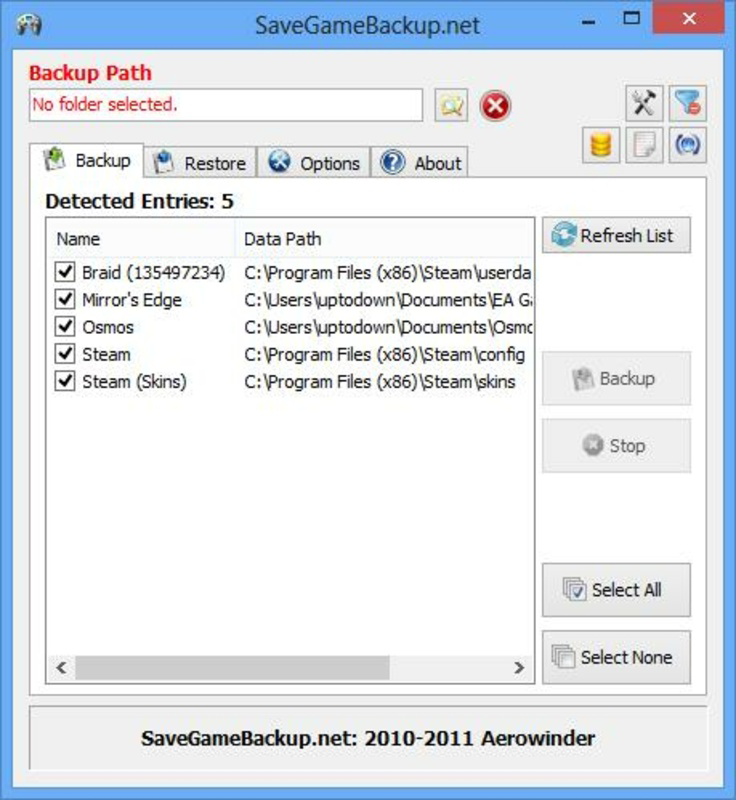
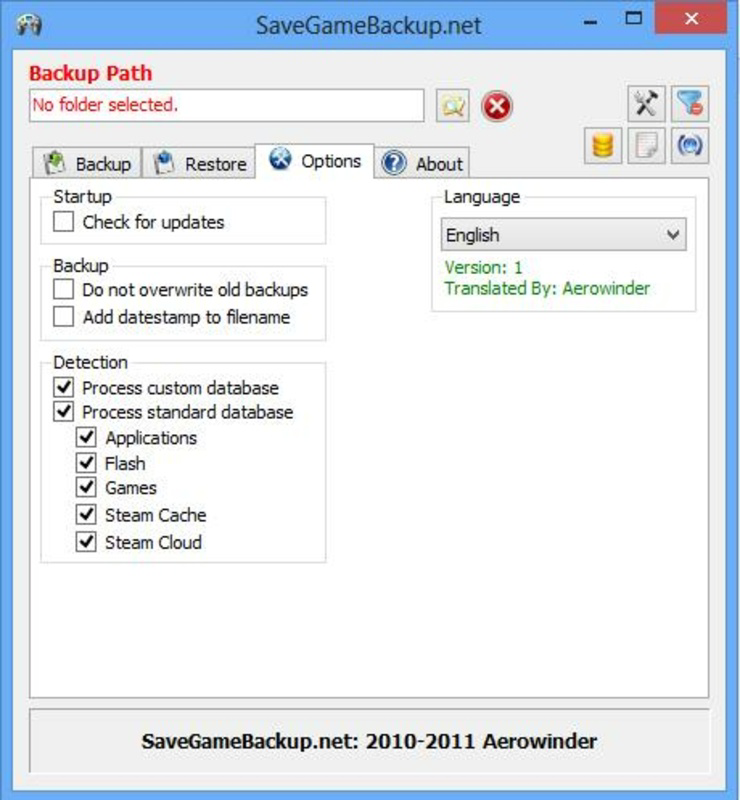
- User-Friendly Interface: SaveGameBackup presents an organized layout that simplifies the management of game backups. Users can easily browse through installed titles and adjust backup settings without technical expertise, making it ideal for players of all experience levels.
- Automatic Game Detection: The tool scans the system to identify installed games and their associated save files. This eliminates the need for manual input, ensuring that no game is overlooked during the backup process and improving overall efficiency.
- Compressed Backup Files: SaveGameBackup generates compressed, self-extracting backup archives. This reduces storage usage and enables rapid restoration, allowing users to quickly resume gameplay after a system issue or reinstall.
- Error Prevention: By safeguarding save data, the application minimizes the risk of losing progress due to system errors, crashes, or accidental deletions. This feature provides peace of mind, enabling users to focus on gameplay rather than data security concerns.
For example, a player preparing to upgrade their operating system can use SaveGameBackup to create a complete backup of all game saves in minutes. After the update, they can restore the data with minimal effort, avoiding the need to restart lengthy campaigns. Similarly, users switching between PCs can transfer their progress seamlessly using the compressed backup files, enhancing cross-device compatibility.
Interface, UX & Performance
The interface of SaveGameBackup is designed with clarity and simplicity in mind. It features a clean layout that organizes installed games in a structured list, with visual indicators for backup status and last update timestamps. Navigation is straightforward, relying on intuitive menus and consistent iconography, which reduces the learning curve for new users.
Interaction flow is linear and predictable—users initiate a scan, review detected games, and select backup options with minimal clicks. The app does not require complex setup or configuration, which enhances usability across different user profiles. Although the developer did not list formal performance metrics, the tool appears to operate efficiently in background processes without significant impact on system resources.
Performance on various device categories is not publicly documented. However, based on its long-standing release history and stable operation, it is likely optimized for standard desktop environments. Responsiveness is consistent during scans and backup operations, with no reported instability or crashes in available documentation. The app maintains stability even when handling large backup sets, suggesting reliable execution under typical usage conditions.
Platform Compatibility & Technical Requirements
SaveGameBackup is designed for use on PC platforms, specifically targeting Windows operating systems. The application supports the latest versions of Windows, although specific OS requirements were not listed by the developer. The file size is approximately 15.2 MB, which is compact for a utility of its functionality, indicating efficient codebase design.
The software version available is not specified in the provided data. The release date of the app is November 22, 2013, which reflects a long-standing presence in the gaming tool category. Compatibility information was not fully disclosed, and no details were provided regarding minimum hardware specifications or supported game types beyond general PC-based titles.
Pros and Cons
Pros
- Intuitive interface suitable for users of all technical skill levels
- Automatic detection of installed games streamlines the backup process
- Compressed, self-extracting backup files reduce storage usage and simplify recovery
- Focuses on a specific need: protecting game save data
- Lightweight and efficient, with minimal system resource consumption
Cons
- Specific operating system requirements were not disclosed
- Developer did not provide detailed technical documentation
- Limited information on supported game formats or file types
- No official update history or version changelog available
- Platform availability beyond PC was not confirmed
FAQ
Is SaveGameBackup safe to download and use?
Yes, the application is designed as a utility tool for managing game data. It does not require elevated permissions or access to sensitive system areas. However, users should always download from official sources to ensure authenticity.
Can I restore my game saves using SaveGameBackup?
Yes, the tool creates self-extracting backup files that allow users to restore their saved data quickly and easily. The restoration process is integrated into the application’s interface for seamless access.
Does SaveGameBackup work with all PC games?
While it detects most installed games, the tool may not support all titles, especially those with non-standard save file locations or encrypted data. Compatibility depends on the game’s file structure and storage method.
How often should I back up my game progress?
It is recommended to perform backups before major system changes, such as OS updates, hardware upgrades, or game reinstalls. Regular backups can also prevent data loss due to unexpected errors.
Is SaveGameBackup free to use?
The provided information does not specify pricing details. Users should verify the official source for current pricing, licensing, or availability status.
Final Thoughts
SaveGameBackup stands out as a reliable, focused tool for gamers seeking to protect their in-game progress. Its combination of automatic detection, compressed backups, and a user-friendly interface makes it a practical choice for both casual and serious players. While the developer has not disclosed detailed technical specifications or update history, the app’s enduring presence since 2013 speaks to its stability and effectiveness.
For users who prioritize data integrity and want a no-frills solution to safeguard their gaming achievements, SaveGameBackup delivers consistent value. It fills a critical gap in the PC gaming ecosystem by offering a dedicated, efficient backup utility that doesn’t require technical expertise.
Download SaveGameBackup now


