
Download SecureGPT – Free ChatGPT Plugin Security Assessment Tool
Overview & Key Benefits
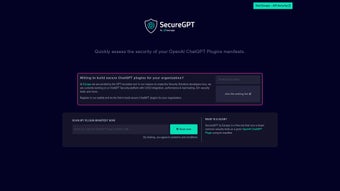
SecureGPT, developed by Escape, is a **free web‑based security assessment tool** designed specifically for OpenAI ChatGPT Plugin manifests. In today’s fast‑moving AI ecosystem, developers rush to ship new plugins, often overlooking subtle security flaws that can be exploited once the code hits production. SecureGPT bridges that gap by running a comprehensive suite of **50+ automated security tests**, delivering instant feedback on vulnerabilities, misconfigurations, and potential data‑leak vectors. The platform is built with CI/CD integration in mind, allowing teams to embed security checks directly into their build pipelines. Whether you are a solo developer experimenting with a personal assistant or part of an enterprise engineering squad, SecureGPT provides a **secure, repeatable, and cost‑free** way to harden your plugin before it reaches end users. The tool also offers a developer waitlist for advanced services such as continuous monitoring, performance benchmarking, and custom rule sets, reinforcing Escape’s commitment to a **security‑first** development culture. By leveraging SecureGPT early in the lifecycle, you reduce the risk of post‑deployment patches, protect user data, and maintain trust in the AI services you deliver.
Features, Installation & Compatibility
Core Feature Set
- Automatic manifest parsing and validation against OpenAI specifications.
- Over 50 built‑in security tests covering injection, authentication, data exposure, and more.
- Real‑time vulnerability report with severity grading and remediation suggestions.
- CI/CD ready – REST API and webhook support for Jenkins, GitHub Actions, GitLab CI, and Azure Pipelines.
- Performance testing module that simulates concurrent user load to spot latency spikes.
- Exportable PDF/JSON report for audit trails and compliance documentation.
- Integration with Escape’s broader security suite for continuous monitoring after deployment.
- Free tier with unlimited scans for open‑source and personal projects.
- Responsive web UI that works on desktop and mobile browsers.
- Developer waitlist for premium features such as custom rule creation and on‑premises deployment.
Installation & Usage Instructions
Since SecureGPT is a **purely web‑based application**, there is no traditional installation process. Follow these three simple steps to start scanning your plugin manifest:
- Access the portal: Navigate to securegpt.escape.dev using any modern browser (Chrome, Edge, Firefox, Safari).
- Upload your manifest: Click the “Upload Manifest” button and drag‑drop the
ai-plugin.jsonfile or paste its contents into the provided editor. The tool instantly validates the JSON syntax. - Run the assessment: Press “Start Scan”. Within seconds, SecureGPT executes the full test suite and presents a dashboard with identified issues, severity levels, and actionable remediation steps. You can export the report or trigger a webhook to your CI pipeline for automated handling.
For teams using CI/CD, generate an API token from the “Account Settings” page and call the endpoint POST /api/v1/scan with your manifest payload. The response contains a scan ID that can be polled for results, enabling fully automated security gates before merging code.
Compatibility (Operating Systems)
SecureGPT runs in any modern web browser, making it **cross‑platform** by design. Whether you are on Windows 10/11, macOS Ventura, Linux distributions, Android, or iOS, the tool renders consistently and performs the same security checks. No additional plugins or extensions are required, and the service complies with GDPR and CCPA data‑privacy standards.
Pros, Cons & Frequently Asked Questions
Pros
- Free and instantly accessible – no download, no licensing fees.
- Comprehensive test suite covering over 50 security vectors.
- CI/CD integration via API and webhooks for automated pipelines.
- Actionable reports with clear remediation steps.
- Responsive UI that works on desktop and mobile browsers.
Cons
- Advanced premium features (custom rules, on‑prem deployment) are behind a waitlist.
- Requires an internet connection; offline scanning is not currently supported.
- Performance testing is limited to simulated load; real‑world stress testing still needs external tools.
FAQ – SecureGPT Security Assessment
Is SecureGPT really free for unlimited scans?
Yes. The public version allows unlimited scans of public or personal plugin manifests at no cost. Enterprise‑grade features such as custom rule sets and on‑premises hosting are part of a paid tier currently accessible via a developer waitlist.
Can SecureGPT be integrated with GitHub Actions?
Absolutely. After generating an API token, you can call the SecureGPT REST endpoint in a GitHub Actions workflow, poll for the scan ID, and fail the build if any high‑severity issues are reported.
What types of vulnerabilities does SecureGPT detect?
The tool checks for insecure endpoints, missing authentication scopes, exposure of secret keys, improper CORS configuration, injection vectors, excessive permissions, and compliance gaps with OpenAI’s plugin guidelines.
Is my manifest data stored after scanning?
SecureGPT retains the manifest only for the duration of the scan (max 24 hours) and then deletes it automatically. No personal data is retained beyond that, adhering to strict privacy policies.
Do I need any special permissions to run SecureGPT in a corporate environment?
Since the service runs entirely in the browser, you only need outbound HTTPS access to securegpt.escape.dev. For tighter security, enterprises can request a dedicated instance through Escape’s premium program.
Overall Rating: 4.5/5 – SecureGPT delivers a robust, free solution for early‑stage plugin security, with only a few limitations around premium features.
Conclusion & Call to Action
In an era where AI‑driven extensions are becoming ubiquitous, **security cannot be an afterthought**. SecureGPT equips developers with a **quick, free, and reliable** method to vet their ChatGPT Plugin manifests before they go live. Its extensive test catalog, seamless CI/CD hooks, and cross‑platform accessibility make it an indispensable part of any responsible development workflow. While the premium tier promises deeper customization, the free tier already provides enough coverage to catch the most common pitfalls that could otherwise lead to data breaches or service disruptions.
If you are ready to **elevate your plugin security posture** today, visit the SecureGPT portal, upload your manifest, and let the tool do the heavy lifting. For teams looking to automate the process, generate an API token and embed the scan into your build pipeline—protecting your codebase with each commit. Don’t wait for a security incident to act; **download SecureGPT now and secure your AI integrations before users ever see them**.



.png)




