
Download SEEdit – powerful XHTML, CSS & RSS editor for web developers
Overview of SEEdit Maxi II
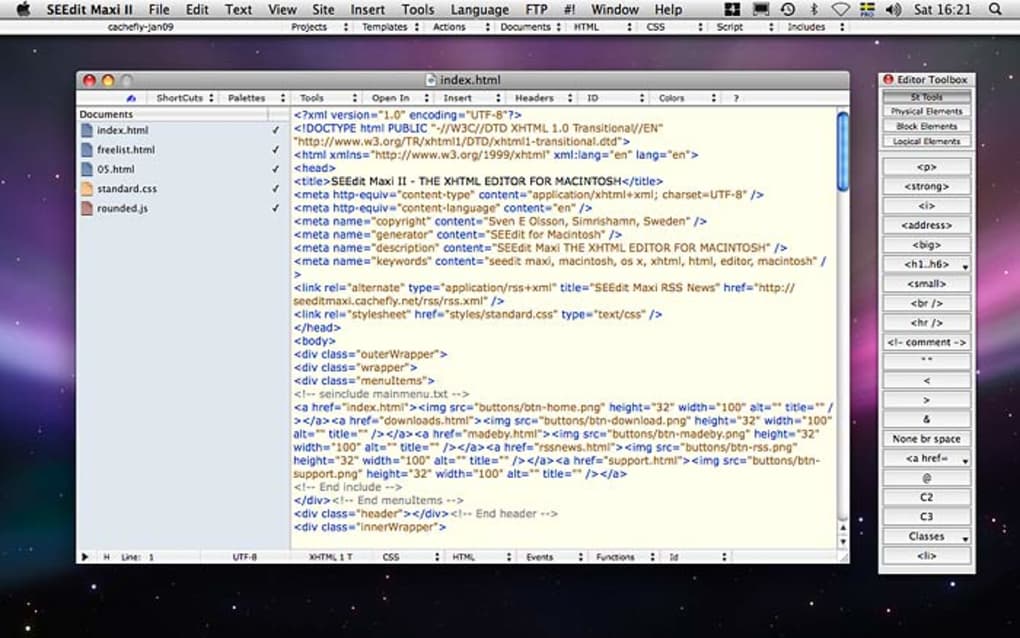
SEEdit Maxi II is a lightweight yet full‑featured HTML editor designed for developers who need a fast, reliable tool on the go. Built around a clean, single‑pane interface, the editor gives instant access to essential functions such as tag insertion, stylesheet creation and RSS feed management. Recent updates introduced a tabbed document interface, allowing you to keep several projects open side‑by‑side without losing context. The built‑in Toolbox makes it easy to select and edit major HTML, CSS and JavaScript classes, while the Quick Insert CSS module lets you generate complete style blocks in seconds. SEEdit also supports auto‑complete for HTML, CSS, JavaScript and plain text, cutting down repetitive typing and reducing syntax errors. Although the live preview works as a full‑screen view rather than a true inline preview, it still offers a reliable way to verify how your page will appear in a browser before publishing. With automatic site backups, language‑code insertion for HTML5, and enhanced export options that handle text‑encoding conversions, SEEdit Maxi II provides a solid foundation for anyone building modern web pages, whether you are a freelancer, a small‑business owner, or a student learning web development.
Key Features that Make SEEdit Stand Out
- Tabbed Document Interface: Manage multiple HTML, CSS or RSS files in separate tabs, reducing the need to constantly open and close files.
- Editor Toolbox: A contextual panel that lists all major HTML tags, CSS properties and JavaScript functions, allowing quick insertion and modification.
- Quick Insert CSS: Generate complete style sheets with a few clicks, covering backgrounds, typography, print styles and more.
- Snippet Library: Save and reuse custom XHTML or CSS snippets, speeding up repetitive coding tasks.
- Auto‑Complete Engine: Real‑time suggestions for HTML, CSS, JavaScript and plain text to keep coding flow uninterrupted.
- Full‑Screen Live Preview: View your page in a browser‑like environment before publishing, ensuring layout fidelity.
- Site Auto Backup (Pro only): One‑click backup with optional filtering for large assets such as images.
- HTML5 Language Code Insertion: Automatically add the correct
attribute for multilingual sites. - Encoding‑Aware Export: Convert document encoding on export, with automatic meta‑tag updates to match the new charset.
- RSS Feed Builder: Simple interface to create and edit RSS 2.0 feeds directly within the editor.
Installation, Usage Instructions & Compatibility
Getting started with SEEdit Maxi II is straightforward. First, download the installer from the official website – the file is available as a free .exe for Windows and a .dmg for macOS. Run the installer, follow the on‑screen prompts, and choose a destination folder. The setup wizard will also ask whether you want to create a desktop shortcut and associate .html, .css and .rss files with SEEdit, which is recommended for a seamless workflow.
Once installed, launch SEEdit from the start menu or the dock. The main window opens with a blank document and the Toolbar on the left. To create a new file, click File → New or press Ctrl+N. For existing projects, use File → Open (Ctrl+O) and select the folder containing your HTML or CSS files – SEEdit will automatically load each file into its own tab. The Toolbox can be toggled via the View → Toolbox menu, giving you instant access to tags like and CSS properties such as margin or box‑shadow.
SEEdit Maxi II runs on Windows 10/11 (both 32‑bit and 64‑bit) and macOS 10.13 or later. A limited Android version is available for on‑the‑fly edits, though full functionality remains Windows/macOS only. The application requires at least 200 MB of free disk space and 2 GB of RAM – modest requirements that make it suitable for older laptops. After you finish editing, simply press File → Save (Ctrl+S) or use the auto‑backup feature (Pro edition) to create a versioned copy of your site. For publishing, the built‑in Export Site wizard can zip the entire project and optionally convert the file encoding to UTF‑8, ISO‑8859‑1 or any other supported charset.
Pros & Cons, Frequently Asked Questions, and Expert Review
Pros
- Intuitive, tab‑based interface that reduces window clutter.
- Robust auto‑complete for HTML, CSS, JavaScript, and plain text.
- Quick Insert CSS speeds up stylesheet creation.
- Automatic encoding conversion during export prevents charset issues.
- Lightweight footprint – runs smoothly on modest hardware.
Cons
- Live preview is not truly inline; it opens in full‑screen mode.
- Advanced features such as auto‑backup and encoding conversion are limited to the Pro edition.
- No built‑in FTP client – you need a separate tool to upload files.
- Android version lacks some desktop‑only functionalities.
Frequently Asked Questions
Is SEEdit free or does it require a license?
SEEdit Maxi II offers a free version with core editing capabilities. The Pro edition, which adds auto‑backup, advanced export options and priority support, is sold as a one‑time purchase.
Can I edit PHP or server‑side scripts with SEEdit?
While SEEdit focuses on XHTML, CSS and RSS, it provides generic text editing with syntax highlighting that can be used for PHP, ASP or other server‑side languages, though it lacks specialized debugging tools.
How does the automatic encoding conversion work?
When you choose “Export Site” you can select a target charset (e.g., UTF‑8). SEEdit scans each file, converts the byte order, and updates the tag automatically, ensuring browsers interpret the text correctly.
Does SEEdit support HTML5 semantic tags?
Yes. The editor includes shortcuts for new HTML5 elements such as , , and automatically inserts the proper language attribute when you enable the “Insert Language Code” feature.
Is there a way to sync my projects with cloud storage?
SEEdit does not have built‑in cloud sync, but you can place your project folder inside a Dropbox, OneDrive or Google Drive directory. The editor will work with the files as usual, and changes will be synced automatically.
Expert Review
Rating: 4.3/5
SEEdit Maxi II delivers a solid balance between simplicity and power. Its tabbed interface and extensive snippet library speed up routine tasks, while the auto‑complete engine keeps syntax errors at bay. The lack of a true inline preview is a minor annoyance, but the full‑screen mode remains accurate enough for most developers. For those who need automated backups and encoding conversion, the Pro upgrade is well worth the price. Overall, SEEdit is an excellent choice for freelancers and small teams looking for a fast, secure, and affordable HTML/CSS editor.
Pros: TechEditor Reviews
Conclusion – Should You Download SEEdit?
If you are searching for a free, lightweight HTML editor that combines a clean UI with powerful CSS and RSS tools, SEEdit Maxi II fits the bill perfectly. Its tabbed workflow, snippet library, and automatic encoding handling make daily web‑development tasks smoother, while the optional Pro features give power users the extra control they need. Download SEEdit today, try the free version, and decide whether the Pro upgrade aligns with your project requirements. With regular updates and a focus on security, SEEdit remains a reliable companion for building modern, standards‑compliant web pages.
Download SEEdit now and start creating faster, cleaner code.








