


Download Shape Collage – Free Photo Collage Maker for Windows & Mac
Overview
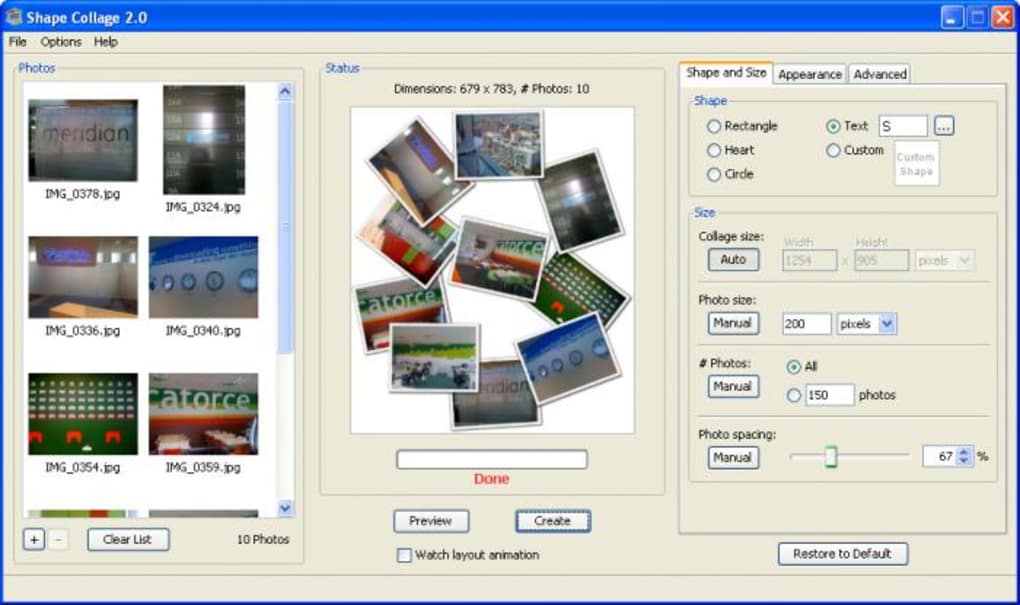
Shape Collage is a free, lightweight photo‑collage tool that lets anyone turn a folder of images into a striking visual composition with just a few clicks. Unlike traditional image editors that demand a steep learning curve, Shape Collage focuses on speed and simplicity while still offering a surprising amount of creative control. Whether you need a classic rectangular grid for a family album, a heart‑shaped layout for a Valentine’s gift, or a custom silhouette that spells out a word, the software delivers a polished result without requiring Photoshop‑level expertise. The interface is built around a clear workflow: import your pictures, choose a shape (or draw one yourself), adjust spacing, preview the silhouette, and export the final collage as JPG, PNG, or even a layered PSD file. Although the preview shows only the silhouette—not the actual photo placement—saving a quick draft lets you see the true composition. Shape Collage supports drag‑and‑drop import, batch loading from entire folders, and works equally well with a handful of pictures or a massive collection of several hundred images. The generation engine is optimized for large‑scale collages, making it up to 100 × faster than many older tools when handling thousands of photos. Overall, Shape Collage strikes a balance between ease‑of‑use and powerful output, making it an ideal choice for hobbyists, teachers, marketers, and anyone who wants to create eye‑catching photo art quickly and securely.
Features & Pros / Cons
- Unlimited shape library – rectangles, circles, hearts, stars, custom masks, and user‑defined text.
- Drag‑and‑drop import for single files or whole folders, with instant thumbnail loading.
- Real‑time silhouette preview; final image export in JPG, PNG, or Photoshop PSD.
- Adjustable parameters – number of photos, spacing, border thickness, and background color.
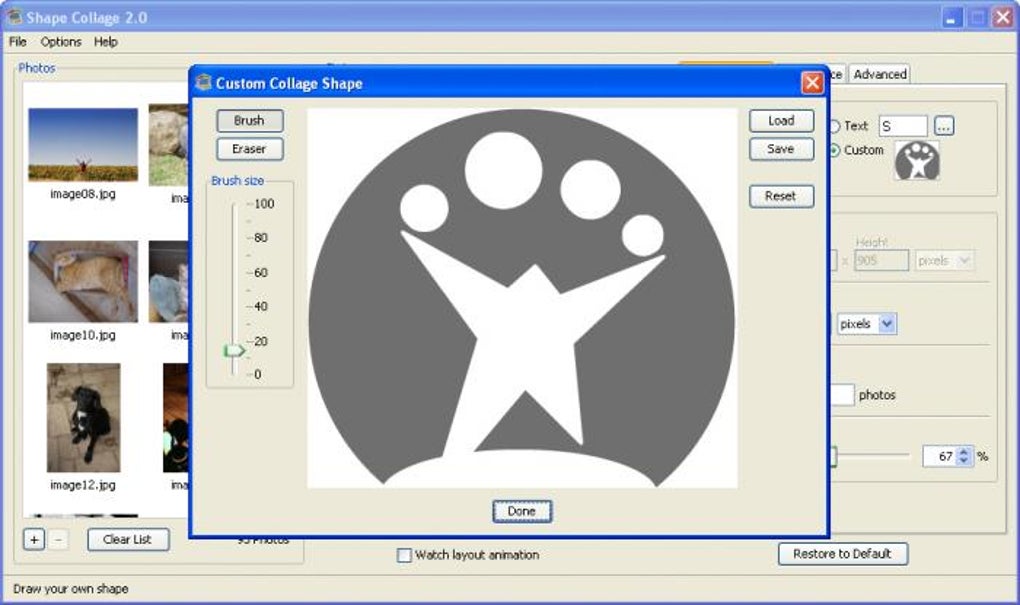
- Built‑in mask editor for drawing custom silhouettes directly in the app.
- Batch processing – create collages with hundreds or thousands of images without crashing.
- Multi‑language support and customizable workspace layouts.
- Free for personal use; optional paid upgrade for commercial licensing and advanced features.
Pros
- Intuitive, wizard‑style workflow that requires no design experience.
- Fast rendering engine, especially for large‑scale photo mosaics.
- Highly flexible shape options, including the ability to upload your own masks.
- Export options include layered PSD for further editing in Photoshop.
- Lightweight installer (under 30 MB) and no ads or bundled software.
Cons
- Silhouette preview does not show actual photo placement; you must save to view the final look.
- No built‑in photo editing tools (cropping, filters) – you must prepare images beforehand.
- Advanced shape customization (e.g., complex vector masks) can be limited for novice users.
- Only available for Windows and macOS; no native mobile app for Android or iOS.
Installation, Usage & Compatibility
Installing Shape Collage is straightforward. Download the installer from the official website, run the .exe (Windows) or .dmg (macOS) file, and follow the on‑screen prompts. The installer verifies the digital signature, ensuring a secure, malware‑free download. Once installed, launch the program from the Start menu or Applications folder.
Step‑by‑Step Workflow
- Import Images: Click the “Add Photos” button or simply drag a folder onto the main window. Shape Collage reads all supported formats (JPG, PNG, BMP, GIF) instantly.
- Select a Shape: Choose from the pre‑loaded library or click “Custom Mask” to draw your own silhouette using the built‑in editor.
- Configure Settings: Set the number of photos, adjust spacing, choose border color, and decide whether the collage background should be transparent.
- Preview: The preview pane displays the chosen silhouette. While it doesn’t show actual photo placement, you can verify size and shape before committing.
- Generate & Export: Click “Create Collage.” After processing (seconds for small sets, a few minutes for thousands), save the result as JPG, PNG, or PSD.
Supported Operating Systems: Shape Collage runs on Windows 10/11 (64‑bit) and macOS 10.13 or later. The software utilizes standard system libraries, so no additional runtimes (such as .NET or Java) are required.
For users who need to work on multiple devices, the program stores workspace settings in a portable .scw file. Simply copy this file to another computer with the same OS, open it via “Load Workspace,” and continue editing without losing any configuration.
Overall Rating: 4.5 / 5 – Shape Collage delivers fast, flexible collage creation with a clean interface, making it a solid free alternative to pricey design suites.
FAQ & Conclusion
Can I use Shape Collage for commercial projects?
Yes. The free version allows personal use, but for commercial purposes you should purchase a commercial license, which removes the “free‑only” watermark and grants unlimited distribution rights.
Is there a limit to the number of photos I can import?
There is no hard limit. Shape Collage can handle thousands of images, though very large sets may increase processing time and memory usage.
Can I edit the collage after it’s been generated?
You can reload the saved .scw workspace to adjust shape, spacing, or photo order, then re‑export. For pixel‑level tweaks, open the exported PSD in Photoshop.
Does Shape Collage support transparent backgrounds?
Yes. When exporting as PNG or PSD, you can choose a transparent background, which is ideal for overlaying the collage onto other designs.
Is the software safe to download?
Absolutely. The installer is digitally signed, and the official website provides checksums for verification. No adware or hidden fees are bundled.
Conclusion & Call to Action: If you’re looking for a fast, free, and secure way to transform your photo collections into eye‑catching collages, Shape Collage is a top contender. Its extensive shape library, batch‑processing speed, and straightforward workflow make it suitable for both casual users and professionals who need quick mock‑ups. Download the installer today, experiment with custom masks, and start creating stunning visual stories in minutes. For businesses or power users, consider the commercial license to unlock full export options and priority updates. Your next memorable collage is just a click away – download Shape Collage now and unleash your creativity!








