Archive for the ‘WordPress’ Category

WordPress RSS feed error – instruction target matching is not allowed

Monday, August 31st, 2009

WordPress RSS feed error

WordPress RSS feed error


Yesterday I met this error when tried to burn my WordPress blog feed at the feedburner.google.com:
“The URL does not appear to reference a valid XML file. We encountered the following problem: Error on line 6: The processing instruction target matching “[xX][mM][IL]” is not allowed”.

After checking feed page source code I discovered that it really has 6 blank rows before the first valid XML tag. So the problem is found but what is the source of such blank lines at the very beginning of the feed page? Thanks to the curious guys, after 30 minutes of Google reseaching I found these very useful for me posts:


Read the rest of this entry

Is new installed WordPress plugin package clean?

Saturday, August 29th, 2009

Security

Security


In this post I wish to talk about cleanness of WordPress plugin’s packages. I name package clean if it doesn’t contain any unnecessary files inside. Unnecessary files together with garbage issue can lead to the real security problem. Let’s take my last download as an example. It is a well known WordPress plugin WP-Forum produced by Fredrik Fahlstad. In case if somebody is new to this plugin, this is the simple discussion forum plugin for WordPress. You can download this plugin from Frederik site http://fahlstad.se/wordpress/plugins/wp-forum/.
I went to the plugin’s home page http://www.fahlstad.se/wp-plugins/wp-forum/ and downloaded a 2.4 version installation package.
Inside this package .zip file in addition to core plugin code files we can see:

Read the rest of this entry

Silence is golden

Friday, August 28th, 2009

Silence is golden

Silence is golden


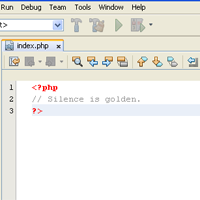
Is your new WordPress plugin secure? Did you see the small 30 byte size only index.php file in such WordPress folders as wp-content, wp-content/themes? It is placed there by WordPress developers for the security reason. The explanation is obvious: if somebody input in his browser the URL like
http://www.yourblog.com/wp-content/plugins/
he could not see the full folder content, its subfolders and files list. Of course there are some other methods to hide directory list from visitors, for example it can be done with .htaccess directive but this (empty index.php file) way is the most simple and straightforward one.
Some of WordPress plugins developers ignore this issue and don’t put such empty index.php file into theirs plugins folders and subfolders.
It is highly recommended that you check this file presence at the new installed plugin folder and its subfolders after every new WordPress plugin installation. Put this index.php file

<?php
// Silence is golden.
?>

there yourself if plugin’s author missed it.
I made a plugin to make this job automatically. You can read about it at Silence is Golden Guard WordPress Plugin. Download link is available there also.