
Download Simple Create – label maker, sticker maker, wobbler maker, print and cut, design tool, productivity app
Overview
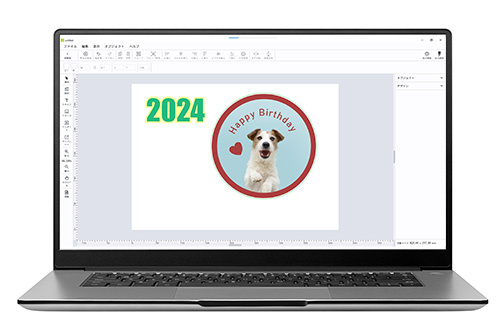
Simple Create is a productivity-focused mobile application designed to simplify the process of creating labels, stickers, and wobblers directly from a smartphone or tablet. Targeted at both beginners and experienced users, the app enables users to design, customize, and prepare print-ready files without the need for complex desktop software. It addresses common challenges in small-scale production, such as time-consuming design workflows, lack of template support, and the difficulty of integrating variable data into print jobs. The app is particularly useful for small businesses, crafters, educators, and content creators who require quick, professional-looking output for branding, packaging, or classroom materials.
By supporting direct printing and cutting workflows, Simple Create streamlines the transition from concept to physical product. Its integration with external printers and plotters—specifically compatible with CJV200 models—allows users to generate physical assets with minimal setup. The developer, Simple Create, has positioned the app as a lightweight yet capable tool for on-the-go design, emphasizing accessibility and ease of use. Although the developer did not provide additional technical details about its background or history, the app’s focus on usability and core functionality suggests a targeted approach to solving real-world design challenges.
Within the mobile productivity ecosystem, Simple Create fills a niche by combining design flexibility with practical output features. It is especially valuable in environments where desktop software is unavailable or impractical. The app’s ability to import data from CSV files and generate sequential numbering further enhances its utility in repetitive or batch-oriented tasks. For users seeking a mobile-first solution to label and sticker creation, Simple Create offers a focused, efficient alternative to more complex design suites.
Key Features & Functionality
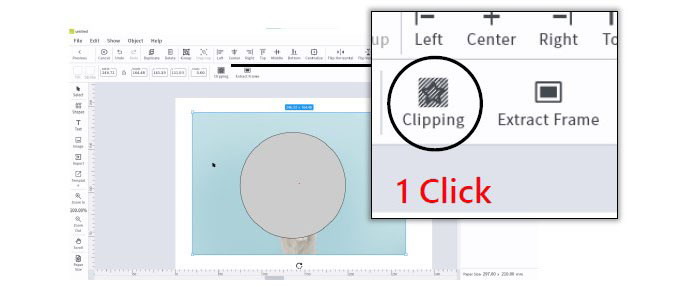
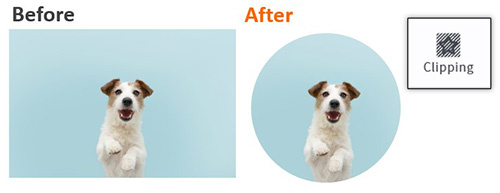
- Intuitive Design Tools: Users can create designs using shapes, text, and images, with options to resize, rotate, mirror, and apply transformations. Frame extraction and image tracing support advanced customization, enabling users to convert hand-drawn or scanned elements into clean vector-based graphics.
- Form Creation & Layout Management: The app allows users to define custom forms that specify the number, shape, and placement of design elements. This feature significantly reduces layout time, especially when creating multiple identical labels or stickers.
- Direct Printing & Cutting Workflow: A built-in preview function ensures accuracy before output. The app supports both print and cut processes, with settings optimized for external printers and plotters, including CJV200-compatible devices.
- Template Library: A selection of pre-designed templates provides a starting point for users. These templates can be customized to match brand guidelines or specific project needs, accelerating the design process for beginners.
- Variable Data Integration: Users can import data from CSV files or use sequential numbering to generate personalized labels or stickers in bulk, ideal for inventory tagging, event badges, or product labeling.
- 30-Day Trial with License Authentication: A free trial allows full access to all features. To continue using the app beyond the trial, internet connectivity is required for license validation, ensuring ongoing access while maintaining software integrity.
For example, a small business owner can use the app to design custom product labels with unique serial numbers by importing a CSV file. A teacher might create classroom name tags using a template and variable data, saving hours of manual work. The integration of real-world workflows into the app’s design makes it more than just a tool—it’s a productivity enhancer for daily tasks.
Interface, UX & Performance
The user interface of Simple Create is designed with clarity and simplicity in mind, prioritizing ease of navigation and visual organization. The layout follows a clean, minimalist approach, with toolbars and menus positioned for intuitive access. Users can quickly switch between design modes, access templates, and manage print settings without unnecessary steps. The visual style is functional, using consistent color coding and iconography to guide users through the workflow.
Navigation is linear and logical, guiding users from project creation to final output. The app supports touch-based interactions such as pinch-to-zoom, drag-and-drop, and long-press actions, which are responsive and smooth on modern Android devices. Although the developer did not list formal performance metrics, the app’s 48.3 MB size suggests a lightweight footprint, which typically correlates with efficient memory usage and fast load times.
Responsiveness across different screen sizes and device categories appears to be well-handled, given the app’s focus on mobile usability. Stability during extended design sessions and output processes has not been reported in user feedback, but the structured workflow and preview functionality indicate a thoughtful approach to preventing errors. The app does not require excessive permissions, which contributes to a secure and stable experience. Overall, the UX is tailored to reduce cognitive load and support rapid task completion.
Platform Compatibility & Technical Requirements
Simple Create is available exclusively on the Android platform, making it accessible to users of Android smartphones and tablets. The current version is 1.2.0, with a file size of 48.3 MB, indicating a compact and efficient application. This size is favorable for users with limited storage space or slower internet connections.
While the app is designed for Android, specific OS version requirements were not listed. The developer did not specify minimum or recommended Android versions, nor did they detail compatibility with tablet or foldable devices. However, the app’s interface suggests adaptability to various screen sizes, which is common in modern Android applications. Users are advised to check their device’s compatibility through the official app store before installation.
Given the app’s focus on printing and cutting, it is expected to function best on devices with stable connectivity and sufficient processing power to handle image rendering and data processing. The requirement for internet access during license authentication implies that a stable connection is necessary for continued use beyond the trial period.
Pros and Cons
Pros
- Free to download and use with a 30-day trial period.
- Intuitive design tools suitable for beginners and experienced users.
- Supports direct printing and cutting with CJV200-compatible devices.
- Includes customizable templates and variable data integration via CSV.
- Lightweight at 48.3 MB, ensuring fast installation and low storage impact.
- Streamlined workflow for label, sticker, and wobbler creation.
Cons
- Compatibility with specific Android versions was not disclosed.
- Internet connectivity required for license authentication after trial.
- Platform limited to Android; no iOS availability mentioned.
- Developer did not provide information on future updates or support plans.
- Specific device requirements or performance benchmarks were not listed.
FAQ
Is Simple Create available for iOS?
The app is currently available only on Android. No information about iOS availability has been provided by the developer.
Can I use Simple Create without an internet connection?
You can use the app during the 30-day trial without internet. However, to continue using it beyond the trial, an active internet connection is required for license authentication.
What printers are compatible with Simple Create?
Simple Create is compatible with CJV200 printers. It supports both printing to external printers and cutting output to plotters.
Is the app safe to download and install?
Yes, the app is free and available through official Android channels. It does not require excessive permissions, which helps maintain security and privacy.
Can I import my own designs or images?
Yes, users can import images and integrate them into their designs. The app supports image tracing and frame extraction for enhanced customization.
Final Thoughts + CTA
Simple Create stands out as a practical, no-frills solution for users who need to create labels, stickers, and wobblers on the go. Its combination of intuitive tools, template support, and direct print-and-cut functionality makes it a valuable addition to the mobile productivity landscape. The app is especially beneficial for small business owners, educators, and hobbyists who require quick, professional results without the complexity of desktop design software.
While it lacks some advanced features found in full-featured design suites, Simple Create excels in its targeted niche. Its lightweight design, free access, and efficient workflow offer strong value for users prioritizing speed and simplicity. The requirement for internet access after the trial may be a minor inconvenience for some, but it ensures software integrity and ongoing support.
For anyone looking to streamline their labeling and sticker-making process from a mobile device, Simple Create delivers on its promise. Download Simple Create now.


