
Download SnapShift – AI Image Generator, Photo Editor & Creative Tool
Overview
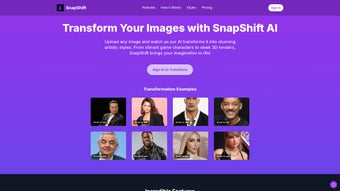
SnapShift is a cutting‑edge, web‑based AI image generator and editor that turns ordinary photographs into striking visual artworks in a matter of seconds. Powered by the latest deep‑learning models, the platform offers an ever‑expanding library of artistic styles—ranging from vibrant video‑game characters, polished 3‑D renders, expressive emojis, nostalgic pixel art, to handcrafted clay‑sculpture looks. Because all processing happens in the cloud, users never need to install heavyweight software or own a powerful GPU; a modern browser and an internet connection are enough to unleash professional‑grade creativity. SnapShift targets a broad audience: casual social‑media enthusiasts who need eye‑catching posts, marketers looking for fresh visual assets, game developers prototyping character concepts, and designers who want rapid style exploration without a steep learning curve. The interface is deliberately minimalistic—upload an image, pick a style, tweak a few sliders, and watch the AI reinterpret the picture with remarkable fidelity. Continuous monthly updates add new styles, improve performance, and tighten security, ensuring the tool stays relevant in the fast‑moving world of visual content creation. Whether you are on a desktop workstation, a laptop, a tablet, or a smartphone, SnapShift delivers a seamless, secure, and fast experience that bridges the gap between casual creativity and professional design.
Key Features & System Compatibility
- AI‑Powered Style Transfer: Convert photos into video‑game avatars, realistic 3‑D renders, emoji‑style icons, pixel‑art sprites, clay‑sculpture visuals, and many more artistic expressions.
- Instant Cloud Processing: Transformations complete in seconds thanks to optimized GPU clusters on secure cloud servers.
- One‑Click Social Sharing: Export results directly to Instagram, Twitter, Facebook, or download in high‑resolution PNG/JPEG formats.
- Batch Upload (up to 10 images): Streamline larger projects by processing multiple files simultaneously.
- Custom Style Builder (beta): Upload a reference artwork to train a personalized style unique to your brand or project.
- Secure Cloud Storage & Auto‑Deletion: All uploads are encrypted in transit and at rest, and are permanently removed after 24 hours.
- Responsive Design: The UI automatically adapts to desktops, laptops, tablets, and smartphones for a consistent experience.
- Regular Feature Updates: New artistic styles and performance enhancements are released monthly.
Compatibility
SnapShift is a pure web application, which means it works on any modern browser across all major operating systems. Whether you are using Windows 10/11, macOS Ventura, Linux distributions, iOS Safari, or Android Chrome, you can access the full suite of tools without installing additional plugins or extensions. The responsive layout ensures that the same feature set is available on a 27‑inch monitor, a 13‑inch laptop, or a 6‑inch smartphone, making it ideal for creators who switch between devices throughout the day.
Installation & Step‑by‑Step Usage Guide
Because SnapShift runs entirely in the cloud, there is no traditional download or installation process. Follow the workflow below to start generating AI‑enhanced images:
- Create an Account: Visit snapshift.ai and register with your email address or a social‑login option. The free tier grants up to 20 transformations per month, while paid plans remove watermarks and unlock unlimited usage.
- Upload Your Source Image: Click the “Upload” button or drag‑and‑drop a file onto the canvas. Supported formats include JPEG, PNG, and WebP, with a maximum size of 10 MB per file. For best results, use high‑resolution images with minimal compression.
- Select an Artistic Style: Browse the style gallery on the right‑hand panel. Hover over each thumbnail for a quick preview, then click to apply the style to your image.
- Fine‑Tune Parameters (Optional): Adjust sliders for “Intensity,” “Color Boost,” and “Detail Level” to control how aggressively the AI applies the chosen style. Advanced users can launch the “Custom Style Builder” to upload a reference image and generate a unique, brand‑specific look.
- Generate & Review: Press the “Transform” button. SnapShift processes the request on secure cloud servers and returns the transformed image within seconds. Use the “Compare” toggle to view a side‑by‑side before/after comparison.
- Save or Share Your Creation: Click “Download” to store the file locally, or use the built‑in icons to publish directly to Instagram, Twitter, Facebook, or generate a short shareable link for collaboration.
Pro tip: For optimal output, avoid overly compressed source files, keep the original aspect ratio, and experiment with intensity settings to prevent over‑stylization. The free plan adds a subtle watermark; upgrading to a premium subscription removes it and provides batch processing, higher‑resolution exports, and priority server access.
Pros, Cons, Frequently Asked Questions & Final Verdict
Pros
- Lightning‑fast AI transformations with no local hardware requirements.
- Extensive library of artistic styles suitable for social media, gaming, and professional design.
- Fully browser‑based; works on Windows, macOS, Linux, iOS, and Android.
- Secure, encrypted processing and automatic deletion of uploads after 24 hours.
- Free tier available for occasional users and creators on a budget.
Cons
- Premium features (watermark removal, unlimited batch processing) require a subscription.
- Internet connection is mandatory; offline usage is not possible.
- File size limit of 10 MB may require pre‑processing for large images.
- Custom Style Builder is still in beta and may produce inconsistent results.
SnapShift delivers a remarkable blend of speed and artistic diversity. The AI’s ability to reinterpret a portrait as a pixel‑perfect 8‑bit sprite or a polished 3‑D render is genuinely impressive. While the free version adds a subtle watermark, the overall value—especially for social‑media managers who need fresh content daily—far outweighs the cost of the premium plan. The web‑only architecture ensures that anyone with a modern browser can access professional‑grade tools without the hassle of installations or GPU upgrades.
Frequently Asked Questions
Is SnapShift completely free to use?
SnapShift offers a free tier that includes up to 20 transformations per month with a small watermark. Unlimited usage, higher‑resolution output, and watermark removal require a paid subscription.
Do I need a powerful computer to run SnapShift?
No. All AI processing occurs on SnapShift’s secure cloud servers. A stable internet connection and a modern web browser are the only requirements.
Can I use SnapShift on my mobile device?
Absolutely. The responsive web app works on iOS Safari and Android Chrome, providing the same style library and transformation speed as the desktop version.
How secure is my uploaded image?
SnapShift encrypts all uploads in transit and at rest. Images are automatically deleted from the servers 24 hours after processing, ensuring privacy and compliance with data‑protection standards.
What file formats does SnapShift support?
JPEG, PNG, and WebP are supported for both input and output. Files larger than 10 MB must be resized before upload.
Conclusion & Call to Action
SnapShift stands out as a fast, versatile, and user‑friendly AI image generator that bridges casual creativity and professional design. Its web‑only approach eliminates hardware barriers, while the ever‑growing library of artistic styles keeps content fresh and engaging. Whether you’re a marketer boosting engagement, a game developer prototyping characters, or an influencer seeking striking visuals, SnapShift provides the tools to turn ordinary photos into share‑ready masterpieces in seconds. Ready to experience AI‑driven creativity? Download SnapShift now, start transforming your images, and unleash a new level of visual storytelling.



.png)




