



Download Solve – Versatile Digital Calculator with Multiple Personalities
Overview
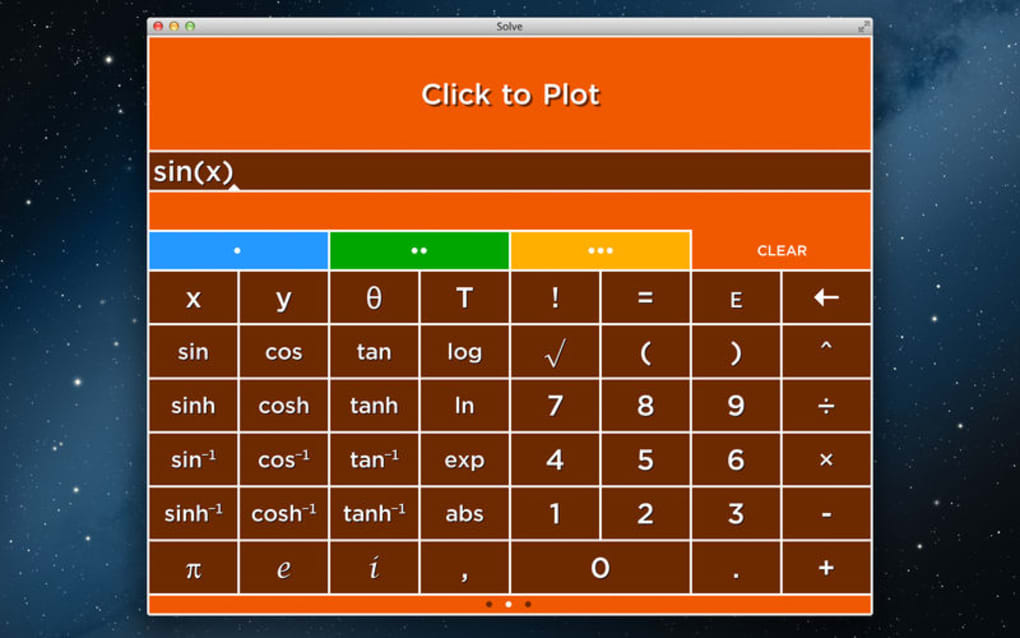
Solve is not just another calculator app; it is a fully‑featured digital computation platform that adapts to the user’s needs by switching between four distinct calculator personalities. Whether you need a quick arithmetic check for a grocery list, a robust scientific engine for engineering formulas, a graph‑oriented tool for high‑school geometry, or a programmable calculator for coding enthusiasts, Solve consolidates all of these capabilities into a single, sleek interface. The design philosophy behind Solve is simplicity meeting power: each calculator tab is color‑coded, allowing you to keep separate workspaces open simultaneously without losing context or having to clear previous results. The innovative memory system lets you store intermediate answers, label them, and retrieve them later, which is especially handy for multi‑step problems or when you are juggling several equations at once. Because the app is built on a cross‑platform framework, it runs natively on Windows, macOS, Android, and iOS, delivering a consistent experience across desktops and mobile devices. Security is baked in – all calculations happen locally, no data is sent to the cloud unless you explicitly choose to share results. For students, professionals, or hobbyists who crave flexibility without juggling multiple apps, Solve offers a single, secure solution that grows with your mathematical challenges. Its intuitive UI, responsive touch controls, and customizable settings make it a reliable companion for everyday number‑crunching as well as complex academic projects.
Key Features & Unique Capabilities
- Four Distinct Calculator Modes: Basic, Scientific, Graphing, and Programmable, each with its own color theme for instant visual differentiation.
- Innovative Memory Store: Save, label, and recall results across sessions; perfect for multi‑step equations and iterative problem solving.
- Live Graph Plotting: Draw functions in real time, zoom, pan, and export graphs as images or PDFs.
- Equation Solver: Input algebraic expressions and receive step‑by‑step solutions, complete with variable isolation and factorization.
- Customizable Interface: Adjust font size, button layout, and color schemes to suit visual preferences or accessibility needs.
- Cross‑Platform Sync (Optional): Use your Solve account to sync saved memories and preferences across Windows, macOS, Android, and iOS devices.
- Secure Offline Processing: All calculations are performed locally, ensuring privacy and eliminating the need for an internet connection.
- Export & Share: Results, graphs, and memory logs can be exported as CSV, TXT, or image files and shared via email or messaging apps.
- Regular Free Updates: New functions, bug fixes, and UI refinements are delivered automatically without additional cost.
The combination of these features makes Solve stand out in a crowded market of single‑purpose calculator apps. The four‑tab system eliminates the frustration of constantly switching apps or losing previous work. For example, a high‑school student can use the Basic tab for quick multiplication, switch to the Graphing tab to plot a quadratic function, and then jump to the Scientific tab to verify the derivative—all without closing any window. Professionals in finance or engineering will appreciate the programmable mode, which supports custom scripts written in a lightweight scripting language, enabling automation of repetitive calculations. Additionally, the memory store functions like a mini‑database; you can tag results (e.g., “Project A – Material Cost”) and pull them up later, saving time and reducing errors caused by manual transcription. The UI’s color‑coded tabs are more than cosmetic—they provide an at‑a‑glance cue that reduces cognitive load, especially when juggling multiple problem sets. Overall, Solve delivers a comprehensive toolbox that feels both familiar and refreshingly innovative.
Installation, Usage Guide & Compatibility
Getting Started on Windows & macOS
Downloading Solve for desktop is straightforward. Visit the official website, click the “Download for Windows” or “Download for macOS” button, and run the installer. The Windows installer supports Windows 10 and later, while the macOS package requires macOS 11 (Big Sur) or newer. Follow the on‑screen prompts: accept the license agreement, choose an installation folder (the default is recommended), and click “Install.” Once installed, launch Solve from the Start menu or Applications folder. The first launch triggers a brief tutorial that walks you through each calculator tab, demonstrates how to store a value in memory, and shows you how to export a graph.
Installing on Android & iOS
Mobile users can obtain Solve from Google Play Store or Apple App Store. Search for “Solve Calculator,” tap “Install,” and wait for the download to complete. After installation, open the app; you will be prompted to grant permission for storage access, which is needed for exporting files. No additional configuration is required; the app automatically detects your device’s orientation and adapts the UI for portrait or landscape mode. For Android users, a “Battery Optimization” exception is recommended to prevent the app from being paused during long calculations.
Using the App Effectively
Upon opening Solve, you’ll see four colored tabs at the top of the screen. Tap any tab to switch modes. Each mode displays a customized keypad: the Basic tab shows numbers and basic operators, the Scientific tab adds trigonometric functions, the Graphing tab provides a coordinate grid, and the Programmable tab opens a small code editor. To store a result, press the “M+” button; a dialog appears allowing you to name the entry (e.g., “Loan Rate”). Access stored values by tapping the memory icon, which opens a searchable list. You can edit or delete entries directly from this list. To plot a graph, type the function into the Graphing tab’s input field and press “Enter.” Use pinch gestures to zoom and two‑finger drag to pan. Export options are located under the share icon in each tab, enabling you to send results via email or save them to cloud storage.
Compatibility Summary: Solve runs on Windows 10+, macOS 11+, Android 8.0+, and iOS 13+. The app is optimized for both touchscreens and traditional keyboards, ensuring a smooth experience whether you are on a laptop, tablet, or smartphone.
Pros and Cons
Advantages
- All‑in‑one solution eliminates the need for multiple calculator apps.
- Color‑coded tabs provide instant visual context, reducing mistakes.
- Memory store with labeling makes multi‑step problem solving efficient.
- Live graphing with export options is ideal for educators and students.
- Offline processing guarantees privacy and works without internet.
- Cross‑platform availability ensures consistency across devices.
Drawbacks
- The programmable mode uses a simplified scripting language, which may be limiting for advanced programmers.
- While the UI is clean, some users may find the abundance of options overwhelming at first.
- Sync feature requires creating a free account, which some privacy‑concerned users might avoid.
Review Summary: Solve earns a solid 4.5 out of 5 stars for its breadth of functionality, intuitive design, and reliable offline performance. The minor learning curve and limited scripting depth are the only notable downsides.
Frequently Asked Questions
Is Solve free to download?
Yes, Solve is free to download on Windows, macOS, Android, and iOS. All core features, including the four calculator modes and memory store, are available at no cost. Optional premium themes are offered as in‑app purchases.
Can I use Solve without an internet connection?
Absolutely. All calculations are performed locally on your device. An internet connection is only required for syncing memory entries across devices or for downloading updates.
How does the memory store work?
When you press the “M+” button, a dialog appears where you can name the result (e.g., “Result A”). The value is saved in a local database that persists between sessions. Access the stored items via the memory icon, where you can search, edit, or delete entries.
Does Solve support unit conversions?
Yes, the Scientific mode includes a built‑in unit converter for common measurements such as length, mass, temperature, and pressure. Simply select the “Convert” button and follow the prompts.
Can I export my graphs as vector files?
Graphs can be exported as high‑resolution PNG images or PDF files, which retain vector quality. This is useful for inserting graphs into reports or presentations without loss of clarity.
Conclusion & Call to Action
Solve redefines what a calculator app can be by merging four powerful computation engines into a single, cohesive platform. Its thoughtful design—color‑coded tabs, persistent memory, and real‑time graphing—addresses the everyday frustrations of switching between disparate tools. Whether you are a student tackling algebra, a professional needing quick scientific calculations, or a hobbyist programmer experimenting with custom formulas, Solve delivers a secure, offline‑first experience that scales with your needs. The free download includes all essential features, and regular updates ensure the app stays current with modern OS versions. Ready to simplify your math workflow? Download Solve today and enjoy a versatile calculator that adapts to every problem you face.








