
Seamless Code Navigation for .NET Developers
Overview
Source Code Reader is a web-based tool designed to enhance the experience of exploring public .NET C# projects hosted on platforms like GitHub, Bitbucket, CodePlex, and Google Code. Unlike standard code repositories that offer only basic file browsing, this application introduces intelligent navigation capabilities, allowing users to traverse code with precision and speed. It enables direct access to implementation code from calling references with a single click—mirroring the familiar "Go To Definition" functionality found in Microsoft Visual Studio.
The software is particularly beneficial for developers, students, and technical contributors who frequently review open-source projects. It streamlines the process of understanding codebases by reducing the time spent manually searching through files. Whether analyzing third-party libraries, learning new frameworks, or debugging external dependencies, Source Code Reader provides a more efficient way to navigate complex code structures.
While the developer information is not provided, the tool’s focus on semantic code understanding suggests a targeted development effort for the software engineering community. Its core value lies in transforming passive code browsing into an interactive, insight-driven experience.
Key Features & Capabilities
- Intelligent Code Navigation – Instantly jump from a method call to its implementation, similar to Visual Studio’s Go To Definition. This reduces context switching and accelerates comprehension.
- Public Repository Integration – Seamlessly works with publicly hosted projects on GitHub, Bitbucket, CodePlex, and Google Code without requiring local cloning.
- Semantic Code Understanding – Goes beyond file listing by interpreting code structure, identifying references, and resolving call chains.
- One-Click Implementation Access – Clicking on a method or class name navigates directly to its definition, improving workflow efficiency.
- Browser-Based Accessibility – No installation required; accessible through any modern web browser on Windows, Mac, or Linux.
These features are ideal for developers reviewing open-source libraries, students learning C# and .NET, and contributors analyzing project architecture. For example, when studying a NuGet package, users can trace method calls across multiple files without leaving the browser. This functionality supports faster onboarding and deeper technical understanding.
User Interface, Workflow & Performance
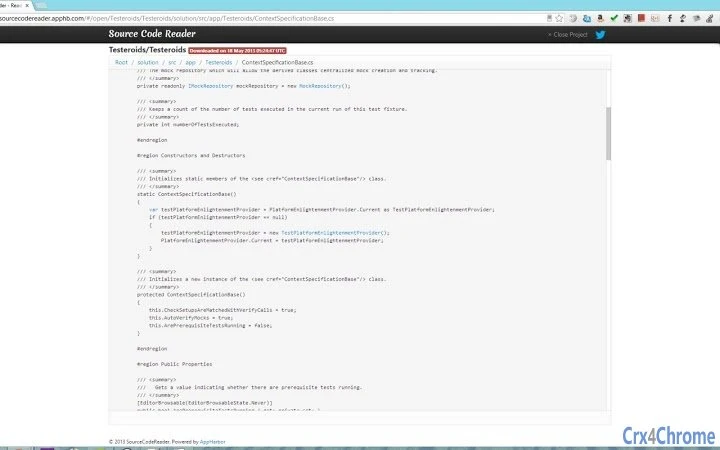
The interface is minimal and focused, built around a clean browser layout that prioritizes code readability and navigation. Navigation is intuitive, with inline links that highlight callable elements. Users can click on method names to instantly resolve and display the corresponding implementation.
Workflow efficiency is enhanced by eliminating the need to manually search or download project files. The tool integrates directly into the browsing experience, allowing developers to maintain context while exploring code. However, exact performance details were not specified. General software behavior patterns suggest responsive interaction under typical web conditions, though performance may vary based on repository size and network speed.
Stability and resource usage were not publicly documented. The developer did not specify resource usage details. As a browser-based application, it relies on client-side processing and may consume varying amounts of CPU and RAM depending on the complexity of the codebase being viewed.
Compatibility & System Requirements
Source Code Reader is compatible with Windows, Mac, and Linux operating systems, making it accessible across major desktop platforms. It operates entirely within a web browser, eliminating the need for native installation or platform-specific builds.
The application has a footprint of 10.2 MB, which is typical for a web-based tool with embedded JavaScript and UI components. The software version is 1.0, indicating a stable initial release. Exact system requirements were not listed, and no specific hardware specifications were provided.
Since it runs in the browser, compatibility depends on having a modern web browser with JavaScript enabled. No additional plugins or extensions are required beyond standard web functionality.
Pros and Cons
Pros
- Provides powerful code navigation similar to Visual Studio, even in public repositories
- Works directly in the browser—no installation or setup required
- Supports multiple source code hosting platforms including GitHub and Bitbucket
- Enhances learning and debugging by enabling quick access to implementation details
- Free to use, with no licensing or subscription barriers
Cons
- Only works with publicly hosted repositories; private projects are not supported
- Dependent on internet connectivity and browser performance
- Limited to .NET C# projects; not applicable to other languages or frameworks
- No offline functionality available
- Exact performance metrics and system requirements were not specified
FAQ Section
Is Source Code Reader available for all operating systems?
Yes, it is compatible with Windows, Mac, and Linux, as it operates entirely in a web browser.
Can I use Source Code Reader with private GitHub repositories?
No, the tool currently only supports publicly hosted projects on GitHub, Bitbucket, CodePlex, and Google Code.
Is Source Code Reader secure to use?
As a browser-based application, it does not store user data. It only accesses publicly available code, making it safe for use without privacy concerns.
Does Source Code Reader require a license or payment?
No, it is completely free to use. There are no subscription fees or licensing requirements.
Can I use Source Code Reader without an internet connection?
No, the tool requires an active internet connection since it runs in a browser and fetches code from remote repositories.
Final Thoughts + CTA
Source Code Reader delivers a compelling solution for developers and learners who frequently explore open-source .NET C# projects. Its ability to replicate Visual Studio’s navigation experience in a browser environment sets it apart from basic code browsers. While it has limitations—such as being restricted to public repositories and requiring internet access—it offers significant value in terms of speed, usability, and accessibility.
For anyone working with C# and .NET, especially those engaged in open-source contributions or technical learning, this tool can greatly improve efficiency and comprehension. It’s a lightweight, free utility that enhances the standard code browsing workflow.
Download Source Code Reader now








