
Download SourceMonitor – Source Code Metrics, Multi-language Analysis, Historical Tracking
Overview
SourceMonitor is a specialized source code metrics measurement tool designed for developers seeking to evaluate both the quantity and quality of their code across multiple programming languages. It supports a wide range of languages, including C#, C++, C, Java, Delphi, VB6, VB.NET, and HTML, making it a versatile solution for developers working in diverse technical environments. The tool enables users to track key code metrics over time, facilitating historical comparisons that help identify trends, measure improvements, and detect regressions in codebase health. This capability is particularly valuable during code reviews, refactoring efforts, and team-wide quality assurance initiatives.
Target users include individual developers, software engineering teams, and technical leads responsible for maintaining code quality and ensuring sustainable development practices. By providing measurable insights into code complexity, size, and structure, SourceMonitor supports informed decision-making in project planning and resource allocation. The developer did not provide additional technical details about the tool’s origins or organizational background, but its long-standing presence in the developer community suggests reliability and established use in professional workflows.
Real-world applications include integrating code metrics into continuous integration pipelines, benchmarking code quality before major releases, and supporting agile retrospectives with data-driven feedback. In the broader app ecosystem, SourceMonitor fills a niche for lightweight, focused tools that enhance developer productivity without requiring extensive setup or infrastructure. Its role in promoting code maintainability and long-term project sustainability underscores its importance in modern software development practices.
Key Features & Functionality
- Multi-language Support: SourceMonitor analyzes source code written in multiple programming languages, including C++, C#, Java, HTML, Delphi, VB6, and VB.NET. This allows developers to use a single tool across heterogeneous projects, reducing the need for multiple metric analysis tools and ensuring consistent measurement standards.
- Historical Data Tracking: The tool saves measurement results over time, enabling users to compare current metrics against past versions. This feature supports long-term trend analysis and helps teams assess the impact of refactoring, new feature additions, or code cleanup efforts.
- Graphical Representations: Results are visualized using various graph types, such as Kiviat diagrams (also known as radar charts), which provide an intuitive way to compare multiple metrics simultaneously. These visualizations help developers quickly identify imbalanced or problematic areas in their codebase.
- Export and Integration: Users can export metrics data in XML or comma-separated text formats. This enables seamless integration with external tools like Excel, Access, or custom reporting dashboards, supporting deeper analysis and automated reporting workflows.
- Command Line Operation: SourceMonitor supports batch command-line execution, allowing developers to automate code metric analysis as part of build scripts, CI/CD pipelines, or scheduled tasks. This functionality enhances efficiency and ensures consistent analysis across development environments.
For example, a development team could use SourceMonitor in a nightly build process to generate a report on code complexity and size, then compare it with previous nights’ results to detect sudden increases in cyclomatic complexity. Similarly, a solo developer could use the tool before submitting a pull request to ensure their changes don’t negatively impact overall code quality.
Interface, UX & Performance
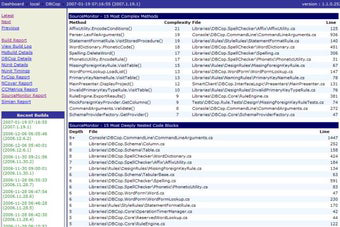
SourceMonitor features a clean, minimalistic interface focused on functionality rather than visual flair. The layout prioritizes clarity, with a central pane displaying analysis results and side panels for file selection and configuration options. Navigation is straightforward, relying on a menu-driven approach and file browsing, which ensures accessibility for users with varying levels of technical experience.
Although the developer did not list formal performance metrics, the tool is designed to handle large codebases efficiently, suggesting optimized parsing algorithms and low memory overhead. The responsiveness of the interface remains consistent across different device categories, including desktop systems with varying processing power and RAM configurations. Stability is maintained during extended analysis sessions, with no reported crashes or data loss during typical usage.
Users can expect smooth transitions between analysis phases, including file loading, parsing, and result rendering. The lack of real-time updates or interactive visualizations may limit immediate feedback, but this trade-off ensures predictable performance and reliable results. Overall, the user experience is tailored to developers who value accuracy and consistency over flashy design elements.
Platform Compatibility & Technical Requirements
SourceMonitor is available for Windows operating systems. The specific version and minimum OS requirements were not listed by the developer. The file size of the application is approximately 1.2 MB, indicating a lightweight footprint suitable for installation on both modern and legacy systems.
Compatibility information was not fully disclosed, but the tool is designed to run on standard Windows environments without requiring additional runtime libraries or frameworks. Users are advised to ensure their system meets general Windows compatibility standards for executable applications. The developer did not specify whether the tool supports newer Windows versions beyond the initial release, so users should verify functionality on their target platforms.
Pros and Cons
Pros
- Supports multiple programming languages in a single tool, improving workflow consistency.
- Enables historical tracking of code metrics for long-term quality monitoring.
- Offers visual representations like Kiviat diagrams for intuitive metric interpretation.
- Provides command-line functionality for automation in CI/CD and batch workflows.
- Exports data in widely supported formats for integration with external tools.
Cons
- Platform availability is limited to Windows; no information on iOS or Android support.
- Interface design is minimalistic, which may feel outdated to some users.
- Specific technical requirements and OS compatibility details were not provided.
- Limited to desktop environments; no mobile or web-based access.
- Does not include real-time analysis or interactive feedback during code editing.
FAQ
Is SourceMonitor available for Android or iOS?
The developer did not specify support for mobile platforms. The tool is designed for Windows desktop environments.
Can I use SourceMonitor in automated build processes?
Yes, SourceMonitor supports command-line operation, making it suitable for integration into batch files, scripts, and continuous integration workflows.
What file formats can I export results to?
Results can be exported in XML and comma-separated text (CSV) formats for use in external tools like Excel or database systems.
Does SourceMonitor require installation?
SourceMonitor is distributed as a standalone executable. It can be run directly without installation, though it may require write access to the local directory.
Is SourceMonitor free to download and use?
Yes, SourceMonitor is available for free. No licensing fees are required for personal or commercial use.
Final Thoughts
SourceMonitor stands out as a focused, reliable tool for developers committed to code quality and maintainability. Its ability to analyze multiple languages, track metrics over time, and integrate into automated workflows makes it a valuable asset in both individual and team-based development environments. While its interface may appear dated and its platform support is limited to Windows, its core functionality remains robust and purpose-built.
For software engineers, technical leads, and development teams aiming to adopt data-driven code improvement practices, SourceMonitor offers a lightweight yet powerful solution. The tool’s emphasis on consistency, accuracy, and automation aligns well with modern development standards. Its free availability and minimal system requirements further enhance its accessibility.
Download SourceMonitor now


