
Download Spanning Sync – free Google Calendar & iCal sync tool
Overview
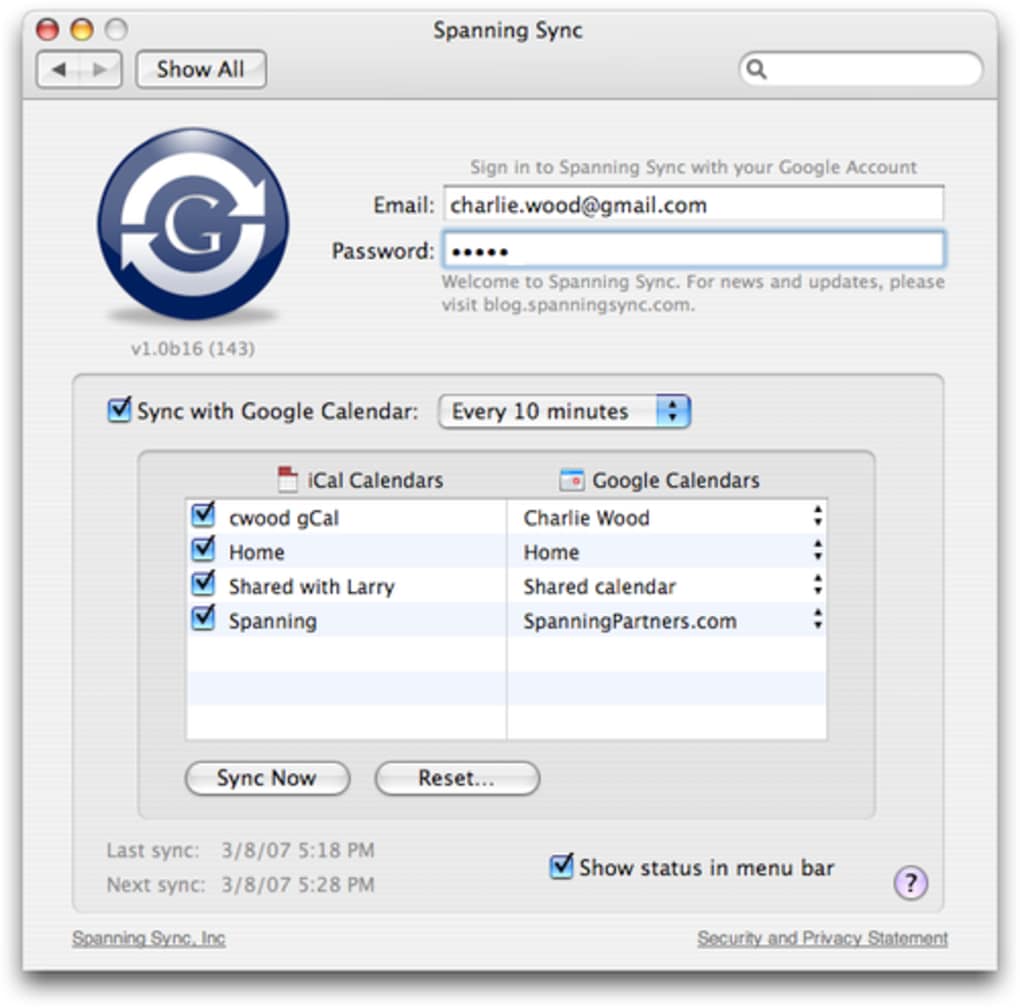
In today’s hyper‑connected world, juggling multiple calendars and contact lists can quickly become a nightmare. Whether you rely on Google Calendar for its web‑centric collaboration features or on Apple’s iCal for deep macOS integration, keeping the two in perfect harmony is essential for staying organized. Spanning Sync steps in as a lightweight, Mac‑only utility that bridges the gap between Google Calendar and iCal, allowing you to merge, replace, or selectively sync events and contacts with just a few clicks. The app lives inside your System Preferences pane, which means you never have to hunt for a separate window or launch a background daemon manually. After a quick sign‑in with your Google credentials, you can choose which calendars or contact groups to sync, decide whether to merge duplicate entries or overwrite one source entirely, and even control how deleted items are handled. Recent updates have added better error handling for invalid URLs, smoother background notifications, and extended support for contact properties like “department.” While it doesn’t yet de‑duplicate identical contacts automatically, Spanning Sync still offers a remarkably straightforward solution for anyone who needs a reliable, secure way to keep Google and iCal data in lockstep.
Key Features
- Two‑Way Calendar Sync: Changes made in Google Calendar instantly appear in iCal and vice‑versa.
- Selective Calendar Merging: Choose specific calendars or groups to merge, replace, or keep separate.
- Contact Synchronization: Sync Google contacts with iCal address book, including custom fields like “department.”
- Granular Conflict Resolution: Decide whether duplicates are merged or one source overwrites the other.
- Background Notifier: Automatic update alerts without opening the preferences pane.
- Delete Protection: Optional filtering of old events prevents accidental loss during sync.
- Enhanced Error Handling: Invalid URLs no longer abort the entire sync process.
- Secure Authentication: Uses OAuth for Google login, ensuring passwords are never stored locally.
- Free Pricing Model: Fully functional core features are offered at no cost.
- Regular Updates: Continuous improvements such as fixing “attempt to insert nil” crashes and background notifier relaunch issues.
Installation, Setup & Compatibility
Getting Spanning Sync up and running is intentionally designed to be as painless as possible. Follow these steps to ensure a smooth installation on your Mac:
- Download the Installer: Visit the official Spanning Sync website and click the Download for macOS button. The file is a standard
.dmgpackage, signed by the developer for added security. - Mount the Disk Image: Double‑click the downloaded
.dmgto mount it. A new window will appear showing the application icon and a shortcut to yourApplicationsfolder. - Copy to Applications: Drag the Spanning Sync icon into the
Applicationsfolder. macOS may prompt you to confirm the action; click Open when asked. - Launch & Grant Permissions: Open Spanning Sync from the
Applicationsfolder. The first launch triggers a system dialog requesting access to your Calendar and Contacts. Approve both, as they are essential for synchronization. - Sign In with Google: A login window appears; use your Google credentials. The app uses OAuth, so your password never touches the local machine.
- Choose What to Sync: Within the preferences pane, switch between the “Calendars” and “Contacts” tabs. Check the boxes next to the specific calendars or contact groups you want to keep in sync. You can also enable “Merge” or “Replace” mode for each selection.
- Configure Advanced Options (Optional): Under “Advanced,” you can enable delete protection, turn off syncing of the calendar “classification” property, and set the frequency of background sync checks.
- Save & Let It Run: Click Apply. Spanning Sync now runs silently in the background, updating both services whenever a change is detected.
Compatibility: Spanning Sync is built exclusively for macOS 10.13 (High Sierra) and later. It integrates directly with the native Calendar and Contacts frameworks, ensuring optimal performance on Intel‑based Macs as well as Apple Silicon (M1/M2) devices. While the app does not have Windows, Android, or iOS versions, its focus on macOS allows it to leverage system‑level APIs for a smoother, more secure experience compared to cross‑platform alternatives.
Pros, Cons, FAQ & Final Verdict
Pros
- Free, no hidden fees or subscription required.
- Simple installation via System Preferences, no extra daemon management.
- Two‑way sync keeps both Google and iCal up‑to‑date automatically.
- Selective merging gives granular control over which calendars or contacts are combined.
- Secure OAuth authentication protects your Google credentials.
- Regular bug‑fix releases improve stability and add useful features.
Cons
- Only available for macOS; Windows and mobile users are left out.
- Duplicate contacts are not automatically de‑duplicated, which can lead to clutter.
- Advanced conflict‑resolution options are limited to “merge” or “replace.”
- No native support for syncing multiple Google accounts simultaneously.
Frequently Asked Questions
Is Spanning Sync really free?
Yes, the core functionality—including calendar and contact sync—is completely free. There are no hidden subscription fees or trial periods.
Can I sync more than one Google account?
At this time Spanning Sync supports only a single Google account per installation. You would need to switch accounts manually if you require multiple accounts.
What happens to events that I delete in Google Calendar?
If you enable “Delete protection” in the advanced settings, Spanning Sync will keep a copy of the deleted event in iCal for a configurable period, preventing accidental loss.
Does the app store my Google password?
No. Authentication is handled through Google’s OAuth 2.0 protocol, meaning your password never touches your Mac. Only a secure token is stored.
Will Spanning Sync work on Apple Silicon Macs?
Absolutely. The app runs natively on both Intel and Apple Silicon (M1/M2) Macs, providing the same performance and stability across architectures.
Final Verdict
For macOS users who rely on both Google Calendar and Apple’s iCal, Spanning Sync delivers a no‑frills, secure, and free solution that eliminates the manual copy‑paste routine that many of us dread. Its integration into System Preferences makes it feel like a native part of macOS, and the selective merging options give you enough flexibility to keep your calendars tidy without sacrificing control. While the lack of Windows or mobile support and the need for manual de‑duplication of contacts may be deal‑breakers for some, the overall value proposition remains strong for the target audience. If you’re looking for a lightweight tool to keep your schedule and contacts synchronized across Google and iCal, download Spanning Sync today and experience a smoother, more unified calendar workflow.








