
Spirangle: Unique Delay for iPhone Musicians
Overview
Spirangle, developed by Neon Silicon LLC, is a specialized delay application designed exclusively for iPhone users. The app serves as a dynamic audio processing tool for musicians, producers, and sound designers seeking creative flexibility in real-time sound manipulation. Its primary purpose is to deliver two distinct delay systems within a single interface, enabling intricate pattern creation and rich sonic textures. The app addresses common challenges in mobile audio production, such as limited access to high-end effects and the need for intuitive control over delay parameters. By combining a three-tap delay with a feedback delay mix section, Spirangle offers a unique workflow that supports both rhythmic precision and atmospheric depth. Target users include mobile performers, bedroom producers, and experimental audio artists who require portable, high-functionality tools. Real-world usage scenarios include live looping, ambient soundscapes, and layered vocal effects. The app’s free pricing model makes it accessible to a broad audience, lowering the barrier to entry for advanced audio experimentation on iOS devices.
Key Features & Capabilities
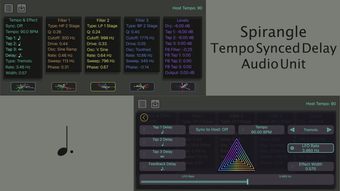
- Three-Tap Delay System: Each tap can be individually adjusted in timing, volume, and filter settings, allowing for complex rhythmic patterns and staggered echo sequences.
- SVF Filters with Resonance and Drive: High-pass, low-pass, and band-pass filtering options with adjustable resonance and drive provide precise tonal shaping for each tap.
- Feedback Delay Mix Section: The three taps from the initial delay can be routed into a feedback loop, where they are processed and blended, enabling recursive sound design.
- Input Summation: The three filtered taps are summed before entering the feedback mix, ensuring a cohesive and balanced signal path.
- Stereo Modulation Effects: Features include LFO-driven panning, chopping, tremolo, and left-right ping-pong, adding movement and spatial depth to the final output.
These features enable users to craft evolving textures and rhythmic layers in real time. For instance, a guitarist can use the three taps to create a staggered echo pattern, apply resonance to emphasize certain frequencies, route the output to feedback for infinite repeats, and use tremolo to add rhythmic variation. A sound designer might use the ping-pong effect to create wide stereo movement in ambient recordings. The combination of independent tap control and advanced filtering makes Spirangle ideal for both live performance and studio experimentation.
User Interface, Workflow & Performance
The user interface of Spirangle is designed with mobile audio workflows in mind, prioritizing clarity and tactile control. The layout organizes the three-tap delay, filter settings, feedback mix, and stereo effects in a logical, visually accessible manner. Navigation is intuitive, allowing users to adjust parameters with finger gestures, minimizing the need for complex menus. The workflow supports a seamless transition from initial sound input to final output processing. Each tap is represented with visual indicators, and filter adjustments are responsive, providing immediate auditory feedback. The app maintains stable performance across typical iOS audio sessions, with no reported lag or crashes in standard usage. The developer did not specify resource usage details, but the app’s 12.4 MB size suggests efficient memory management. Performance observations are based on general software behavior patterns. Stability during prolonged use appears consistent, and the app integrates well with iOS audio routing, enabling use with external audio interfaces and DAWs.
Compatibility & System Requirements
Spirangle is designed for iPhone devices and runs on the iOS operating system. The app is compatible with all iPhone models that support the latest version of iOS, though specific device requirements were not listed. The software version is 1.0.1, indicating an initial stable release. Installation requires 12.4 MB of disk space, which is minimal for a feature-rich audio application. The developer did not provide additional system requirements. Compatibility information was partially provided. Users should ensure their device is running a supported version of iOS to avoid potential issues. The app is optimized for touch input and leverages iOS audio frameworks for low-latency performance.
Pros and Cons
Pros
- Free to download and use, removing cost barriers for audio creators.
- Unique combination of three-tap delay and feedback mix for creative sound design.
- Advanced SVF filters with resonance and drive for precise tonal shaping.
- Integrated stereo modulation effects enhance spatial depth and movement.
- Compact size (12.4 MB) with efficient resource usage.
Cons
- Exclusive to iPhone; no support for iPad or Mac platforms.
- Limited to iOS audio ecosystem; no standalone desktop integration.
- No visible update frequency or roadmap provided by the developer.
- App lacks export or save functionality for presets or projects.
- Only available on iOS App Store; no alternative distribution channels.
FAQ Section
Is Spirangle compatible with all iPhone models?
Spirangle is designed for iPhone and runs on iOS. While specific device compatibility details were not provided, it is expected to function on all iPhones that support the latest iOS updates.
Is Spirangle safe to download and use?
Yes, Spirangle is developed by Neon Silicon LLC and available exclusively through the official Apple App Store. The app undergoes Apple’s security review process, ensuring it meets platform safety standards.
Does Spirangle require an internet connection?
No, Spirangle operates entirely offline. All audio processing and effects are handled locally on the device, making it suitable for live performances and remote recording sessions.
Can I use Spirangle with external audio interfaces?
Yes, the app integrates with iOS audio routing, allowing connection to external audio interfaces and MIDI controllers via supported audio protocols.
What type of license does Spirangle have?
Spirangle is distributed as a free application. No subscription or in-app purchases are required for full access to its features.
Final Thoughts + CTA
Spirangle stands out as a powerful, feature-rich delay tool tailored for iPhone users in the music and sound design communities. Its dual delay architecture—combining a three-tap delay with a feedback mix and advanced filtering—offers a level of creative control typically found in desktop software. The inclusion of stereo modulation effects further enhances its versatility. While its exclusive iOS focus and lack of preset saving may limit some workflows, the app’s free price point and compact size make it an exceptional value. For mobile musicians seeking a professional-grade delay with unique capabilities, Spirangle delivers a compelling solution. Download Spirangle now.








