
Download SpotAI – AI‑Powered Video Monitoring, Real‑Time Alerts, Secure Cloud Dashboard
SpotAI Overview – Transforming Video Surveillance with Intelligent Automation
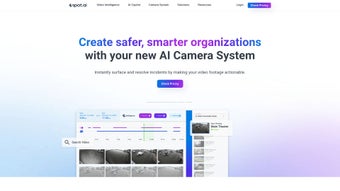
SpotAI is an advanced AI video monitoring solution that redefines how organizations watch, analyze, and act on video footage. Built as a subscription‑based web application, SpotAI combines the power of cloud and edge computing to deliver instant, actionable insights from any camera feed. Whether you’re protecting a manufacturing floor, managing a retail chain, or overseeing a large campus, SpotAI’s intuitive dashboard lets you locate relevant clips in seconds, resolve incidents faster, and improve overall safety. The platform works seamlessly with SpotAI’s own premium IP cameras—high‑resolution, NDAA‑compliant, and equipped with on‑edge AI processing—or with any existing camera infrastructure you already own. This flexibility eliminates costly hardware swaps while still providing 24/7 local storage and real‑time AI alerts. With a single, cloud‑based console, administrators can monitor multiple sites, automate video workflows, and generate training material that promotes a safer work environment. In short, SpotAI is the secure, scalable, and smart video tool that turns raw footage into a strategic asset for loss prevention, compliance, and operational excellence.
Key Features & Benefits of SpotAI
- Real‑Time AI Alerts: Instant notifications for abnormal motion, safety violations, or equipment misuse.
- Edge Processing: On‑camera AI analysis reduces bandwidth usage and speeds up incident detection.
- Unified Cloud Dashboard: Manage dozens of locations, assign user roles, and generate custom reports from any browser.
- 24/7 Local Storage: Redundant on‑edge recording guarantees footage is retained even during network outages.
- NDAA‑Compliant IP Cameras: High‑resolution, secure video streams meet government standards without premium price tags.
- Smart Search & Clip Retrieval: AI‑powered indexing lets users find relevant moments by object, activity, or time range within seconds.
- Automated Workflow Engine: Set rules to trigger actions—such as emailing a clip, opening a ticket, or locking down an area—without manual intervention.
- Scalable Subscription Model: Pay per camera or per site, with flexible plans that grow as your organization expands.
- Worker Safety & Training Modules: Convert incident footage into bite‑size training videos that reinforce best practices.
- Secure Cloud Architecture: End‑to‑end encryption, role‑based access, and regular security audits protect your data.
By leveraging these features, SpotAI helps businesses reduce shrinkage, improve compliance, and create a culture of safety. The AI engine continuously learns from new footage, meaning alerts become more accurate over time. Moreover, the platform’s modular design lets IT teams integrate SpotAI with existing VMS, access control, or ERP systems, ensuring a seamless flow of information across the enterprise.
Installation, Usage Instructions & Compatibility
Step‑by‑Step Setup
Getting SpotAI up and running is straightforward, even for teams with limited IT resources. First, sign up for a SpotAI subscription on the official website and create an administrator account. Once logged in, you’ll be guided to the “Add Camera” wizard. If you’re using SpotAI’s premium cameras, simply power them on, connect them to your network, and scan the QR code displayed on the device using the SpotAI dashboard. For legacy cameras, enter the RTSP stream URL and enable ONVIF support to allow SpotAI’s edge AI module to access the feed. After the cameras are registered, the system automatically provisions local storage on each device and begins streaming to the cloud dashboard.
The next step is to configure AI models. SpotAI ships with pre‑trained models for people detection, hard‑hat compliance, vehicle movement, and custom object recognition. Within the dashboard, select “AI Settings,” choose the models you need, and assign them to specific cameras or zones. You can also set sensitivity thresholds and define alert escalation rules (e.g., send an SMS to a supervisor after three consecutive safety violations). Once the models are active, SpotAI starts processing video at the edge, sending only relevant metadata to the cloud.
Daily Usage Workflow
Users access SpotAI through any modern web browser—Chrome, Edge, Firefox, or Safari—on Windows, macOS, Linux, or even mobile devices via responsive design. The dashboard’s home screen provides a live map of all locations, with color‑coded status indicators for camera health, storage usage, and recent alerts. Clicking on a camera opens a real‑time feed with an overlay showing AI detections (e.g., bounding boxes around workers not wearing PPE). The “Search” tab lets you query the entire video archive by keyword, time range, or detection type, instantly pulling the relevant clips.
For organizations that prefer a native app, SpotAI offers Android and iOS clients that push notifications directly to smartphones, enabling on‑the‑go incident response. All data transfers are encrypted with TLS 1.3, and the platform complies with GDPR, CCPA, and ISO 27001 standards, ensuring privacy and regulatory adherence.
Compatibility
SpotAI’s cloud dashboard is platform‑agnostic, while the edge AI module runs on SpotAI’s proprietary hardware (ARM‑based or Intel NUC) and supports any ONVIF‑compatible camera. This means you can integrate SpotAI with existing Windows‑based VMS, Linux servers, or third‑party cloud services through RESTful APIs. Mobile apps are available for Android 12+ and iOS 14+. The subscription portal works on all major browsers, making SpotAI a truly cross‑platform solution.
Pros, Cons & Frequently Asked Questions
Pros
- Highly accurate real‑time AI alerts reduce response time.
- Edge processing minimizes bandwidth and storage costs.
- Flexible integration with existing cameras and VMS.
- Scalable subscription model fits small teams to enterprise fleets.
- Comprehensive safety and training modules improve worker compliance.
Cons
- Initial learning curve for configuring custom AI models.
- Subscription pricing may be higher than basic NVR solutions for very small deployments.
- Requires stable internet for cloud dashboard access; offline mode limited to local storage.
Frequently Asked Questions
Can SpotAI work with my existing IP cameras?
Yes. SpotAI supports any ONVIF‑compatible camera that provides an RTSP stream. Simply add the camera’s stream URL in the dashboard, enable the desired AI models, and SpotAI will begin processing video at the edge.
Is there a free trial available?
SpotAI offers a 30‑day free trial with full feature access for up to five cameras. Sign up on the website, and you can cancel anytime before the trial ends.
How is video data secured?
All video streams are encrypted with TLS 1.3 during transmission, and stored footage is encrypted at rest using AES‑256. Access is controlled via role‑based permissions and two‑factor authentication.
What hardware is required for edge AI processing?
SpotAI’s premium cameras include built‑in AI chips, but you can also attach a compatible edge box (ARM‑based or Intel NUC) to any existing camera. The edge device handles AI inference locally and forwards only metadata to the cloud.
Can I integrate SpotAI alerts with my existing ticketing system?
Absolutely. SpotAI provides webhook support and a REST API that can push alerts directly to platforms like ServiceNow, Jira, or custom ticketing solutions, enabling automated incident workflows.
Conclusion – Is SpotAI the Right Choice for Your Organization?
SpotAI delivers a powerful combination of AI‑driven video analytics, edge processing, and a cloud‑first management console that addresses the most common pain points of modern surveillance—high bandwidth costs, delayed incident response, and fragmented camera ecosystems. Its ability to work with both SpotAI’s premium hardware and legacy cameras makes it a versatile investment for companies looking to future‑proof their security and safety programs. While the subscription model may be a consideration for very small operations, the ROI realized through loss prevention, compliance automation, and reduced manual review time often outweighs the ongoing cost.
If you’re ready to upgrade from a traditional NVR to an intelligent, scalable monitoring platform that actively protects your assets and workforce, download SpotAI today and start your free trial. Experience real‑time AI alerts, effortless multi‑site management, and a safer work environment—all from a single, secure dashboard.
Overall Rating: 4.7 / 5
Pros: Accurate AI, edge processing, flexible integration.
Cons: Learning curve, subscription cost for tiny deployments.



.png)




