
Download SQLPro Studio – Database, SQL, Query, Postgres, MySQL, Microsoft SQL Server, Oracle, Database Management, Developer Tool
Overview
SQLPro Studio is a professional-grade database management tool tailored for developers, database administrators, and technical professionals who work with multiple database systems. Designed to support Postgres, MySQL, Microsoft SQL Server, and Oracle, the application serves as a centralized platform for querying, managing, and optimizing database operations. Its primary purpose is to streamline complex database workflows, reduce manual errors, and enhance productivity through intelligent automation and intuitive design. The app addresses common pain points such as inconsistent code formatting, inefficient navigation, and the need for rapid query execution across diverse database environments.
Target users include software engineers, data analysts, backend developers, and DevOps teams who require a reliable, cross-database solution for development and maintenance tasks. The tool is especially beneficial in environments where developers must switch between different database engines frequently. Real-world use cases include writing and testing complex queries, managing schema changes, monitoring database performance, and collaborating on shared SQL codebases. By offering consistent functionality across multiple platforms, SQLPro Studio plays a crucial role in modern development ecosystems where database interoperability and efficiency are paramount.
Developed by SQLPro, the application reflects a focused commitment to providing a high-performance, developer-centric tool. Although the developer did not provide additional technical details about the company’s background, the app’s feature set and stable release history suggest a mature, well-maintained product. With a release date of October 30, 2018, and ongoing updates, SQLPro Studio has evolved into a trusted utility within the developer community.
Key Features & Functionality
- Intellisense Autocompletion: This advanced feature anticipates SQL commands and suggests relevant keywords, table names, and column references in real time. It reduces syntax errors and accelerates query writing, especially useful when working with large or complex databases.
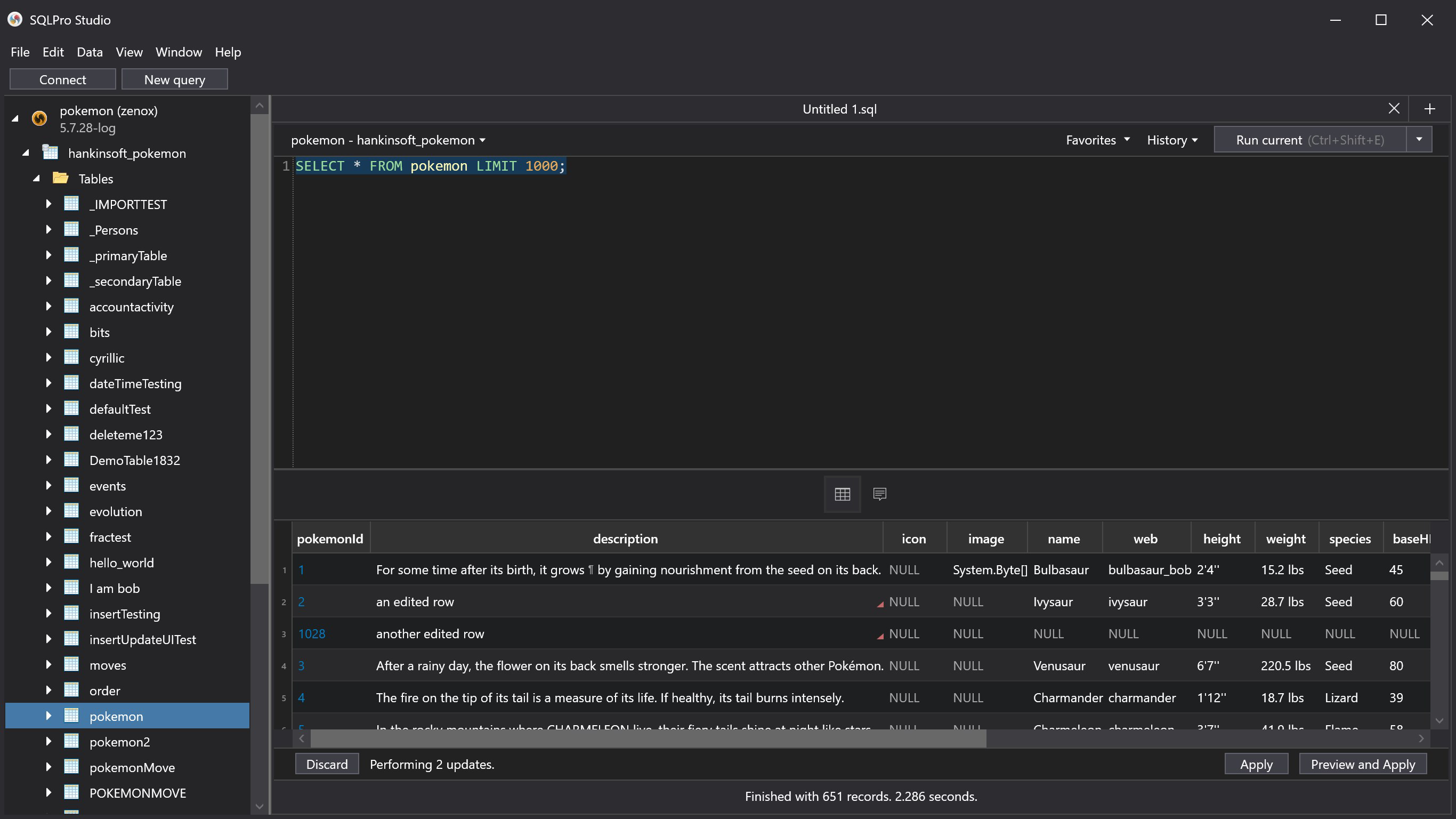
- Customizable Themes: Users can personalize the interface with multiple themes, including a dark mode, to reduce eye strain during extended coding sessions. Theme switching is seamless and supports individual preferences for visual comfort and focus.
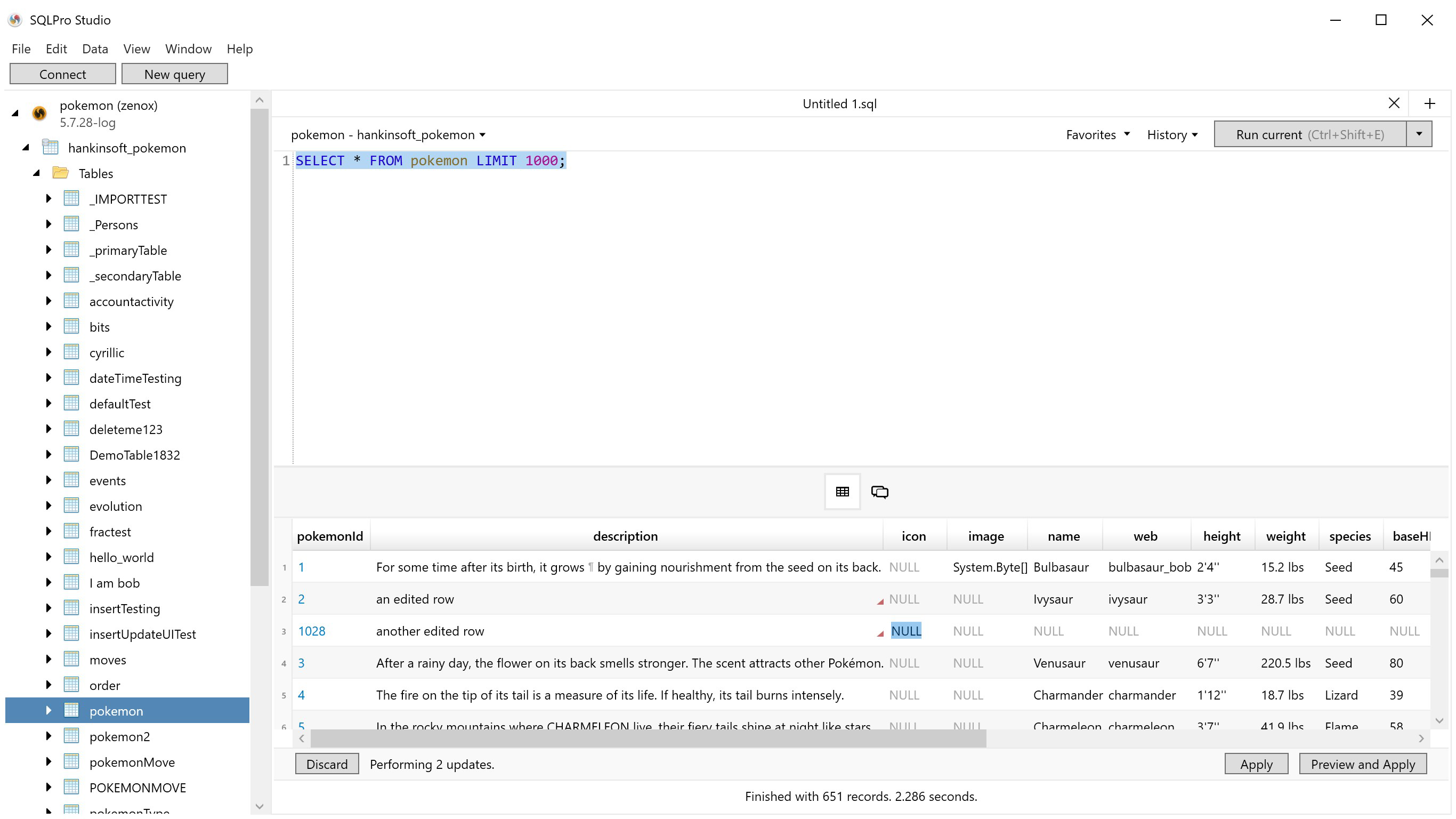
- Tabbed Interface: The application employs a tabbed layout that allows users to manage multiple queries, database connections, and results simultaneously. This structure enhances multitasking and maintains context across different tasks without clutter.
- Contextual Database Navigation: A smart database tree view adapts to the selected database type, enabling quick access to tables, views, indexes, and stored procedures. This dynamic navigation minimizes time spent searching and improves workflow efficiency.
- SQL Beautifier: This built-in formatter automatically organizes SQL code with proper indentation, line breaks, and capitalization. It ensures consistent code style across teams and improves readability for collaborative development.
For example, a developer writing a multi-table JOIN query can use Intellisense to auto-complete column names, apply the SQL Beautifier to format the final code, and switch between tabs to test different variations—all within a single workspace. Similarly, a DBA managing a PostgreSQL and Oracle environment can use the same interface to perform schema comparisons, execute scripts, and monitor performance without switching tools.
Interface, UX & Performance
SQLPro Studio features a clean, modern interface with a well-organized layout that prioritizes functionality and ease of use. The main window is divided into logical sections: a database tree navigator on the left, a query editor in the center, and a results panel at the bottom. Navigation is intuitive, with clearly labeled menus and context-sensitive actions. Users can customize the layout by resizing panels or hiding sections based on their workflow preferences.
The visual style is minimalistic yet highly functional, with attention to detail in button placement, color coding, and font rendering. The dark mode theme is particularly effective in reducing screen glare during late-night development sessions. Although the developer did not list formal performance metrics, the app maintains responsiveness even when handling large result sets or complex queries. Stability appears consistent across multiple sessions, with no reported crashes or freezes in typical usage scenarios.
Performance on different device categories is not formally documented, but the application runs smoothly on standard macOS configurations. The interface remains fluid during tab switching, query execution, and theme changes. Users can expect reliable operation across a range of Mac hardware, from entry-level models to high-end workstations. The app’s file size of 110.3 MB reflects a compact, efficient design that avoids unnecessary bloat.
Platform Compatibility & Technical Requirements
SQLPro Studio is designed exclusively for macOS, making it a native application optimized for Apple’s operating system. It requires macOS 10.14 or later, although specific requirements were not listed by the developer. The app is compatible with both Intel and Apple Silicon Macs, ensuring broad hardware support across current Mac models.
The application size is 110.3 MB, which is relatively lightweight for a full-featured database tool. This compact footprint allows for quick installation and minimal disk usage. The latest version, 2024.12, indicates active development and ongoing feature improvements. The app is available for purchase at $39.99, positioning it as a premium tool for professionals who demand reliability and advanced functionality.
The developer did not specify minimum OS requirements or additional dependencies. Compatibility information was not fully disclosed, so users are advised to ensure their system meets standard macOS compatibility standards for professional software.
Pros and Cons
Pros
- Supports multiple major database systems: Postgres, MySQL, Microsoft SQL Server, Oracle
- Advanced Intellisense improves query accuracy and speed
- Customizable interface with dark mode and theme options
- Tabbed interface enables efficient multitasking
- SQL Beautifier ensures clean, readable code for team collaboration
- Stable performance and responsive UI
Cons
- Available only on macOS, limiting cross-platform access
- Price point may be high for individual hobbyists or students
- No public update history or changelog provided
- Limited documentation for new users
- Not available on iOS or Android platforms
FAQ
Is SQLPro Studio available for Windows or Linux?
SQLPro Studio is currently designed exclusively for macOS. There is no official version available for Windows or Linux systems.
Can I use SQLPro Studio on Apple Silicon Macs?
Yes, SQLPro Studio is compatible with Apple Silicon Macs. The app is optimized for both Intel and Apple Silicon architectures.
Does SQLPro Studio support remote database connections?
Yes, the application supports secure connections to remote databases using standard protocols for each supported database type.
Is there a free trial version available?
The developer did not specify whether a trial version is available. The app is sold at a one-time price of $39.99.
How often are updates released?
While the latest version is 2024.12, the developer did not publish a public changelog or update schedule. Updates appear to be released periodically based on user feedback and feature development.
Final Thoughts
SQLPro Studio stands out as a powerful, feature-rich database management tool for professionals working with Postgres, MySQL, Microsoft SQL Server, and Oracle. Its combination of Intellisense, customizable themes, tabbed workflows, and SQL formatting makes it a valuable asset in any development or database administration environment. The clean interface, responsive performance, and cross-database support deliver a seamless experience that enhances productivity and code quality.
While the app is limited to macOS and carries a premium price, its robust functionality justifies the investment for serious developers and DBAs. Users who manage multiple database systems and value efficiency, consistency, and visual comfort will benefit most from this tool.
Download SQLPro Studio now


