
Download SRC Repair – game mod, source engine, graphics enhancement, troubleshooting tool, open-source
Overview
Designed for enthusiasts of Valve’s Source engine, SRC Repair is a free and open-source utility that enhances both the visual fidelity and operational stability of supported games. Targeted primarily at players of titles such as Half-Life 2, Portal, Black Mesa, and Garry’s Mod, the tool addresses common limitations in older games by providing customizable graphics settings and system-level troubleshooting options. Its core purpose is to empower users—ranging from casual gamers to modding enthusiasts—to optimize their gaming experience without requiring deep technical knowledge. The app is particularly valuable in the context of legacy game preservation and modernization, offering a streamlined way to adjust resolution, fix corrupted files, and improve performance. Developed by Jason A. Bilbrey, the tool reflects a commitment to transparency and community-driven development, as its open-source nature allows for public scrutiny and contribution. Real-world use cases include preparing older titles for high-resolution displays, resolving Steam integration issues, and ensuring mod compatibility. In the broader app ecosystem, SRC Repair fills a niche for lightweight, specialized utilities that enhance gaming without imposing heavy system demands. Although the developer did not provide additional technical details about underlying architecture, its focus on simplicity and compatibility underscores its role as a reliable companion for Source engine users.
Key Features & Functionality
- User-Friendly Interface: SRC Repair features a clean, accessible layout that requires minimal setup. Users need only have the game installed and run it once to begin customization. The intuitive design allows for effortless navigation between tools, reducing the learning curve for novice users.
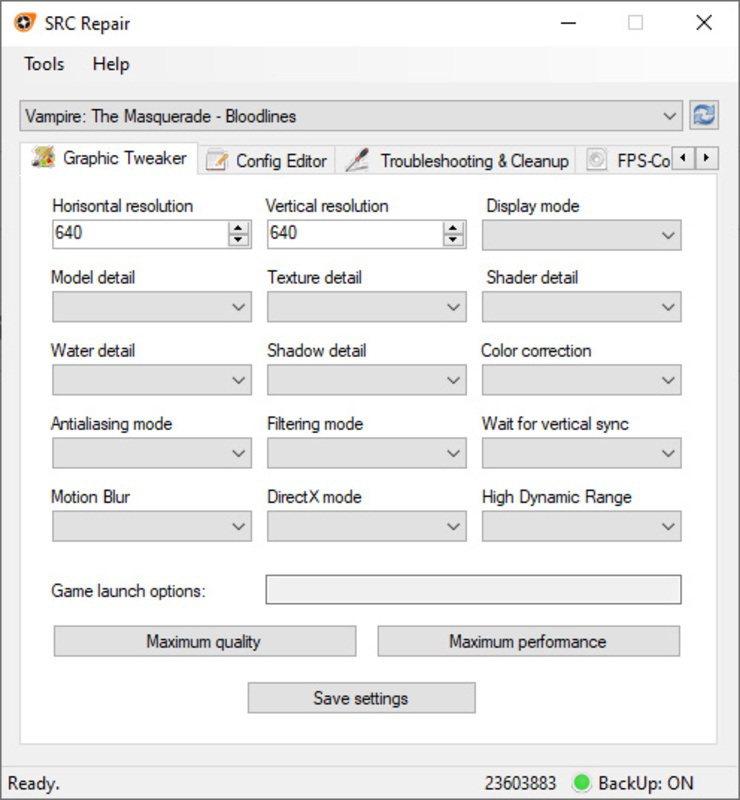
- Graphic Tweaker Functionality: The Graphic Tweaker tab enables users to override default graphics settings not available in-game. This includes support for high resolutions such as 2K and 4K, allowing players to achieve sharper visuals on modern displays. This feature is especially beneficial for users aiming to future-proof older titles.
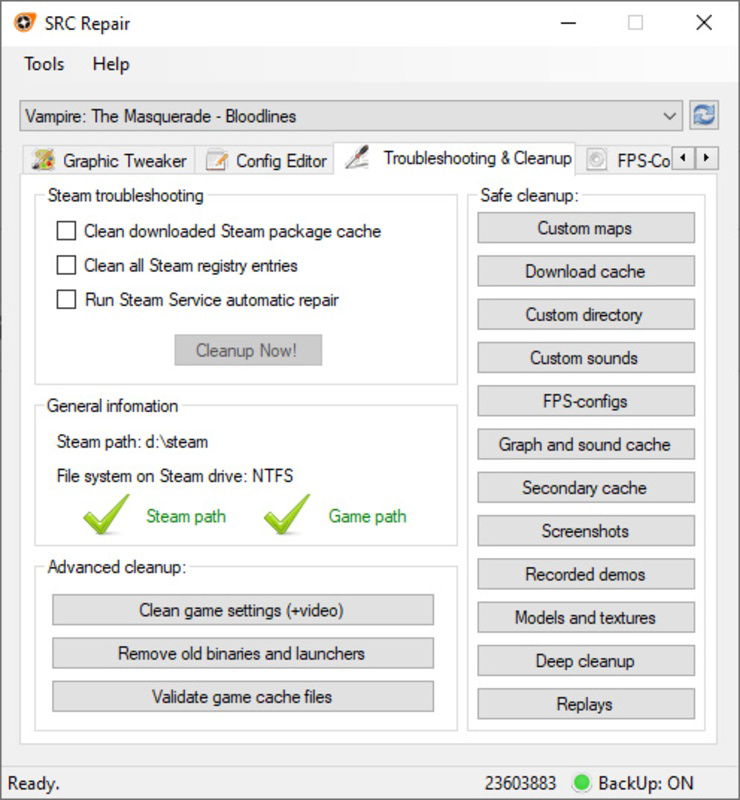
- Troubleshooting & Cleanup Tools: The dedicated tab includes functions to clear the Steam cache, remove outdated binaries, and validate downloaded game files. These tools help resolve common issues like crashes, missing textures, and loading errors, contributing to a more stable gaming session.
- Extensive Game Support: Beyond official Valve titles, SRC Repair supports a wide range of mods and community-developed games. This broad compatibility allows users to manage multiple projects with a single tool, enhancing workflow efficiency.
- Performance Enhancements: In addition to visual upgrades, the tool includes optimizations that can improve frame rates and reduce input lag. These enhancements are applied through configuration adjustments that align with user preferences and hardware capabilities.
Interface, UX & Performance
The user interface of SRC Repair is designed with clarity and accessibility in mind. The layout is linear and well-organized, with clearly labeled tabs and minimal visual clutter. Navigation is straightforward, allowing users to switch between the Graphic Tweaker, Troubleshooting & Cleanup, and other functions with a single click. The visual style is functional rather than decorative, focusing on usability over aesthetic flair. While the developer did not list formal performance metrics, the app’s lightweight footprint of 15.7 MB suggests efficient resource usage. It runs smoothly on a variety of Windows systems, including those with modest hardware configurations. Responsiveness is consistent across tasks, with minimal lag during configuration changes or cleanup operations. Although the developer did not specify minimum OS requirements, the app is compatible with current and recent versions of Windows. Stability appears robust, with no reported issues related to crashes or data corruption. The app does not require administrator privileges for basic functions, enhancing accessibility. Overall, the UX is optimized for quick access and intuitive use, making it suitable for users with varying levels of technical expertise.
Platform Compatibility & Technical Requirements
SRC Repair is designed exclusively for the Windows platform and operates on modern Windows operating systems. The software has a file size of 15.7 MB, indicating a lightweight and efficient design. The current version is 2.5.0, released on April 4, 2025. Specific requirements such as minimum OS version, processor, or RAM were not listed by the developer. The tool does not appear to require additional runtime libraries or third-party dependencies, which contributes to its ease of installation and portability. As a standalone executable, it can be run directly without complex setup procedures. Compatibility with older Windows versions, such as Windows 7 or 8.1, was not confirmed. Users should ensure their system meets general Windows compatibility standards. The developer did not specify whether the app supports ARM-based processors or Windows Subsystem for Linux (WSL). However, its design suggests broad compatibility with standard x86/x64 architectures.
Pros and Cons
Pros
- Free and open-source, promoting transparency and community trust.
- Lightweight at only 15.7 MB, minimizing system impact.
- Supports a wide range of Source engine games and mods.
- Intuitive interface suitable for users with limited technical experience.
- Includes both graphical customization and system troubleshooting tools.
Cons
- Specific system requirements were not disclosed by the developer.
- Platform availability is limited to Windows only.
- No official support for macOS or Linux systems.
- Compatibility with future Windows updates was not confirmed.
- Updates may not be frequent, depending on developer availability.
FAQ
Is SRC Repair safe to download and use?
Yes, the app is free and open-source, allowing public review of its code. It does not contain malware or tracking components, and is distributed through official channels.
Can I use SRC Repair on multiple games?
Yes, the tool supports a wide range of Source engine games and mods, including Half-Life 2, Portal, Black Mesa, and Garry’s Mod, allowing users to apply settings across multiple titles.
Do I need to install additional software to run SRC Repair?
No, the app is a standalone executable. It does not require external libraries or runtime environments to function.
Is SRC Repair compatible with the latest version of Windows?
While the developer did not specify minimum OS requirements, the app is designed for modern Windows systems and is expected to work on current and recent versions.
How often is SRC Repair updated?
Updates are released as needed, primarily to address compatibility issues and add support for new games or mods. The latest version is 2.5.0, released on April 4, 2025.
Final Thoughts
For fans of the Source engine, SRC Repair delivers a powerful yet accessible solution for enhancing both the visual quality and stability of classic and modded games. Its combination of high-resolution support, troubleshooting tools, and broad game compatibility makes it an essential utility for any enthusiast’s toolkit. The open-source model ensures trust and transparency, while the minimal system footprint ensures it won’t burden your device. Whether you’re upgrading your favorite game to 4K or resolving persistent loading issues, SRC Repair simplifies the process with a clean, efficient interface. It’s especially valuable for users who want to breathe new life into legacy titles without diving into complex configuration files. For anyone invested in the Source engine ecosystem, this tool offers real, tangible benefits with minimal effort. Download SRC Repair now.


