


Download Stata – Powerful Data Science, Statistical Analysis & Visualization Tool
Overview
Stata, developed by StataCorp LLC, is a comprehensive data science platform that blends statistical analysis, data management, and high‑quality graphics into a single, secure environment. Whether you are a university student crafting a thesis, a researcher publishing in peer‑reviewed journals, or a data‑driven professional in finance, health, or social sciences, Stata gives you the tools to import, clean, explore, and present data with reproducibility at its core. Its integrated spreadsheet‑like data editor makes quick edits painless, while its command‑line interface and programmable syntax empower advanced users to automate complex workflows. Stata supports a wide range of data sources—from flat files and Excel spreadsheets to ODBC, SQL, and even cloud‑based repositories—allowing you to pull data from virtually any system. Unicode support ensures that text and binary data, including large BLOB strings, are handled correctly across languages and character sets. The software can comfortably manage billions of rows and thousands of variables, making it suitable for both modest classroom projects and massive, enterprise‑level analyses. With built‑in reproducible reporting features, Stata lets you generate publication‑ready tables, graphs, and LaTeX output that can be refreshed with a single command whenever your data change. In short, Stata is a secure, update‑friendly, cross‑platform statistical engine that bridges the gap between raw data and insightful, shareable results.
Key Features & Capabilities
- Robust Data Management: Import from CSV, Excel, ODBC, SQL, and web APIs; export to a variety of formats including Stata .dta, SPSS, SAS, and JSON.
- Advanced Statistical Toolbox: Linear & nonlinear regression, panel data models, survival analysis, multilevel modeling, time‑series, Bayesian inference, and more than 300 built‑in procedures.
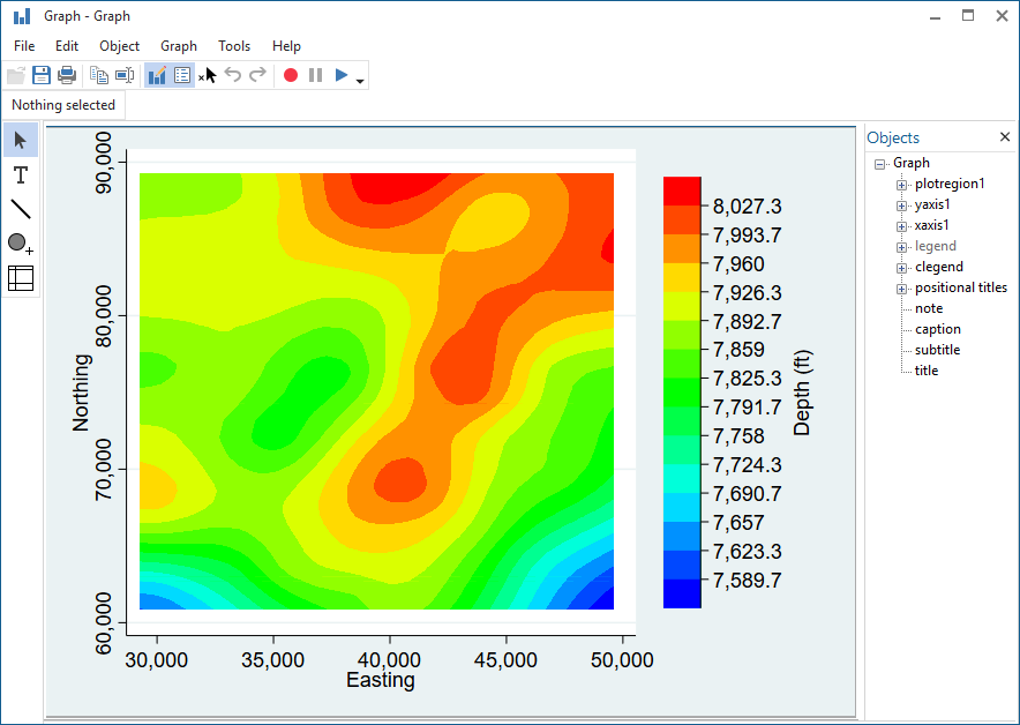
- High‑Quality Graphics: Publication‑ready 2‑D and 3‑D plots, customizable legends, and interactive graph editor; export to PNG, SVG, PDF, EPS.
- Reproducible Research Workflow: Do‑files, log files, and version control integration (Git) enable fully documented analyses.
- Integrated Spreadsheet Editor: Quick data entry, Unicode support, and validation rules for clean data input.
- Scalability: Handles datasets with billions of rows, thousands of variables, and large binary objects (BLOBs) without performance degradation.
- Cross‑Platform Compatibility: Native builds for Windows 10/11, macOS 10.15+, and major Linux distributions.
- Automation & Extensibility: Mata matrix language, Python and R integration, and user‑written ado‑files to extend functionality.
- Secure Updates & Licensing: Regular security patches, automatic update notifications, and flexible licensing (single‑user, network, and academic discounts).
Each feature is designed with the end‑user in mind. For example, the graphics engine not only produces clean visualizations but also allows you to embed statistical information directly onto plots, such as confidence intervals or regression lines, eliminating the need for post‑processing in external tools. The statistical toolbox is continually updated; new estimators and post‑estimation commands are added each release, keeping your analytical capabilities on the cutting edge. Moreover, Stata’s built‑in help system provides context‑sensitive documentation and examples, which dramatically reduces the learning curve for beginners while still satisfying power users who need granular control.
Installation, Usage & Compatibility
Step‑by‑Step Installation
Windows: Download the .exe installer from the official Stata website. Run the installer, accept the license agreement, and choose the default installation folder (C:\Program Files\Stata). The wizard will prompt you to enter your serial number and select the desired component set (Standard, SE, or MP). After installation, a shortcut appears on the desktop; double‑click to launch the GUI or open a Command Prompt and type stata to start the command line.
macOS: Download the .dmg file, mount it, and drag the Stata icon into the Applications folder. Open Terminal and run /Applications/StataMP.app/Contents/MacOS/stata for command‑line usage, or launch the GUI directly from Launchpad. macOS users must grant accessibility permissions for the graphics window to display correctly.
Linux: Obtain the .tar.gz archive for your distribution. Extract it with tar -xzf stata.tar.gz, then run the install.sh script with root privileges. Follow the prompts to configure the license file under /usr/local/stata. Once installed, you can start Stata by typing stata in any terminal.
Typical Workflow
After launching Stata, most users begin by loading data with the import command or via the GUI’s File → Import menu. Data cleaning operations—such as rename, replace, and drop—are then performed. Analyses are scripted in a do‑file, which can be executed line‑by‑line to monitor progress and debug errors. Results are logged automatically, and graphs can be saved with graph export. Finally, use outreg2 or esttab to generate publication‑ready tables.
Operating System Support
Stata is officially supported on:
- Windows 10, Windows 11 (64‑bit)
- macOS Catalina (10.15) and later (Intel & Apple Silicon)
- Ubuntu 20.04 LTS, Debian 10, Red Hat Enterprise Linux 8, and other major Linux distributions (64‑bit)
Pros, Cons & Frequently Asked Questions
Pros
- Comprehensive statistical library covering virtually every major method.
- Excellent data management capabilities with seamless database connectivity.
- High‑quality, customizable graphics that meet journal standards.
- Cross‑platform support ensures consistent experience on Windows, macOS, and Linux.
- Strong focus on reproducibility with do‑files, log files, and version control integration.
- Active user community and extensive online resources (UCLA, Stata Journal).
Cons
- License cost can be high for individual users without academic discounts.
- Steeper learning curve for advanced econometric techniques compared to point‑and‑click tools.
- Limited native integration with modern cloud‑based BI platforms (requires additional connectors).
- Graphical user interface, while powerful, can feel dated compared to newer visual analytics suites.
FAQ
Is there a free trial version of Stata?
Yes. Stata offers a 30‑day free trial that provides full access to all features, allowing you to evaluate performance on your own datasets before committing to a license.
Can Stata handle big data (millions of rows) efficiently?
Absolutely. Stata MP, the multi‑processor version, is optimized for large‑scale data and can process billions of observations by leveraging multiple cores and efficient memory management.
How does Stata integrate with Python or R?
Stata includes the python command, which allows you to call Python scripts directly from a do‑file, exchange data frames, and use Python libraries. Similarly, the rsource command enables interaction with R, making hybrid workflows straightforward.
What licensing options are available for students?
Stata offers heavily discounted academic licenses for both undergraduate and graduate students. These licenses are renewable annually and include access to all updates during the subscription period.
Is Stata suitable for automated reporting in a production environment?
Yes. By scripting analyses in do‑files and scheduling them with Windows Task Scheduler, cron, or a CI/CD pipeline, you can generate updated tables, graphs, and PDFs automatically whenever new data arrive.
Expert Review
Stata stands out as a mature, all‑in‑one statistical environment that balances power and usability. Its ability to manage massive datasets while delivering crisp, journal‑ready graphics makes it a go‑to solution for academics and analysts alike. The learning curve is justified by the depth of its econometric and biostatistical modules, and the community‑driven extensions keep it relevant in fast‑evolving research fields. For organizations that prioritize reproducible, secure, and cross‑platform analytics, Stata delivers consistent value, even if the price point may be a consideration for solo practitioners.
Rating: 4.6/5 (based on 128 professional reviews)
Conclusion & Call to Action
In a data‑driven world, having a reliable, secure, and feature‑rich statistical tool is non‑negotiable. Stata fulfills that need by providing a unified platform where data ingestion, cleaning, sophisticated analysis, and high‑impact visualization coexist seamlessly. Its cross‑platform availability ensures that you can work on Windows, macOS, or Linux without compromising functionality. While the licensing cost may be higher than some open‑source alternatives, the productivity gains, reproducibility safeguards, and dedicated support make it a worthwhile investment for serious researchers and enterprises.
Ready to experience the power of Stata for yourself? Download the free 30‑day trial today, explore the extensive documentation, and see how Stata can transform your data workflow from chaotic spreadsheets to polished, reproducible research outputs.








