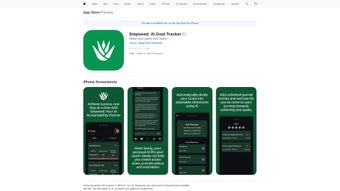

Download Stepseed – AI Goal Tracker, Personal Productivity App
Introduction & Overview
Stepseed is a web‑based AI goal‑tracking platform that transforms vague aspirations into clear, achievable milestones. Powered by an intelligent assistant named Seedy, the service offers a seamless blend of motivation, planning, and analytics—all wrapped in a sleek, ad‑free interface. Whether you’re aiming to launch a new product, adopt a healthier lifestyle, or master a new skill, Stepseed guides you through each stage of the journey, turning long‑term objectives into bite‑size actions you can execute daily. The application’s core philosophy is personal accountability: it encourages you to reflect on progress, celebrate wins, and adjust strategies in real time. By integrating a personal journal, curated growth content, and real‑time notifications, Stepseed eliminates the overwhelm that often accompanies self‑improvement projects. The result is a focused, data‑driven experience that keeps you accountable without the distractions of ads or unnecessary clutter. In an era where productivity tools are abundant yet fragmented, Stepseed stands out by combining AI‑generated planning, habit‑forming reminders, and insightful analytics into a single, user‑friendly web app.
Key Features & How Seedy Helps You Succeed
- AI‑Driven Goal Breakdown: Seedy analyzes your high‑level objectives and automatically creates realistic, time‑bound milestones.
- Personal Journal: A built‑in journaling space lets you capture reflections, track emotions, and document achievements.
- Curated Growth Content: Hand‑picked articles, videos, and podcasts appear based on your goals, feeding you relevant knowledge.
- Daily Reminders & Notifications: Customizable alerts keep you on track without feeling nagged.
- Progress Analytics Dashboard: Visual charts and heat maps reveal trends, highlight bottlenecks, and celebrate consistency.
- Motivational Coaching: Seedy offers supportive messages, celebrates milestones, and suggests adjustments when you stall.
- Ad‑Free Experience: All features are delivered without intrusive advertisements, preserving focus.
- Cross‑Device Sync: Because Stepseed is web‑based, your data updates instantly on any browser, from desktop to mobile.
- Secure Data Handling: End‑to‑end encryption protects your journal entries and goal data.
- Free Tier with Optional Premium Add‑Ons: Core tracking is free; advanced analytics and premium content are available via subscription.
Each feature works together to create a feedback loop that nudges you toward success. For instance, when you log a completed milestone, Seedy instantly updates the analytics dashboard, displays a celebratory message, and recommends the next logical step. This dynamic interaction reduces decision fatigue and reinforces positive habits. Moreover, the personal journal doubles as a reflective tool, helping you identify patterns that either accelerate or impede progress. The curated content library ensures you’re never stuck searching for resources—Seedy surfaces the most relevant material based on your current objectives, saving you time and keeping learning aligned with action. Altogether, these capabilities make Stepseed more than a static checklist; it becomes a living, adaptive partner in your personal growth journey.
Getting Started – Installation, Usage & Compatibility
Stepseed is a cloud‑native application, which means there’s no traditional download or installation process on your computer. To begin, simply visit stepseed.com, click “Sign Up,” and create a free account using your email address or a social login (Google or Apple). After confirming your email, you’ll be taken to the onboarding wizard where Seedy asks a few quick questions about your primary goals, preferred timeframes, and notification preferences. Within minutes, Seedy generates a personalized goal map and suggests the first set of milestones.
Because Stepseed runs entirely in the browser, it is compatible with all modern operating systems—including Windows 10/11, macOS Ventura and later, Linux distributions, as well as mobile platforms such as Android 8+ and iOS 13+. The only requirement is an up‑to‑date browser (Chrome, Firefox, Safari, or Edge) that supports JavaScript and local storage. For users who prefer a native feel, Stepseed also offers progressive web app (PWA) support: simply tap “Add to Home Screen” on your mobile device, and the app will behave like a regular iOS or Android app, complete with offline caching for journal entries.
Once logged in, the main dashboard displays three primary panels: Goals Overview, Today's Tasks, and Analytics Snapshot. From the Goals Overview you can add new objectives, edit existing milestones, or archive completed goals. The Today’s Tasks panel shows actionable items generated by Seedy for the current day, each with a checkbox that updates your progress in real time. The Analytics Snapshot provides quick visual feedback—completion percentages, streak counts, and time‑spent graphs—allowing you to see the impact of your efforts at a glance.
Customization is straightforward. Click the gear icon in the top‑right corner to adjust notification timing, switch between light and dark themes, or enable two‑factor authentication for added security. If you decide to upgrade to the premium plan, the same settings page lets you enter payment details and instantly unlock advanced analytics, exclusive content bundles, and priority support. Overall, the onboarding flow is designed to be frictionless, so you spend more time acting on goals and less time learning how to use the tool.
Pros & Cons, FAQ, and Final Verdict
Pros
- AI‑generated, actionable milestones reduce planning overhead.
- Integrated journal encourages reflection and habit formation.
- Real‑time analytics give clear insight into progress trends.
- Ad‑free, secure, and accessible from any device with a browser.
- Free core features make it suitable for students and casual users.
Cons
- Advanced analytics and premium content require a subscription.
- No dedicated desktop client (relies on browser performance).
- Customization of AI suggestions is limited to preset preferences.
Frequently Asked Questions
Is Stepseed completely free to use?
The core goal‑tracking, journal, and basic analytics are free forever. Premium features such as deep‑dive analytics, exclusive growth content, and priority support are available via a monthly or annual subscription.
Can I export my data?
Yes. Stepseed provides CSV and PDF export options for both your goal milestones and journal entries, accessible from the Settings → Data Export section.
How does Seedy generate personalized milestones?
Seedy uses a proprietary natural‑language processing model that interprets the language of your goal, assesses typical timeframes for similar objectives, and then creates a step‑by‑step roadmap optimized for your selected deadline and effort level.
Is my journal data private?
All journal entries are encrypted in transit and at rest. Stepseed does not sell or share personal data with third parties, and you can enable two‑factor authentication for added protection.
Do I need an internet connection to use Stepseed?
A connection is required for initial login and synchronization. However, the PWA mode caches recent journal entries and milestone data, allowing you to view and edit them offline. Changes sync automatically once you reconnect.
Final Verdict & Call to Action
Stepseed delivers a compelling blend of AI‑powered planning, reflective journaling, and data‑driven insights—all within an intuitive, ad‑free web environment. Its free tier is generous enough for most personal development needs, while the optional premium plan adds depth for power users. The primary drawback is the lack of a native desktop client, but the robust PWA experience mitigates this for most workflows. If you’ve struggled with turning big dreams into daily actions, Stepseed offers a structured, supportive partner that keeps you accountable without overwhelming you with complexity.
Ready to start achieving your goals with the help of Seedy? Create your free Stepseed account today and experience AI‑guided productivity like never before.



.png)




