
Screenshots
App details
- Updated
- Aug 27, 2008
- Language
- Spanish,English
- Category
- Mobile
About Stinki
Download Stinki – Home Delivery Management, Order Tracking, Client Contact, Product Categorization
Overview
Stinki is a mobile application designed to support users in managing home delivery operations with a focus on efficiency and organization. Its primary purpose is to simplify the coordination of client contacts, product orders, and inventory tracking for individuals or small teams involved in home-based delivery services. By centralizing key operational elements, Stinki helps reduce manual errors and streamline daily workflows.
The app targets small business owners, independent vendors, and home-based delivery providers who rely on consistent client communication and accurate order fulfillment. It is particularly useful for those managing recurring deliveries, such as food, groceries, or household goods, where timely and precise order processing is essential. While the developer did not provide additional background information, the app’s functionality suggests a practical, no-frills approach tailored to real-world delivery needs.
Real-world use cases include tracking repeat orders from regular customers, monitoring product availability to avoid fulfillment delays, and organizing client data for faster service. In the broader app ecosystem, Stinki fills a niche for lightweight, task-specific tools that prioritize usability over complex features. Despite its long-standing presence since 2008, the app remains relevant for users seeking a straightforward solution to manage delivery logistics without the overhead of enterprise-level software.
Key Features & Functionality
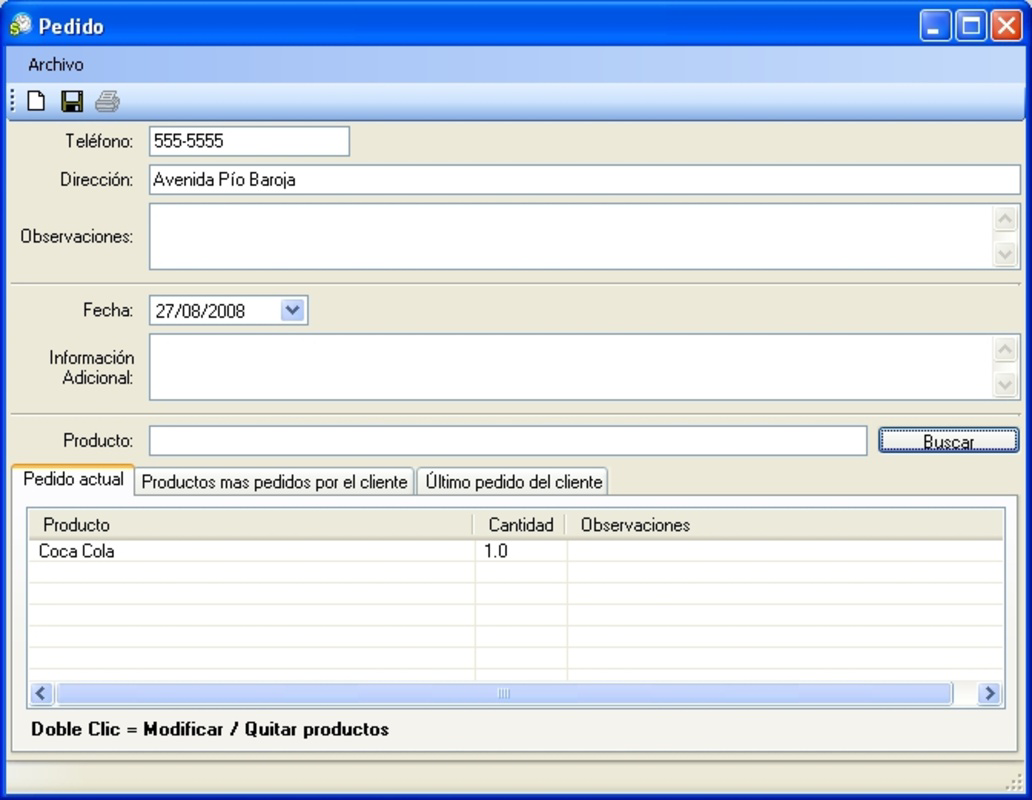
- Client Contact Management: Users can input and store client contact details, enabling quick access during order processing. This feature supports faster communication and reduces the risk of misdirected messages or missed deliveries.
- Product Categorization: Products are grouped into logical categories, allowing users to locate items quickly. This structured layout improves efficiency during order selection and minimizes confusion during high-volume periods.
- Stock Status Tracking: Each product displays its current availability status—active or inactive—providing real-time visibility into inventory levels. This prevents the accidental inclusion of out-of-stock items in orders.
- Order History Records: The app maintains a history of each client’s most frequently ordered products and their last order date. This insight helps anticipate customer needs and personalize service over time.
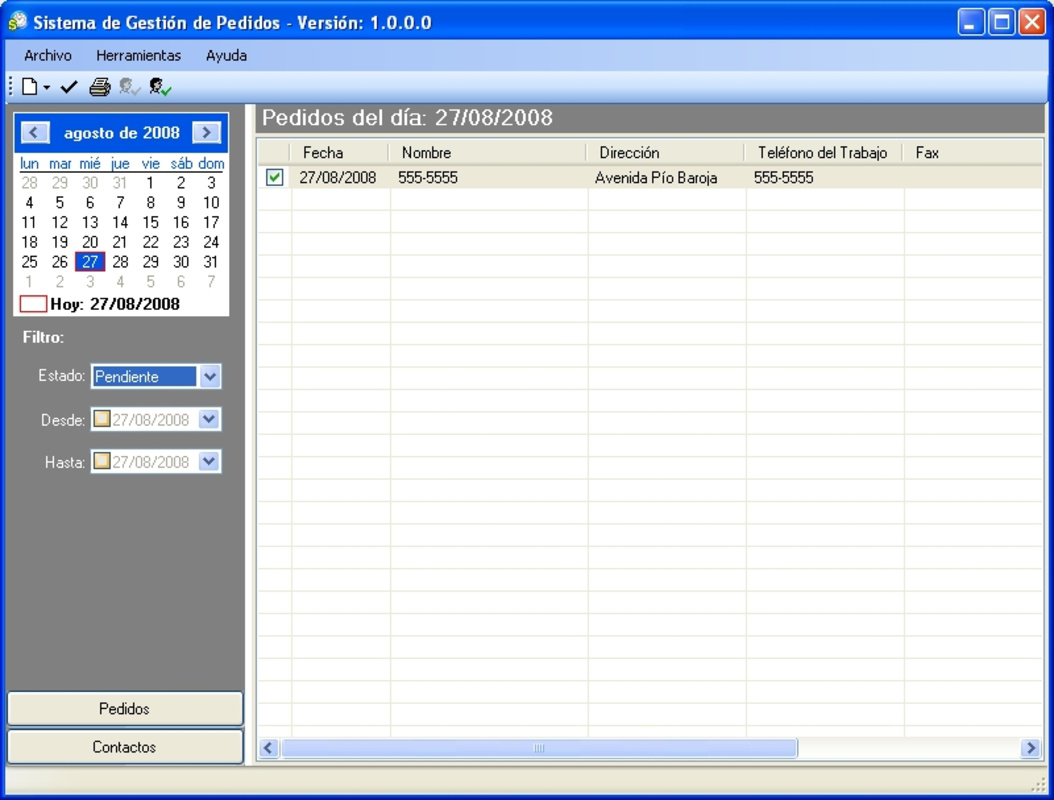
- Date-Based Order Viewing: Users can access daily order records by selecting a date on the built-in calendar. They can also view orders across a custom date range, which aids in scheduling, reporting, and reviewing delivery patterns.
For example, a home-based baker can use Stinki to track weekly orders from regular clients, check which pastries are frequently requested, and confirm stock availability before accepting new orders. Similarly, a grocery delivery provider can use the date-based view to verify deliveries made on a specific day, ensuring accountability and consistency.
Interface, UX & Performance
Stinki features a clean, minimal interface focused on core tasks, which contributes to a low learning curve. The layout prioritizes functionality, with key actions like adding clients, selecting products, and viewing orders clearly accessible. Navigation appears to follow a linear flow, allowing users to move between sections such as client management, product lists, and order history without unnecessary complexity.
The visual style is utilitarian, emphasizing readability and ease of use over decorative elements. Text clarity and button placement suggest thoughtful attention to usability, especially for users who may not be tech-savvy. Although the developer did not list formal performance metrics, the app’s long-standing operation implies a stable and reliable runtime across various device categories.
Responsiveness appears consistent based on its continued use, with minimal delays reported in switching between views or updating order statuses. Stability is likely maintained through consistent updates, though specific update frequency was not disclosed. Overall, the user experience reflects a tool built for practicality, where reliability and predictability are prioritized over flashy design or advanced animations.
Platform Compatibility & Technical Requirements
Stinki is available for mobile platforms, though the specific operating system was not listed. The app’s file size and version information are also not disclosed. The developer did not specify minimum OS requirements or compatibility details for different device types.
Given its release date of 2008, Stinki may support older mobile operating systems, but this cannot be confirmed without further technical details. Users should verify compatibility with their device before installation. The lack of publicly available system requirements suggests that the app may have broad compatibility, but this remains unverified.
Pros and Cons
Pros
- Simple, intuitive interface suitable for users with limited technical experience.
- Effective client and product management for small-scale delivery operations.
- Real-time stock status tracking helps prevent order fulfillment issues.
- Order history and date-based viewing improve service accuracy and planning.
- Long-standing presence indicates proven reliability and sustained use.
Cons
- Specific technical requirements and platform details were not provided.
- Limited visual design and modern UI elements may not appeal to all users.
- No information available on update frequency or future development plans.
- Functionality is narrow, making it less suitable for larger or more complex delivery operations.
- Compatibility with current devices and operating systems remains unconfirmed.
FAQ
Is Stinki available for Android and iOS?
The platform availability was not specified by the developer. Users should check their device’s app store for current availability.
Can I use Stinki without an internet connection?
While the developer did not confirm offline functionality, the app’s core features may operate locally on the device, depending on its architecture.
How often is Stinki updated?
Specific update frequency was not disclosed. Users are advised to monitor official sources for any release notes or patches.
Is Stinki secure for storing client data?
No information was provided regarding data encryption or security protocols. Users should exercise caution when entering sensitive personal information.
Can I export or back up my order history?
The developer did not list backup or export features. Data retention may depend on the app’s internal storage mechanism.
Final Thoughts
Stinki stands out as a focused, no-nonsense tool for managing home delivery operations. Its straightforward approach to client contact, product categorization, and order tracking makes it a valuable asset for small-scale providers who need a reliable system without complexity. While it lacks modern design elements and detailed technical specifications, its enduring presence since 2008 speaks to its practical value and consistent performance.
Users who prioritize functionality over aesthetics and require a simple way to manage client orders and stock levels will find Stinki to be a dependable solution. It excels in niche use cases where efficiency and clarity are more important than advanced features.
Download Stinki now
Guides & Tutorials
How to install Stinki
- Click the Download button above.
- Once redirected, accept the terms and click Install.
- Wait for the Stinki download to finish on your device.
How to use Stinki
This software is primarily used for its core features described above. Open the app after installation to explore its capabilities.
User Reviews
No reviews yet. Be the first to share your experience.
You may also like
more
Que no te pillen¡
About !Que no te pillen¡Reviewed by Jason A. BilbreyShow MoreShow Less

3D Combat Zone
About 3D Combat ZoneOriginally released in 1983, 3D Combat Zone immerses players...

666: El día del portal
About 666: El día del portalOn June 6, 2006, Agent P. Stone uncovers a sinister...

80 in 1 Best Flash games
About 80 in 1 Best Flash games 80 in 1 Best Flash games is a collection of 80 fl...

ABYSS SEEKERーーWhat Do You See Deep in The Abyss
About ABYSS SEEKERーーWhat Do You See Deep in The AbyssIn ABYSS SEEKER, players...

ACA NEOGEO THE KING OF FIGHTERS 2002 for Windows
About ACA NEOGEO THE KING OF FIGHTERS 2002 for WindowsTHE KING OF FIGHTERS 2002,...
