
Screenshots
App details
- Version
- 1.1
- Updated
- July 20, 2024
- Requires
- iOS 16.4
- Language
- English
- License
- Full
- Developer
- OSC Audio LLC
- Category
- iPhone OS
About sumFX
sumFX: Modular Multi-FX Processor
Overview
sumFX is a modular multi-FX processor designed for music creators across Mac, PC, and iOS platforms. Built to streamline the audio effects workflow, it enables users to focus on creativity by offering a flexible yet intuitive environment for shaping sound. The software features 8 high-quality FX modules, each with 8 assignable slots, allowing for complex signal chains without overwhelming the user interface. Each slot includes Wet/Dry control, Global Dry/Wet mixing, and dual 5-mode LFOs, providing dynamic modulation capabilities for expressive sound design. The processor supports cross-platform preset sharing, with 50 built-in slot and chain presets to help users quickly access a wide variety of sonic textures. These presets are designed to work across Mac, Windows, and iOS, enhancing workflow continuity for producers who work across devices. The intuitive pre/post waveform view offers real-time visual feedback, helping users assess the impact of effects without distraction. This makes sumFX particularly valuable for sound designers, independent music producers, and audio engineers seeking a lightweight yet powerful tool for real-time processing and experimentation.
Key Features & Capabilities
- Modular FX Architecture – Eight high-quality FX modules with 8 slots each allow for deep signal chain customization, enabling complex audio processing workflows within a single application.
- Wet/Dry and Global Mixing – Each slot includes individual Wet/Dry controls, with a global Dry/Wet mix for overall signal balance, giving users precise control over effect intensity.
- Dynamic LFOs – Two 5-mode LFOs per slot offer rhythmic and automated modulation, ideal for evolving textures in reverb, delay, and filter effects.
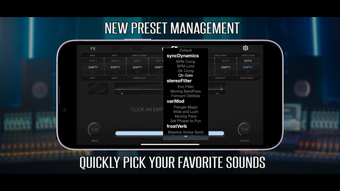
- Cross-Platform Presets – 50 built-in presets for slots and chains are compatible across Windows, macOS, and iOS, ensuring consistent performance and workflow continuity.
- Visual Feedback System – The pre/post waveform view provides real-time visual representation of audio changes, helping users evaluate effect impact without relying solely on auditory cues.
- Comprehensive FX Suite – Includes dynamic effects, stereo filters, modulation tools, EQ, reverb, delay, pitch shifting, and saturation utilities, covering essential audio processing needs.
User Interface, Workflow & Performance
The user interface of sumFX is structured to balance functionality with clarity, featuring a clean layout that emphasizes workflow efficiency. Navigation is straightforward, with modular slots clearly laid out and accessible via a single panel. The visual waveform display, positioned before and after the FX chain, provides immediate feedback on signal transformation, supporting precise sound shaping. Users can switch between modules and adjust parameters with minimal clicks, reducing workflow interruptions. The software maintains a responsive interface, even when multiple effects are active, suggesting efficient handling of real-time audio processing. Performance details were not specified by the developer, but the 45 MB file size indicates a lightweight footprint, likely contributing to stable operation on a range of systems. The application does not report any known performance bottlenecks or instability issues in its initial release. Resource usage patterns are not documented, but the compact size and modular design suggest optimized CPU and memory handling. Overall, the workflow is designed to keep the user focused on creative decisions rather than technical overhead.
Compatibility & System Requirements
sumFX is available for Windows, macOS, and iOS platforms, making it accessible to a broad range of music producers and sound designers. The software is compatible with both desktop and mobile environments, enabling seamless transitions between studio and on-the-go workflows. The installation size is 45 MB, which is relatively small for a multi-FX processor, indicating efficient packaging and minimal disk space usage. The developer did not specify exact system requirements, so users should ensure their devices meet the baseline standards for running modern audio applications. Compatibility information was partially provided, with no mention of minimum CPU, RAM, or audio interface requirements. For optimal performance, users are advised to run the software on systems that support real-time audio processing. The lack of detailed technical specifications means that system compatibility may vary depending on device configuration and operating system version.
Pros and Cons
Pros
- Modular design with 8 FX modules and 8 slots per module for deep sound shaping
- Includes 50 cross-platform presets for instant access to diverse sound textures
- Intuitive pre/post waveform visualization aids real-time audio assessment
- Supports real-time modulation with dual 5-mode LFOs per slot
- Lightweight 45 MB installation size enhances portability and fast deployment
- Free to download and use, lowering the barrier to entry for creators
Cons
- No detailed system requirements were provided by the developer
- Exact performance metrics, such as CPU or RAM usage, were not disclosed
- Limited information on audio interface or driver compatibility
- Platform-specific features or limitations were not outlined
- Long-term stability and update frequency are unknown
FAQ Section
Is sumFX compatible with my Mac or PC?
sumFX is available for both Windows and macOS. The software is designed to run on standard desktop systems, but specific hardware requirements were not listed by the developer.
Can I use sumFX on iOS devices?
Yes, sumFX supports iOS platforms, allowing users to access the same FX modules and presets on mobile devices. This enables on-the-go sound design and real-time processing.
Is sumFX safe to download and use?
sumFX is distributed as a free desktop and mobile application. The developer has not reported any security issues, and the 45 MB file size suggests a minimal footprint, reducing potential risks associated with larger software packages.
Does sumFX require a license or subscription?
sumFX is available at no cost. There is no indication of a license fee or subscription model, making it accessible for both hobbyists and professionals.
Can I use sumFX offline?
Yes, sumFX does not require an internet connection to function. Once installed, the application operates independently, allowing full access to all features without online dependency.
Final Thoughts + CTA
sumFX delivers a compelling blend of modularity, visual feedback, and cross-platform compatibility in a lightweight, free package. Its 8-slot FX architecture with dual LFOs and built-in presets makes it a strong contender for producers and sound designers seeking a flexible yet accessible tool. The intuitive waveform display enhances workflow clarity, while the consistent preset performance across Mac, PC, and iOS supports a unified creative experience. Although detailed system requirements and performance data are not available, the application’s small size and efficient design suggest broad compatibility. For music creators who value creative freedom without technical clutter, sumFX offers a powerful starting point. Download sumFX now to explore its modular capabilities and elevate your audio production workflow.
Guides & Tutorials
How to install sumFX
- Click the Download button above.
- Once redirected, accept the terms and click Install.
- Wait for the sumFX download to finish on your device.
How to use sumFX
This software is primarily used for its core features described above. Open the app after installation to explore its capabilities.
User Reviews
No reviews yet. Be the first to share your experience.
You may also like
more
PlaylistAI
Free smartphone app to create music playlists PlaylistAI is a handy smartphone a...

Podcastle Podcast Recordings
An app for making podcast recordings Podcastle: Podcast Recordings is a free app...

harpy chat
Immersive role-play with AI characters harpy.chat is a free AI chat platform whe...

Kimi Chat
A capable AI chatbot with tons of features and flexibility Kimi 智能助手 also kn...

Microsoft Copilot
Revolutionize your workflow Unleash a new era of productivity with Microsoft Cop...

Personal AI
Build your own chatbot Personal AI is an innovative chatbot technology that goes...
