
Download Summit – AI Life Coaching Assistant, Goal‑Tracking Tool, Personal Development App
Overview of Summit
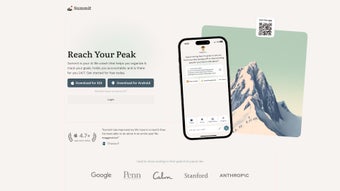
Summit is an AI‑driven life‑coaching platform that transforms how you set, track, and achieve personal and professional goals. Built as a subscription‑based web application, Summit offers 24/7 virtual coaching that adapts to your schedule, learning style, and ambition level. Whether you are aiming to launch a startup, complete a marathon, or develop healthier habits, Summit breaks large objectives into bite‑size milestones, assigns daily habits, and supplies real‑time accountability. Its standout capability is the customizable AI coaching personality: you can choose a strict, goal‑obsessed motivator or a supportive, empathy‑focused companion, ensuring the experience feels genuinely personal. Additionally, the app encourages collaborative success through “accountability groups,” where members share progress, exchange feedback, and celebrate wins together. The clean, responsive interface works across browsers, making it easy to access from any device without sacrificing performance. In short, Summit is more than a to‑do list; it is a strategic partner that helps you navigate complexity, stay focused, and turn aspirations into tangible results.
Core Features That Set Summit Apart
- AI‑Powered Goal Architecture: Automatically decomposes long‑term goals into actionable milestones and daily habits, using proven behavioral‑science algorithms.
- Customizable Coaching Styles: Choose from multiple AI personalities—strict motivator, gentle guide, data‑driven analyst, or creative brainstormer—to match your preferred communication tone.
- Accountability Groups: Create or join groups of friends, colleagues, or like‑minded strangers to share progress, exchange encouragement, and hold each other accountable.
- Dynamic Progress Dashboard: Visualize your journey with interactive charts, heat maps, and streak counters that update in real time.
- Adaptive Reminders & Nudges: Receive smart notifications that adjust based on your activity patterns, ensuring reminders feel helpful, not intrusive.
- Strategic Review Sessions: Quarterly AI‑generated performance reviews highlight strengths, identify bottlenecks, and suggest new tactics.
- Secure Cloud Sync: All data is encrypted in transit and at rest, with automatic backup across devices for uninterrupted access.
- Integrations & API Access: Connect Summit with calendars, task managers, fitness trackers, and productivity suites for a seamless workflow.
- Multi‑Language Support: Available in English, Spanish, French, German, and Mandarin, expanding its reach to global users.
- Regular Feature Updates: Monthly releases introduce new habit templates, AI coaching refinements, and UI enhancements.
Installation, Usage Instructions, and Compatibility
Getting Started – Simple Web‑App Setup
Summit operates entirely in the browser, eliminating the need for cumbersome downloads or installations. To begin, visit summitcoaching.com, click the “Start Free Trial” button, and follow the on‑screen registration flow. You’ll be prompted to create a secure password, verify your email, and select a preferred AI coaching style. Once registered, the onboarding wizard asks a series of short questions about your primary objectives, time horizon, and current habits. The AI then auto‑generates a personalized goal map that you can edit, rearrange, or expand at any time.
Daily Interaction – How to Use Summit Effectively
Each morning, Summit delivers a concise briefing that includes your top three priorities, upcoming deadlines, and a motivational prompt tailored to your chosen coach personality. Throughout the day, you can log habit completions, add ad‑hoc tasks, or request a quick “strategy session” via the chat interface. The platform’s natural‑language processing allows you to type commands like “break my 6‑month marathon goal into weekly runs” and receive instant, structured plans. For accountability groups, simply invite members by email; the group dashboard aggregates each member’s progress, highlights collective milestones, and enables group chat for real‑time encouragement.
Device Compatibility – Operating Systems & Browsers
Summit is fully compatible with modern browsers on Windows 10/11, macOS Ventura and later, Chrome OS, as well as mobile browsers on Android 9+ and iOS 13+. Because the service runs in the cloud, performance is consistent across laptops, tablets, and smartphones. For users who prefer a native experience, a progressive web app (PWA) version can be installed on desktop or mobile, providing offline access to previously loaded data and push notifications.
Security & Updates
All communications between your device and Summit’s servers are encrypted with TLS 1.3. The platform complies with GDPR and CCPA, giving users control over data export and deletion. Updates are rolled out automatically; you’ll never need to manually download patches. Subscription billing is handled through a secure PCI‑compliant portal, offering monthly or annual plans with a 14‑day money‑back guarantee.
Pros, Cons, and Frequently Asked Questions
Pros
- Highly personalized AI coaching that adapts to user preferences.
- Robust goal‑decomposition engine turns vague ambitions into concrete actions.
- Accountability groups foster community support and shared motivation.
- Cross‑platform accessibility via browser and PWA ensures you’re never locked out.
- Secure cloud storage with regular backups protects your data.
- Integrations with popular productivity tools streamline workflow.
Cons
- Requires an internet connection for full functionality; offline mode is limited.
- Subscription cost may be a barrier for casual users who only need basic to‑do lists.
- Learning curve for advanced features like custom AI prompts and API usage.
- Currently no desktop‑only native application for Windows or macOS.
FAQ – Your Summit Questions Answered
Is there a free version of Summit?
Summit offers a 14‑day free trial with full feature access. After the trial, you must choose a paid subscription to continue using the AI coaching and accountability group features.
Can I cancel my subscription at any time?
Yes. Subscriptions are month‑to‑month or annual with automatic renewal. You can cancel through the account settings page; cancellation takes effect at the end of the current billing cycle.
How does Summit protect my personal data?
All data is encrypted in transit (TLS 1.3) and at rest (AES‑256). Summit adheres to GDPR and CCPA regulations, and you can export or permanently delete your data from the privacy dashboard.
Can I integrate Summit with my existing calendar?
Absolutely. Summit syncs with Google Calendar, Outlook, and Apple Calendar. Once connected, milestones and habit reminders appear directly in your calendar, preventing double‑booking.
Is there a mobile app for iOS and Android?
While Summit is a web‑based service, you can install it as a Progressive Web App (PWA) on iOS and Android. This provides app‑like icons, push notifications, and limited offline access.
Conclusion – Is Summit the Right AI Coach for You?
Summit combines cutting‑edge AI, behavioral science, and community‑driven accountability into a single, easy‑to‑use platform. If you’ve struggled with vague goal‑setting, inconsistent habit tracking, or lack of motivation, Summit’s structured approach can dramatically improve your success rate. The ability to pick a coaching style that resonates with you means the experience feels less like a generic app and more like a personal mentor. While the subscription cost may deter occasional users, the value delivered—especially for professionals, entrepreneurs, and serious self‑improvement enthusiasts—justifies the investment. With secure cloud sync, seamless cross‑device access, and regular feature updates, Summit is built to grow with you as your ambitions evolve.
Ready to turn your aspirations into measurable progress? Start your free 14‑day trial of Summit today and experience an AI life‑coach that works around the clock, adapts to your style, and holds you accountable every step of the way.



.png)




