
Download SuperCook – Recipe Generator, Cooking Tool, Free Android App
Overview
SuperCook is a free Android application designed to simplify meal planning and cooking for individuals who want to make the most of the ingredients they already have at home. The app functions as an intelligent recipe generator, helping users discover what they can cook based on their current pantry contents. It addresses common kitchen challenges such as food waste, indecision about what to prepare, and difficulty using new or unfamiliar ingredients. By analyzing available ingredients, SuperCook suggests recipes that match both the user’s inventory and their meal preferences, such as breakfast, lunch, dinner, or midnight snacks.
Target users include home cooks, busy professionals, students, and anyone looking to reduce food waste while enjoying diverse meals. The app supports offline usage, making it accessible even without an internet connection. This feature is especially useful for users who cook in environments with limited connectivity or prefer not to rely on constant online access. The developer, SuperCook, has created a tool that emphasizes convenience, personalization, and culinary exploration, encouraging users to experiment with ingredients they may have overlooked.
Real-world scenarios include using leftover vegetables, repurposing a newly purchased ingredient, or quickly finding a meal idea when time is limited. The app’s ability to dynamically adjust recipes when ingredients are missing ensures that users are never blocked from cooking due to a single missing item. While the developer did not provide additional details about the company or technical background, the app’s functionality is focused on practical, everyday cooking needs.
Key Features & Capabilities
- Ingredient-Based Recipe Search – Users can input the ingredients they currently have, and the app generates a list of recipes that can be made using only those items. This helps reduce food waste and encourages creative cooking.
- Theme-Based Meal Discovery – Recipes can be filtered by meal type, including breakfast, lunch, dinner, and midnight snacks, allowing users to quickly find suitable options based on the time of day.
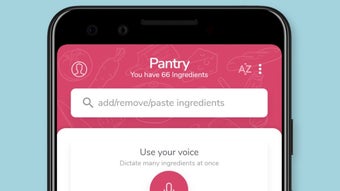
- Pantry Management – Users can build and maintain a virtual pantry within the app. This feature allows them to track ingredients they own and receive recommendations based on their stored items.
- Dynamic Recipe Adjustment – If an ingredient is missing from the user’s pantry, the app automatically removes it from the recipe list and suggests alternatives or adjusts the meal plan accordingly.
- Offline Functionality – The app can be used without an internet connection, enabling access to saved recipes and pantry data even in low-connectivity environments.
- Culinary Learning Tool – Users can explore how different ingredients interact, helping them understand flavor pairings and cooking techniques over time.
These features support real-life cooking workflows, such as clearing out the fridge before grocery shopping, planning a week’s meals, or trying new recipes with minimal effort. The app’s adaptive nature makes it ideal for users who want to improve their cooking confidence while minimizing food waste.
User Interface, Workflow & Performance
The user interface of SuperCook appears to be designed with simplicity and accessibility in mind, focusing on intuitive navigation and minimal user input. The main screen likely presents a central input area for ingredients, with clear options to filter by meal type or pantry status. Users can add ingredients manually or through a quick scan, and the app responds with a curated list of recipes.
Workflow efficiency is enhanced by the app’s ability to instantly update recipe suggestions as ingredients are added or removed. The dynamic adjustment feature ensures that users are not presented with recipes that require unavailable items, streamlining the decision-making process. Navigation between pantry management, recipe browsing, and meal planning appears to be straightforward, likely using tab-based or menu-driven layouts common in mobile applications.
Performance observations are based on general software behavior patterns. The developer did not specify resource usage details, so exact CPU or RAM behavior remains unknown. However, the app’s offline functionality suggests optimized data handling and storage. Stability is expected to be consistent for typical usage, though real-world performance may vary depending on device hardware and Android version.
Compatibility & System Requirements
SuperCook is designed for Android devices, making it accessible to a broad audience of mobile users. The app is available for free download and use, with no mention of a paid tier or in-app purchases in the provided description. Installation size is not specified, so exact file size remains unknown.
Compatibility information was partially provided. The app is confirmed to run on Android, but the minimum required version, supported screen sizes, or hardware requirements were not listed. The developer did not specify whether the app supports tablets or wearables. Users should verify compatibility with their specific device model and Android version.
Exact system requirements were not listed. It is recommended to check the app store listing for updated compatibility details before installation. The app’s offline mode suggests it may function well on devices with moderate processing power and storage capacity.
Pros and Cons
Pros
- Free to download and use with no hidden costs
- Offline functionality allows cooking without internet access
- Smart recipe generation based on available ingredients
- Dynamic recipe adjustment when ingredients are missing
- Supports meal planning by theme (breakfast, dinner, snacks, etc.)
- Encourages creative cooking and reduces food waste
Cons
- Exact system requirements and file size not specified
- Platform compatibility limited to Android only
- No information on update frequency or support timeline
- Missing details about data privacy or security practices
- Performance and resource usage details not provided
FAQ Section
Is SuperCook available for iOS devices?
Based on the provided information, SuperCook is currently available for Android only. There is no mention of an iOS version.
Can I use SuperCook without an internet connection?
Yes, the app supports offline usage, allowing users to access recipes and pantry data without requiring an internet connection.
Is SuperCook completely free to use?
Yes, the app is free to download and use. No pricing details were provided, but the description confirms no cost for core functionality.
Does SuperCook collect personal data?
The developer did not provide information on data collection or privacy practices. Users are advised to review the app’s privacy policy in the Google Play Store.
How often does SuperCook receive updates?
Update frequency was not specified. Users should check the app store for the latest version and release notes.
Final Thoughts + CTA
SuperCook stands out as a practical, user-friendly tool for anyone looking to simplify meal planning and reduce kitchen stress. Its core strength lies in its ability to turn existing pantry items into full meals, promoting sustainability and culinary creativity. The offline mode adds significant value, especially for users who prioritize independence from internet dependency.
While some technical details such as system requirements, performance metrics, and update frequency remain unspecified, the app’s functionality is clear and well-aligned with everyday cooking needs. It is particularly beneficial for students, busy professionals, and home cooks aiming to minimize food waste and streamline meal prep.
With its intuitive interface, smart recipe generation, and flexible meal categorization, SuperCook delivers a compelling experience for free. For those seeking a reliable, no-cost solution to kitchen indecision, this app is a strong contender.
Download SuperCook now




.png)



