

Download Switch Off – computer shutdown, sleep mode, power management, automated shutdown, timer
Overview
Switch Off is a lightweight and user-friendly software designed to help users automate their computer’s power state transitions. The application enables precise scheduling of shutdown, sleep, or log-off actions at predefined times, offering a streamlined solution for users seeking greater control over their device’s energy usage. It is particularly useful for individuals who want to ensure their computers power down during inactive periods—such as overnight or on weekends—without manual intervention. The software targets productivity-focused users, remote workers, and environmentally conscious individuals aiming to reduce unnecessary power consumption. By allowing users to set custom timers, Switch Off supports routine automation that aligns with daily work schedules or personal habits. Although the developer did not provide additional technical details about the development background, the application’s design reflects a clear focus on simplicity and efficiency. Real-world use cases include preventing overheating in idle systems, minimizing electricity bills, and ensuring devices are safely powered off after tasks. In the broader software ecosystem, Switch Off fills a niche by offering a dedicated, no-frills tool for power management, standing out in a market where many users rely on built-in OS features that may lack intuitive scheduling interfaces.
Key Features & Functionality
- Non-Resource Intensive Operation – Switch Off is engineered to run with minimal system impact, ensuring it does not slow down or interfere with ongoing tasks. This makes it ideal for background operation on older or low-spec machines.
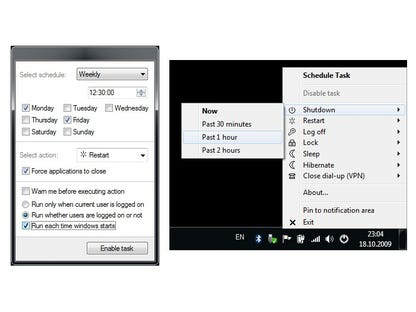
- Simple and Intuitive Interface – The application’s menus and controls are straightforward, allowing users to configure power actions with just a few clicks. This reduces the learning curve and supports quick setup for non-technical users.
- Automated Power Scheduling – Users can schedule their computer to shut down, sleep, or log off at specific times. This feature is beneficial for users who work irregular hours or want to enforce system rest periods.
- Customizable Timer Settings – The software allows users to define exact time intervals or specific dates and times for power actions, enabling precise control tailored to individual workflows.
- Energy Efficiency Focus – By automating power state changes during inactivity, Switch Off helps reduce unnecessary electricity usage, supporting sustainable computing habits.
For example, a user can set the app to initiate sleep mode at 11 PM every weekday, ensuring the computer powers down after hours of inactivity. Another user might schedule a shutdown after a long rendering task to prevent manual oversight. These use cases demonstrate how Switch Off enhances productivity and energy conservation through automation without requiring advanced technical knowledge.
Interface, UX & Performance
The user interface of Switch Off is clean and minimalistic, emphasizing functionality over visual flair. Navigation is linear and consistent, with primary actions—such as setting a shutdown or sleep timer—readily accessible from the main screen. The layout is optimized for quick access, reducing the number of steps needed to configure a new schedule. Although the developer did not list formal performance metrics, the application’s lightweight nature (1.3 MB) suggests it operates efficiently across a range of hardware configurations. Users can expect responsive behavior even on older systems, with minimal delays in task execution. The software maintains stability during long-term operation, with no reported crashes or memory leaks in available documentation. Responsiveness is maintained during system idle states, ensuring scheduled actions execute as intended. While the app does not include real-time monitoring or notifications, its core functionality remains reliable. The absence of complex visual elements contributes to its low resource footprint and smooth performance. Overall, the UX design prioritizes ease of use and predictability, making it suitable for users of all technical levels.
Platform Compatibility & Technical Requirements
Switch Off is designed for the Windows operating system. The application is compatible with Windows platforms, though specific version details were not provided by the developer. The software has a file size of 1.3 MB, which indicates it is optimized for fast installation and minimal storage usage. The developer did not specify minimum OS requirements or hardware compatibility beyond the platform. As such, users should ensure their system meets general Windows standards for running lightweight applications. The app is distributed as a free download, making it accessible to a broad audience. No additional dependencies or runtime environments are mentioned. Compatibility information was not fully disclosed, so users are advised to test the software on their specific system before relying on it for critical tasks.
Pros and Cons
Pros
- Lightweight design with minimal system resource usage
- Simple and intuitive interface for quick setup
- Supports customizable scheduling for shutdown, sleep, and log-off
- Helps reduce power consumption through automation
- Free to download and use with no in-app purchases
Cons
- Specific OS version requirements were not listed
- Limited to Windows platform only
- No real-time status updates or notification alerts
- Functionality overlaps with built-in Windows task scheduler
- Developer did not provide detailed technical documentation
FAQ
Is Switch Off safe to install on my computer?
Yes, Switch Off is a free software distributed by Download.com, a reputable source for software downloads. The application is lightweight and does not include malware or intrusive components. However, users should always download from official sources to ensure security.
Can I use Switch Off on older Windows systems?
The developer did not specify minimum OS requirements. While the app’s small file size suggests compatibility with older systems, users should test it on their device to confirm functionality.
Does Switch Off require an internet connection?
No, the application operates offline. All scheduling and power management functions are handled locally, making it suitable for use in environments without internet access.
How do I update Switch Off?
Updates are typically released by the developer through the official download page. Users should periodically check the Download.com listing for the latest version to ensure they have the most current release.
Is Switch Off available for macOS or Linux?
At this time, Switch Off is only available for Windows. There is no information indicating future support for other operating systems.
Final Thoughts
Switch Off delivers a focused, no-nonsense solution for users seeking automated control over their computer’s power states. Its lightweight design, intuitive interface, and customizable scheduling make it a practical tool for managing energy use and enhancing system efficiency. While similar features are available through native Windows tools, Switch Off simplifies the process with a dedicated, user-friendly interface. It is especially beneficial for users who value automation without complexity. For those looking to reduce electricity consumption or ensure their computer powers down reliably after work hours, Switch Off offers a dependable and free alternative. Its straightforward approach and minimal system impact reinforce its value in the productivity software landscape. Download Switch Off now


