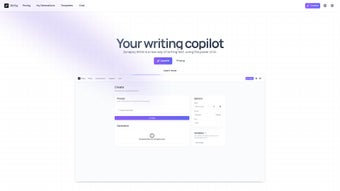

Download Synapsy Write – AI‑Powered Writing Tool for Email, Essays, Tables & More
Overview
Synapsy Write is a web‑based AI writing assistant that brings the power of OpenAI’s GPT‑4 to everyday content creation. Whether you need a concise email, a structured report, a complex table, or a multi‑page essay, Synapsy Write translates a simple prompt into polished, ready‑to‑publish text. The platform distinguishes itself with a custom generation engine built specifically for intricate essay structures, allowing users to dictate headings, sub‑headings, and citation styles with a single command. A unique variable system lets you embed reusable placeholders, making it easy to generate personalized letters or dynamic marketing copy at scale. Designed with non‑technical users in mind, the interface offers drag‑and‑drop blocks, live preview, and a one‑click “Generate” button that eliminates the learning curve associated with most AI tools. Because the core codebase is open source, developers can extend functionality, contribute plugins, or tailor the AI prompts to niche industries. In practice, Synapsy Write boosts productivity by reducing the time spent on research, drafting, and formatting, while maintaining high‑quality output that meets professional standards. Its cloud‑first architecture ensures that updates, security patches, and model improvements roll out automatically, keeping the tool both free‑to‑try and secure for personal or business use.
Key Features
- GPT‑4 powered text generation for emails, blogs, reports, essays, and more.
- One‑prompt table creation – turn a simple description into fully formatted tables.
- Custom essay engine with automatic outline, citations, and logical flow.
- Variable placeholders for interactive and reusable content templates.
- Intuitive block‑based UI with real‑time preview and editing.
- Open‑source core allowing community plugins and custom prompt libraries.
- Secure cloud hosting with automatic updates and GDPR‑compliant data handling.
- Multi‑language support and tone adjustment (formal, casual, persuasive).
Each feature is built to address a specific pain point in the writing workflow. The GPT‑4 backbone ensures that the generated content is context‑aware, grammatically correct, and stylistically consistent. For example, the table generation feature parses natural language like “Create a three‑column table comparing iPhone, Android, and Windows phones on price, battery life, and camera quality,” and instantly produces a clean HTML or markdown table ready for insertion into reports or web pages. The essay engine goes beyond simple paragraph output; it prompts the AI to produce an introduction, thesis statement, supporting arguments, counter‑arguments, and a conclusion, all while adhering to the user‑selected citation format (APA, MLA, Chicago). Variables act like dynamic fields—type {{first_name}} once and reuse it across a series of personalized emails without re‑typing. The open‑source nature means that power users can write their own prompt modules or integrate third‑party APIs, extending Synapsy Write far beyond its out‑of‑the‑box capabilities. Together, these features create a versatile, future‑proof writing companion for students, marketers, analysts, and anyone who writes regularly.
Installation & Usage Instructions
Step‑by‑Step Setup
Getting started with Synapsy Write is deliberately straightforward. Because it is a web‑application, there is no traditional “installation” on your desktop; you simply need a modern browser (Chrome, Edge, Firefox, or Safari) and an internet connection. Follow these steps:
- Visit the official website at synapsywrite.com and click the “Sign Up Free” button.
- Enter your email address, create a strong password, and confirm your account via the verification email you receive.
- Once logged in, you’ll land on the Dashboard where the main writing canvas is displayed.
- Choose a template from the left‑hand menu (Email, Essay, Table, Blog Post, Custom).
- Enter your prompt in the text box at the top. For example: “Write a 200‑word professional email to a client apologizing for a delayed shipment.”
- Optionally, add variables by typing
{{variable_name}}within the prompt. These will appear as editable fields after generation. - Click the “Generate” button. The AI processes your request in seconds and populates the canvas with formatted output.
- Review the content, make any manual edits, or click “Regenerate” to get an alternative version.
- When satisfied, export the result as plain text, markdown, HTML, or directly copy to clipboard.
Advanced users can access the “Prompt Library” from the Settings menu, where community‑shared prompts are categorized by industry and use‑case. The “API Access” tab provides a personal API key for integrating Synapsy Write into custom workflows, such as CRM email templates or automated report generators. Because all processing happens in the cloud, your local machine’s performance has no impact on generation speed; the heavy lifting is done on Synapsy’s secure servers, which are regularly updated to include the latest GPT‑4 model improvements.
Compatibility, Pros & Cons
Supported Operating Systems
Synapsy Write runs on any device with a modern web browser, making it truly cross‑platform. Whether you’re on Windows 10/11, macOS Monterey or later, Linux distributions, Android 8+ tablets, or iOS 13+ iPhones, the responsive design adapts to different screen sizes without loss of functionality. The tool also supports progressive web app (PWA) installation, allowing you to “pin” Synapsy Write to your desktop or mobile home screen for a native‑like experience, complete with offline caching of previously generated drafts.
Pros
- High‑quality output: Powered by GPT‑4, the text feels human‑written and context‑aware.
- Versatile content types: From simple emails to multi‑page essays and complex tables.
- Variable system: Enables reusable templates and personalized mass communication.
- Open‑source core: Encourages community contributions and custom extensions.
- Zero‑install, cloud‑first: Works on any device with a browser, no heavy software required.
- Secure & GDPR‑compliant: Data is encrypted in transit and not stored longer than necessary.
- Free tier available: Provides generous usage limits for students and freelancers.
Cons
- Internet dependency – offline generation is not possible without the PWA cache.
- Advanced formatting (e.g., complex LaTeX equations) may require manual tweaking after generation.
- Free tier imposes a daily token limit; heavy users may need a paid subscription.
- Learning curve for variable syntax for absolute beginners.
- Limited native integration with desktop word processors; export is required.
Synapsy Write impresses with its blend of AI sophistication and user‑friendly design. The table generation from plain language prompts saves countless hours, and the variable system is a game‑changer for marketers. While the free tier’s token cap may frustrate power users, the overall value and open‑source ethos make it a top contender in the AI writing space.
Frequently Asked Questions
Is Synapsy Write truly free to use?
Synapsy Write offers a free tier that includes up to 15,000 tokens per month, which is sufficient for most students and occasional freelancers. For higher volume needs, a paid subscription unlocks unlimited tokens, priority processing, and advanced features.
Can I use Synapsy Write offline?
The core generation engine runs on cloud servers, so an internet connection is required for AI processing. However, the PWA version caches the interface, allowing you to view previously generated drafts without a connection.
How does the variable placeholder system work?
You embed variables in your prompt using double curly braces, e.g., {{first_name}}. After generation, Synapsy Write highlights these placeholders as editable fields, letting you quickly insert personalized data across multiple copies of the same content.
Is my data safe when I generate content?
Yes. All data transmitted between your browser and Synapsy’s servers is encrypted with TLS 1.3. The platform follows GDPR guidelines, storing user prompts only temporarily for the duration of the generation process.
Can I integrate Synapsy Write with other tools?
Through the provided API key, developers can call the generation endpoint from CRM systems, content management platforms, or custom scripts. The open‑source SDKs for Python and JavaScript simplify integration.
Conclusion & Call to Action
Synapsy Write stands out in a crowded AI‑writing market by marrying cutting‑edge GPT‑4 technology with a clean, non‑technical interface and a suite of features that address real‑world writing challenges. Whether you are a student drafting a research paper, a marketer crafting personalized outreach, or a data analyst needing quick table creation, Synapsy Write reduces the time spent on repetitive drafting and lets you focus on higher‑level thinking. Its open‑source foundation fosters a community that continually enriches the platform, while the secure cloud architecture guarantees that you always work with the latest model updates. Although the free tier has token limits and offline usage isn’t possible for new content, the value delivered per token is high, and the optional paid plans are competitively priced. If you’re ready to boost productivity, improve writing quality, and explore a flexible AI tool that grows with you, click the button below to create your free account and start generating instantly.



.png)




