Lync 2010 Server Large Meeting Support Dissected

On 1/31/2012, Microsoft published a document regarding support for Large Meetings in Lync 2010.

Background

This particular topic is near and dear to my heart. While working as a sales person for Lync, I had the privilege of selling OCS, OCS R2 and Live Meeting. Say what you will the Live Meeting experience, one thing Live Meeting did well was meeting sizes up to 1250 attendees. Meetings that required more than 1250 attendees is what is referred to as an “event”. Microsoft at one point provided a service that allowed for events of up to 2500 users, but that was discontinued. Meetings that required more than 1250 attendees was then referred to folks like On24, Worktank and Eventbuilder. Live Meeting is not a long term service for Microsoft. While it was a core service for BPOS, it is not included in Office 365. With Office 365, web conferencing is transitioned to Lync Online and Microsoft began the tough job of working to transition the customers of Live Meeting to Lync Online or Lync Server 2010. Microsoft ultimately published some good materials on transitioning users from Live Meeting to Lync. This set of materias includes planning workbooks, some job aids and other materials aimed and assisting the transition from Live Meeting to Lync. The one elephant in the room, however, over the last 12+ months, has been the fact that both Lync and Lync online had a published limit of 250 attendees in a meeting and while I would agree that the LARGE majority of meetings are less than 250 attendees, and to that even less than 20 attendees, meetings of 1000 users are important. Customers want large meetings and don’t want to necessarily have to go to a web streaming content provider to deliver them.

Changes to Lync Meeting Support

In November of 2011 a brief blog entry announced that Lync Online would now support up to 1000 participants in a meeting. The blog entry indicated that changes to the Lync Online documentation would be coming. I haven’t seen any changes to the documentation as of yet and the Service Description for Lync Online dated 1/13/2012 still refers to the limit as 250. That said, the hope that the limit had changed was enough that the blog entry was picked up in different media outlets, I found it on Twitter and the word was spread with the hope that somehow the same limits would ultimately apply to Lync 2010.

That brings us to tonight and the new document was posted supporting large meetings.

What does it mean to be “Supported” anyway?

When you read something is “supported” or “not supported” it generally can mean one of only a couple of things. First, it could mean that the product team has gone through testing and found that a particular scenario fails testing. However, when that happens, there is generally documentation to support it in a knowledge base (KB) article or whitepaper. The more likely scenario is that the product team was simply unable to test the scenario and so while it may be possible; it hasn’t been tested and therefore cannot be supported by Microsoft. You have to realize, the testing matrix for a product can include a tremendous number of interoperability and functionality tests. So while the product team would like to test every scenario and the test team does try to, there are simply things that have to fall out so a product can ship on time. Thus, the dreaded “not supported” tag is occasionally utilized. So again, it is possible that a scenario will function, if the product team hasn’t tested it, it will likely be unsupported. With Lync, meetings of larger scale than 250 users hadn’t really been tested and so could not be supported. ****In this case, it should be noted, Virtualization Support for this subsequent topology is NOT supported.

Lync Scalability Testing

Hao Yan (author of the document), walks you through the scalability testing of the Lync product and provides the details around the documented 250 attendee limitation in Lync. That limit is based on a model where servers are leveraging all of the possible modalities included in a meeting including audio, video, application sharing, powerpoint presenting, polls, Instant Messaging and more. The test team has to also utilize hardware based on the specs outlined in the Lync documentation and then they run through some calculations to try to determine how they will leverage the Lync stress tool to test the environment. Because of the distribution of the conference load, the sharing of hardware resources and the reservation-less model used by Lync, it is simply more difficult to support larger meetings without a very structured approach to setting up large meeting support.

Supporting Large Metings

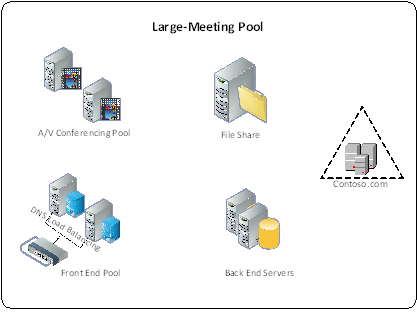
So what changed? Well, to summarize 10+ pages, you need to dedicate a Front End Pool just for large meetings. The idea is to create an environment where the server that will host the meeting will not have to share its resources with ANYONE or ANYTHING else and VIRTUALIZATION IS NOT SUPPORTED. There are strict topology guidelines for supporting large meeting and they provide a sample topology in the documentation.

Topology for a dedicated large meeting pool
Image

The idea is that you have a dedicated Front End Server, dedicated A/V conferencing server and a dedicated back end server. The reason 2 are shown per workload is simply for redundancy. If you deploy multiple front end servers, then you will have to plan for the required load balancing including Hardware load balancers for http traffic as appropriate. Archiving and Monitoring servers do not have to be dedicated for this pool. Keep in mind this topology will only support 1 large meeting at a time. If you have a need to support more than 1 large meeting at a time, then you will have to duplicate this topology. In my experience however, it has been uncommon to have more than one of these large meetings going on concurrently. Once the servers are set up, it is important to note that some specific conferencing policies must also be set in this pool to support the large meeting. Large meetings are not generally interactive events, so it is important to ensure that policies are in place to limit the load on the servers that are supporting the meeting. Settings like maximum video resolution and disabling application sharing will be very important if the server hardware is to appropriately scale.

Setting the user permissions on the meeting is also very important. The document outlines the settings for the defaults around meeting participants. Typically users within an organization are automatically presenters when they join an online meeting. In the case of a large meeting, generally you want everyone to join as a passive participant. So attendees should join as attendees only with their microphones muted. The organizer (who is the only user set up in the pool) then promotes whomever will be presenting and allows them to have 2-way audio.

The document has a number of suggestions around workflow, setting up a calendar for large meetings, workflow for accepting events and the process for using a moderator. I would say the prescriptively it is very thorough. Customers will not be able to replicate in entirety what is provided by a Worktank (for example), but the document goes a long way to try and show the level of detail that having a moderator requires and to in-house a meeting of that size, you require that kind of logistics.

User Experience

The last item to note is what the user experience is like when they join a meeting of 1000 users. The document publishes observations around the user experience as more users join the meeting and I am including their table here:

Time required for users joining a meeting with 1000 users

Media mix

Time to join A/V

Time to join data collaboration

Time to receive roster updates

Overall join time

1000 users using data collaboration, with 250 users using A/V

27 seconds

55 seconds

25 seconds

55 seconds

1000 users using data collaboration, with 750 users using A/V

39 seconds

62 seconds

43 seconds

62 seconds

1000 using data collaboration, with 1000 users using A/V

48 seconds

70 seconds

50 seconds

70 seconds


As you can see, if you are going to be using video and audio and your meeting has 1000 users, it can take over a minute to join the meeting and receive the slide content. This is relevant because generally, any hosted web service has a more streamlined join experience for these types of meetings. Its also important to ensure that the users understand that IM in the meeting is limited to Q&A only. The reason is explained in the FAQ that is provided at the end of the document. The key is understanding that for large meeting support, the servers need to be as focused on supporting the meeting as possible. Excessive IM traffic will impact the server load and subsequently could affect the user experience.

Overall Impressions

I am happy to see that the Lync team has been able to complete testing and provide prescriptive guidance on how to support meetings of more than 250 users. Again, in my experience, the number of meetings that are held of that size are normally not more than 10-15 a year. That is based on my experience in booking these types of meetings for a customer that had high Live Meeting usage in the past. I am a little disappointed to discover the overall impact to Lync in having large meetings and that it requires such a dedicated infrastructure. Organizations that decide to take this on should keep in mind the user experience as well and consider limiting the number of 1000 user meetings because of the possible negative experience.

The document is located here.
Posted in Uncategorized | Leave a comment

Plantronics Voyager Pro UC, it’s not just about softphone and mobile anymore

I have been writing up a bunch of Plantronics devices recently. Specifically, I have been highlighting some of the newer devices that I have been fortunate enough to work with because of my excellent relationship with the Plantronics team. Now that I am here in California and specifically working for Janalent as a Lync and voice integrator, it is critical to not only understand what the Lync device options are, but also have some experience in using as many of the devices as possible. The device I’m writing about today, the Voyager Pro UC v2 (otherwise known as the B230-M) is not a new device. However, I recently had the opportunity to add yet another way to utilize the headset that has made a direct impact to me personally.

A little about the Voyager Pro UC v2

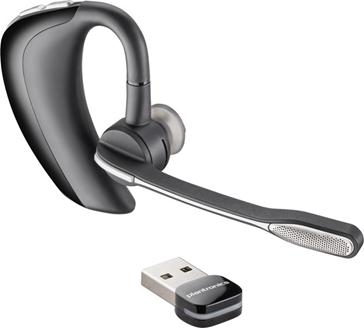
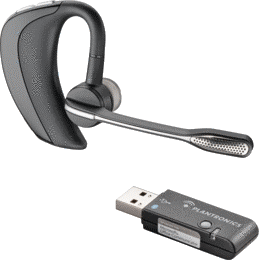
The Voyager Pro UC series of devices were originally available as part of the OCS Certified Devices. The obvious benefit of the Voyager Pro was that it would allow you to pair the device to BOTH a mobile phone AS WELL as your PC and subsequent softphone. Both devices came with a USB accessory that was important for getting the most out of the device. What is most noticeable as far as the original WG201 (Voyager Pro UC) versus the B230-M (Voyager Pro UC v2) is that there has been a major change to the USB accessory that is included

Image                            Image


The image on the left is of the original WG201, Voyager Pro UC. The USB accessory is larger and has a button to enter pairing mode to ensure that the headset properly pairs. What became apparent was that users that loved the headset would try to leave the key attached to their laptop and that would make for some unhappy folks because it either wouldn’t fit in the laptop bag or, it would wind up getting damaged in transit. Fast forward a couple of years and we now have the device on the right. The design is largely the same, but the USB key has been reduced to roughly the size of a dime. This solves the issue of transporting a PC with the key still plugged in. That makes a tremendous difference. It’s important to note that despite the fact that MANY notebooks come with available Bluetooth stacks, it is recommended that you continue to use the USB Key that is delivered with the Voyager devices. It makes it possible to get the necessary drivers to ensure wideband audio on your calls when using a softphone.

The v2 version of the Voyager also takes advantage of a number of advances in technology. The headset is smart from a standpoint of it doesn’t require you to push a button to answer a call. All you have to do when you have an incoming call, is put the headset on. Sensors in the headset detect that it has been put on and will auto-answer the call. Additionally, those sensors make it possible to “lock” the headset to ensure that when you aren’t wearing it, you won’t make any outbound calls.

Finally, a very helpful innovation is the ability of the Voyager to assist in updating your presence. If you are connected to OCS/Lync or Skype and a call comes in to your mobile phone, your presence will automatically be updated to reflect that you are busy on a call. That is a very helpful addition to the software to prevent you from having to fend off calls from your co-workers, if they are acknowledging your presence, you won’t have to worry about dealing with incoming calls to your softphone.

But What Else Can It Do

So the title of this article references additional capabilities of the voyager pro. Let me just say that I’m sure that we can probably use any headset for the functionality that I am going to describe. That said, since I have been providing reviews of Lync enabled devices, this offered me the opportunity to highlight the voyager pro UC while talking about some terrific functionality in our Panasonic Cordless phones at home. What has become a recent feature in cordless phones for home/work is that ability to support Bluetooth devices. That is to say, in the case of our Panasonic phone, we can pair 2 bluetooth devices (read, Mobile Phones) to the base of the Cordless Phone. That allows me to use the cordless handsets as devices for answering my mobile phone, if my mobile phone rings and isn’t immediately handy. The Bluetooth stack in the base ALSO makes it possible to pair a Bluetooth HEADSET to the base. So, rather than having to cart around the handset and deal with a corded headset with it, all you need to do is have a Bluetooth headset (such as the Voyager pro UC) and you will be able to answer an incoming call to your home phone. This is critical if you have folks (such as my spouse at home) who have neck/shoulder issues and cradling a phone on their shoulder will cause issues, but they need both hands free. In this case, I had a Voyager Pro UC that I received from Plantronics recently, and I gave that to my wife. She has become an instant fan and this has been a huge quality of life change for her since she spends a lot of time on the phone (the Voyager provides 6 hours of talk time) and I charge it every night so it will provide days of standby time if she isn’t on the phone.

What does this all mean

So bottom line, the voyager pro is a compact device that now is very compatible with the mobile worker. The new USB key makes it very transportable and of course the audio quality is outstanding as it is a certified device so it supports wide band audio. That said, the new sensors provide some conveniences in answering calls and the software makes it possible to properly update presence even when answering a mobile phone. MOST IMPORTANTLY, with Bluetooth enabled home phones, it acts as a headset for your home phone and allows for comfortable hands free without requiring you to carry a handset around. Overall, a very good device if you have an affinity for Bluetooth headsets.

Posted in Uncategorized | 4 Comments

Part 3 – New Year, New Devices

Recap

In the first 2 parts of this series, I extolled the virtues of the W440-M cordless DECT headset and then the Blackwire C435-M. Both are outstanding headsets and both have their place. Specifically, they both have their place in my laptop bag as my choices for both Lync and Skype as telephony devices. The final installment of this series of product reviews will be about the Calisto P240-M “handset” from Plantronics.

The Calisto P240-M

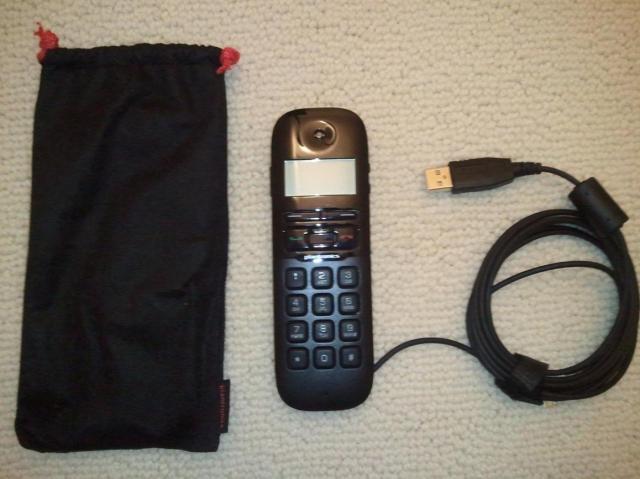
Plantronics recently released the Calisto P240-M. It is the well-designed successor to the P210-M (available for OCS) and competitor to the Jabra Dial 520. I am often asked why folks would want to use the form factor represented by this device. The answer is very simple, some users require the feeling of a handset form factor when making phone calls, but also want portability that they cannot get from a device such as the Calisto 540 or Polycom CX300. My personal reason for carrying this device in my bag is simple, it’s a small device that I put in my bag and leave there, and you can see below that the form factor and packaging are quite succinct:

Image

I leave it in my bag and those days that I am at the coffee shop and don’t have scheduled calls; I will plug this device in. Now I have a phone that I can use for those ad-hoc calls. Audio quality is great due to the support for wideband that comes with all of the Lync optimized devices and I am really happy glad to see some of the improvements over the P210-M.

Device Improvements

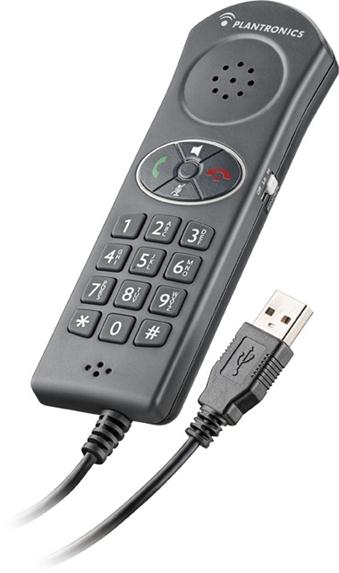
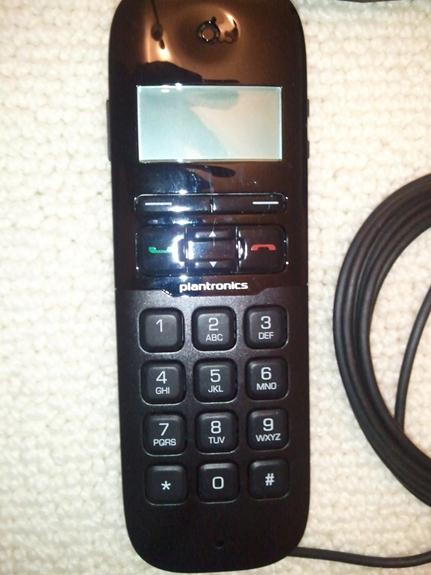
If you look at both devices side by side, some of the changes look pretty obvious (the P240-M is on the right)

ImageImage

You can’t tell from the pic I took with my WP7, but the new P240-M is significantly thinner than the P210-M. The biggest noticeable change is the addition of the LCD screen. The competing Jabra Dial 520 is a much smaller/thinner device from the P210-M and has an LCD display so the thinner form factor and LCD display are welcome changes. The P240-M also makes available a full-duplex speakerphone which is enabled by a switch on the side of the device. The opposite side of the device has volume control. The absence of the ringer switch is somewhat disappointing. I enjoyed being able to just switch off the ringer when I wanted some peace. Now you have to navigate some menus on the display to disable the ringer, not quite as convenient. I also enjoy the fact that the Plantronics device actually HAS a ringer. The Jabra Dial 520 doesn’t have a ringer. That was a significant oversight and was the reason I preferred the Plantronics over the Jabra, despite the size and screen.

This device was designed for the mobile worker so it goes without saying that its extremely convenient to carry. That said, the P210-M was also designed for the mobile worker and it wasn’t nearly as convenient to carry as the P240-M is today.

Operation

Using the P240-M is pretty straightforward. The phone rings and you answer it. There is a green button on the left to answer or take the phone off-hook and a red button on the right to hang the phone up. It’s a familiar interface seeing as it has been used on cell phones for the last 15 years. The action buttons right underneath the LCD are to navigate the menu for controlling ring volume and other options and there are up/down buttons to assist in navigation as well. As I have stated, audio quality is good of course because it is a wideband audio device. The only caution I would make is that long phone calls could get uncomfortable since you are holding this device up to your ear, but it wouldn’t be any more uncomfortable than your mobile phone. If you are a pacer on long calls (like me), then you might get some anxiety if you are on a long call with the P240-M since you are tethered to your PC. However, I am a big fan of using the right device for the right call. If I am going to be on a long call, then I want either the Backwire 435-M OR the Savi W440-M. I would prefer the 440-M since I am a pacer, but there is the off chance I have a battery issue in which case I would go to my “steady always ready” wired headset.

Wrap-Up

The P240-M is not going to be the device for everyone. I know that this form factor has been popular in Europe and as a mobile worker, I am pleased with the form factor. I am grateful for the design changes that went into the P240-M, the thinner form factor and LCD screen are great additions and I like the speakerphone capability as well. I am disappointed in not having the ringer on/off switch, but that isn’t stopping me from carrying this device. I would prefer to have a ringer than not.

If you find yourself working from ad-hoc locations like coffee shops/bookstores/local supermarket and don’t like having to rely on a headset for simple ad-hoc calls, I would contact your Plantronics representative and take this device for a spin. I think you will be very happy.

Posted in Uncategorized | Leave a comment

Happy New Devices – Part 2 (the Plantronics Blackwire C435-M)

Recap of Part 1

In Part 1 of this series, I spoke about the benefits of using Lync Optimized devices and why it is important to use quality devices. I then continued and provided an overview and review of the Plantronics W440-M cordless DECT headset and why it is high on the awesome meter. It is portable with good range and accessories such as spare batteries that are hot swappable to provide the battery life that information workers require.

Part 2, the Blackwire C435-M

A word about Corded headsets

I will now switch gears and talk about a new corded headset that I received. I have gone through multiple iterations of devices through my bag over the last 5 years. Since my previous role in sales for OCS/Live Meeting and into Lync, I have been fortunate to have the opportunity to sample a number of devices. Customers would frequently ask me about what devices I use every day. As I mentioned in my previous post, I was a loyal fan of the Jabra 9350 but it has since been usurped by the W440-M as my favorite cordless device and I have since given my 9350(s) away. The problem with the Jabra 9350 is that it wasn’t portable. That required me to have an “everyday” type of device for when I was away from my home office. As I said previously, I was never a real fan of Bluetooth (BT) headsets with OCS/Lync so that left me with corded devices. When it comes to corded devices, the mobile professional is generally left with 3 options:

  • Corded Headset
  • Corded Phone/candy bar “style” devices (such as the Jabra Dial 520, Plantronics P210-M and the Calisto P240-M)
  • Speakerphones

It is the first item on the list that I will be discussing here. Corded headsets generally come in 2 styles, Mono and Stereo. My personal preference has been for mono headsets when dealing with telephony headsets. Additionally, “optimized for Lync” continues to be critical to ensure that drivers and device quality are maintained. There is no excuse for not using an “optimized for Lync” headset. Travel “pouches” were typically included with the headsets to attempt to easy the portability of the device when it is “tossed” into a laptop bag. Some headsets continue to offer a pouch for travel. I’ve been ok with that, but those pouches don’t necessarily protect the headsets from abuse inside of the laptop bags that carry the headsets. A tougher case could provide a safer environment for the headset when in a bag that could take abuse. Especially considering what travel is like these days.

The C435-M

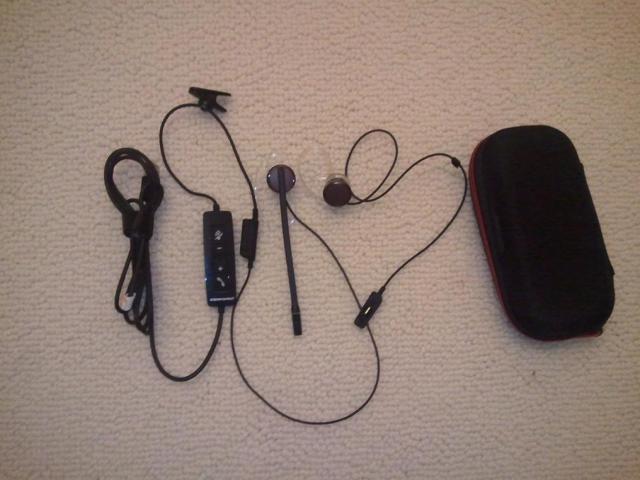
The Blackwire line of headsets from Plantronics represents 4 different lines of headsets that have been optimized for Microsoft Lync. The Blackwire C435-M is my first hands on experience with a Plantronics Blackwire headset. I’ve had the opportunity to sample numerous other devices from Plantronics and with few exceptions, I have never been disappointed. The C435-M comes in very small and simple packaging. The reality is that the headset doesn’t require much packaging. It is extremely straightforward:

Image

The C435-M comes with the headset, interchangeable ear pieces and a travel case.

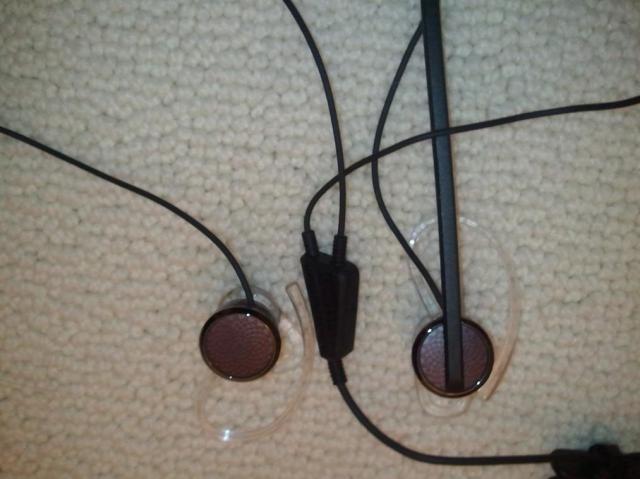
The headset has an interchangeable configuration that allows for either a mono or a stereo connection. The headset comes from Plantronics in a stereo configuration. However, the junction where the ear buds connect allows you to disconnect the ear bud without a microphone to put the headset in a mono configuration.

Image

Image

When you disconnect the junction, there is a cover that allows you to have a mono configuration and protect the junction from exposure to the elements.

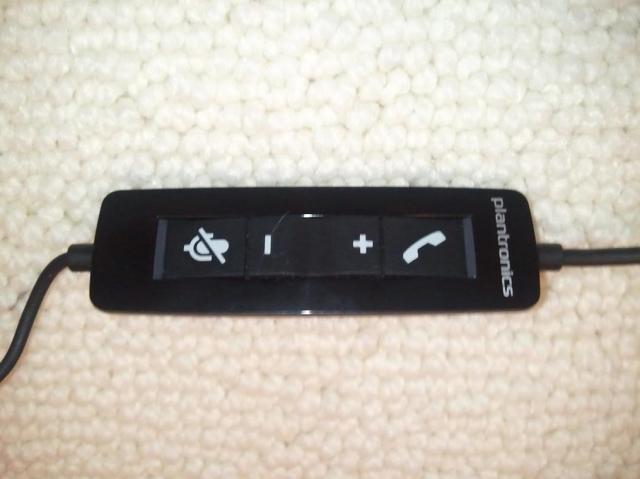
The call controls are available in-line. The standard controls are available, volume control, mute and hang-up and call control (hang-up and connect). This headset has controls that work across any softphone. The call controls have visible light indicators so that you get visual cues as to whether the line is muted and when the line is open. I had the opportunity to utilize this headset with both Lync and Skype. I was pleasantly surprised to see that all of the call controls were available in both softphone applications.

Image

The audio quality of the C435-M was outstanding. Audio quality was terrific in all calls. That is to be expected since the C435-M supports enhanced wide-band audio. Phone calls in Lync and in Skype sound outstanding, even when making calls to the PSTN. The over the ear design of the ear bud makes it inconspicuous when making video calls. I was very impressed with the audio quality both for music and for phone calls. The interchangeable ear cushions give options for different ear sizes.

Conclusion

The Blackwire C435-M is an outstanding headset. I was impressed from the time I opened the package to the time that I used it for my first call. As I have said before, Plantronics gets the mobile worker and the carrying case for the 435 is really helpful and outstanding for travel. It is my new favorite corded headset and is now travelling with me in my computer messenger bag which is saying something because I have been travelling with a Jabra Biz 2400 for the last 2 years and have been endorsing it to customers for some time. I have now been telling my customers that I have replaced it with this headset. I truly have been converted.

It should be noted that folks who aren’t happy with ear bud design headsets should likely review another Blackwire headset. Plantronics has 4 different lines of Blackwire headsets, the C435-M may not be the one for you. If you are able to handle the ear bud design of a headset, then I cannot recommend this headset enough. Information workers using Skype or Lync can truly benefit from the flexible design and the extremely portable design. If audio quality is what you look for both for softphone and music, the C435-M is definitely for you.

Posted in Uncategorized | 2 Comments

Happy New Year and new devices!!!

Welcome 2012

Its 2012 and we at Janalent are looking forward to a very happy 2012. We are already off to a great start and looking forward to continuing to help our customers with migrations to Exchange 2010, Office 365 and (most near and dear to my heart) Lync. I have been having more and more conversations with customers about Lync and voice and many cynics (and cisco/avaya supporters) out there will say “it’s just talk, nobody will move to Lync for voice”. Let me be clear, these customers are setting themselves up to be able to transition to Lync for voice. There are a number of reasons why, and this posting isn’t going to go into details on that. However, feel free to contact me at sam.cavaliere@janalent.com and I will be happy to explain why my customers are looking at Lync for voice. In the meantime, as these customers continue to look at Lync for voice, or even for conferencing, I cannot stress enough the importance of having a good quality Lync certified device to use for audio and video.

Lync Certified Devices, does it really matter?

I have been asked on several occasions both in my new role here at Janalent and in my previous role in sales “seriously Sam, a headset is a headset right?” In this case, the answer is absolutely not. It’s not that simple. Unless the device displays this logo:

Image

You cannot be sure that you will get the best experience from the device. What that means is that you will likely not experience the rich sound from wideband audio and RTAudio support. It also means, that you can’t count on the device to have the support for muting and call control that users have come to expect with their devices. Take your standard BT headset. Many folks will try to pair it with their laptop since many laptops come with BT support these days. That’s fine, but what is the point of having a wireless headset if you can’t tap the control button to answer a call, or mute the headset. BT devices (such as the Plantronics Voyager Pro UC 2 found here) that have been optimized for Lync will not only be able to provide call control, but will likely have the capability of ranges beyond what the laptop BT stack can support.

The reality is Microsoft recognized that while it is important to have as large a variety of devices as possible, it is also necessary to exercise a level of control over the experience to ensure that customers have a consistent experience regardless of the type of device that is in use. Devices bearing the logo above have been put through rigorous testing against some strict requirements and ultimately, need to be produced by partners that are in this for the long haul.

So enough about that, I’m actually here to brag about some new devices I had the opportunity to play with J

Ho ho ho, Plantronics drops some gifts this year!

I need to provide a call out to my partners at Plantronics. They have consistently supported my efforts over the years and have been a very close partner, constantly supporting me through devices to provide my customers and my colleagues the best experience with OCS and now Lync. So first, Happy New Year and Happy Holidays to John Gillespie and Debbie Bukosky over at Plantronics!!! You all have been outstanding partners and I look forward to my continued partnership with Plantronics in working with my customers on new Lync deployments.

This will be my first public review of some of products like this and I have some really great products to talk about. I can tell you that the overall theme you will see is that Plantronics GETS the mobile information worker. They realize that folks are now VERY mobile and need to have devices that are easy to travel with. You will see what I mean as I go through the devices. Today I will be reviewing the following devices (and please forgive the photography from my WP7):

Plantronics Savi W440-M

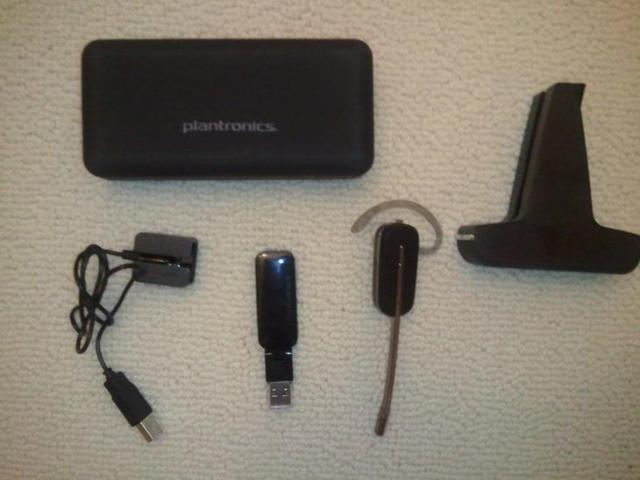
The Plantronics Savi line has been available since OCS . I can’t say that I was a fan of the Plantronics Savi line of headsets before. I had a previous bad experience while testing another Savi headset and so when it came to a cordless headset for my office, I had been a faithful user of the Jabra 9350 headset. That said, my friends at Plantronics told me I had to try this new headset and they sent me one. I can now say that they have won me over in the wireless headset department. The W440-M comes with a simple set of gear:

Image

Included in the package were:

  • Desktop charging stand
  • Headset with interchangeable earbuds (there is an optional behind the neck or over the head band for this headset)
  • USB adapter
  • USB charger
  • Travel case

Note what I listed there. A USB charger and travel case. In the past when I have tried to do the wireless headset thing and travelling, I often ran into a couple of problems:

  1. The headset didn’t have any range
  2. Inevitably the battery would die on me and then I was out of luck.

Plantronics addresses both of these issues in a number of ways.

Range, it isn’t just for desktop headsets anymore

Folks who deal with headsets every day know that the range for a Bluetooth headset just doesn’t do it. The range is generally fine for a mobile phone because the phone is in your pocket all the time or somewhere close to your person. With a desktop headset though, your PC will sit in one place and you want to walk around. Bluetooth, with its roughly 10 meter range limit (and who really gets 10 meters), just doesn’t do it when you are not driving your car or using your mobile. Office environments require DECT and a quality DECT headset. This is a quality DECT headset. The range is measured in hundreds of feet. This is big for both office environments as well as home workers. Even travelers can take advantage of this because you can now walk away from your desk in the hotel without having to end your conversation or worry about static.

Portability

As I said, the theme here is that Plantronics GETS the mobile information worker. The USB Adapter is responsible for the DECT signal and since it is USB, its fully portable. Additionally, Plantroinics provides a USB charger so that when you aren’t in the office and cannot use the handy desktop charging stand, you can still charge your headset. This is very convenient for folks like me who enjoy the freedom of cordless, but need something that can be easily charged while I am on the road. Finally, the handy portable case provides the perfect accessory to make this device the portable device we need it to be. When I’m packing to head to the airport, I unplug the USB adapter, grab the headset out of the desktop charging stand, I put them both in the travel case (which already has the travel charger) and throw it in my bag. It takes up little space and so it’s a perfect companion.

But what about battery life

So I mentioned before that in addition to range issues, my concern with a wireless headset is that I wouldn’t know that the battery was going to die on me until after I lost the call. That only needed to happen to me one time and I stopped using wireless headsets with my PC when I was mobile. When I was home, my desktop wireless headset had an indicator to show me what the battery situation was. The issue with portable wireless headsets is that if you are wearing it, you can’t tell what the battery situation is. Plantronics has addressed this 2 ways. The first way (and common way) is to allow for a spare battery that can be hot-swapped out. Jabra has provided this in the past with their 9350. Plantronics offers this with the Save W440-M and it is a terrific option. However, without a battery life indicator, you don’t know when to swap batteries out. Plantronics provides this through additional software that is added to your PC. The Plantronics Battery Status application gets installed on your PC and provides a display of the current battery status of your headset:

Image

If that was not enough, there is an optional second battery (I personally do not have it at this time). The way I have seen this work in the past, you can charge the second battery while using the headset and when you get to a low-battery situation, you can swap batteries without losing the call. I haven’t tried that with this device yet since I do not yet have a second battery. I have no reason to believe that the experience would be any less than perfect.

Audio quality and Interoperability

Finally, there really isn’t any point in using a headset of the audio quality isn’t there or it only works with one application. I’ve already addressed audio quality earlier in this posting. By definition, this headset will have outstanding audio quality. Not just because it’s a Plantronics, I have never really had a BAD Plantronics headset. Not just because of the noise cancelling microphone. Just because it has been certified as optimized for Lync. That by itself means the product has been tested to death and then tested again to ensure that audio quality is there to be able to display the logo. Its important to note though that this quality is not just limited to Lync only. The support for wideband goes beyond Lync. I am now a heavy skype user and I don’t want to have to switch headsets depending on which softphone application I am using. This headset works for either Lync or Skype flawlessly. The ‘M’ in W440-M indicates that it has been optimized for Lync and as such, you won’t have to worry about finding drivers for the device to work with Lync. It will be plug and play. That said, if you ARE going to be using this device with other softphones (like Skype), then I would suggest downloading the Plantronics software and installing the softphone support you require. As I said, I use for Skype and I have been EXTREMELY happy with this device.

Price

The Savi W440-M is a fairly pricey headset, but most quality cordless headsets are. The MRSP is $279.95, which is a far cry from the $399.95 that the W740-M (older brother of the W440-M) costs. However, a quick search online showed that you can reasonably expect to purchase this headset for under $200 (I found it at B&H Photo for a little more than $160 or at Buy.com for the same). So, you can find this headset at a reasonable price.

Conclusion

I give the W440-M, 2 MAJOR thumbs up. The reality is that since I was provided this headset some 2 months ago, I have carried it in my laptop bag no matter where I have gone. It is convenient, it is reliable and that audio quality is outstanding. Funny thing was I had presumed that I would never carry another corded headset in my bag until the C435-M which I will be reviewing in part 2 of this posting. I’ve used my W440-M religiously for several months now and it has traveled to Mt Rushmore, Bryce Canyon, the Grand Canyon, Vegas and the travel case keeps it very well protected. This is a winner in anyone’s book. Let me know what you think, either here or on my feed @MFDSam

Posted in Uncategorized | 1 Comment

Lync Mobile is here!!!

It has been a long journey and it has been a long wait, but today Lync Mobile for Windows Phone 7 made its debut on the marketplace today. This is a great day as Microsoft’s mobile strategy has been contingent on getting the mobile software launched.

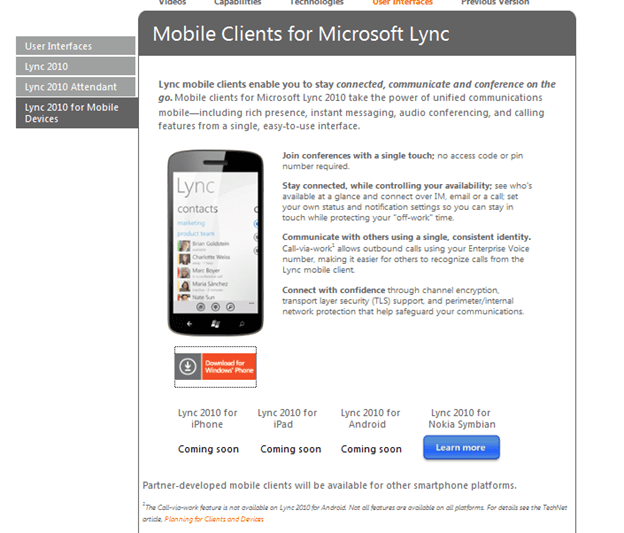
Microsoft created a page as part of the Lync product site related to the mobile clients. That site has hyperlinks to the different mobile products and right now the only one available is for Windows Phone. That site can be found here. I for one am waiting patiently for the iPad client as I am currently using Xync from Damaka and would love to see the client from Microsoft. The last time I looked at the native iPad client, it was an internal dogfood and was very exciting. So I look forward to seeing what is coming next!!!

Image


Image

What’s in it?

The real question is “what will the mobile client’s support”? That is a truly loaded question. What is important to understand is that VoIP, Video, Video Conference and conferencing content will not be displayed in the current clients. More details on that is available in the technet documentation for mobile clients here http://technet.microsoft.com/en-us/library/hh691004.aspx.

How do we make it work?

The NextHop team has published a terrific article that talks about how to find information on the mobility server updates in CU4 and the mobile clients here http://blogs.technet.com/b/nexthop/. It isn’t as simple as just connecting the client and go, there is a little preparation that will be required for your organization. That is a good thing.

If you are a Lync Online customer (like I am), you will also have to make an infrastructure change to support mobile clients and specifically the Lync Mobile client for WP7. The office365 team has published an article that specifically calls out the DNS change that will be required to support Lync Mobile clients. Internally at Janalent, we had to make the necessary DNS changes ourselves to support Lync Mobile and now I can say that we are happy Lync Mobile users.

More Information

I know that ITPros want as much information as possible. There is an update protocol and port poster available from Microsoft with the details around the mobility server and mobile clients.


Hope you find the information useful. Follow me on twitter @mfdsam for additional Lync information.

Posted in Uncategorized | Leave a comment

Relocating to California

This is the first chance I’ve had where I can write about the trip and I’m not totally exhausted. We finished packing up the house on Tuesday and have been on the road since Tuesday night. We left Madison, NJ in the afternoon and began the trip west. Unfortunately, we didn’t get very far. There was way too much traffic because it was rush hour. That put a huge damper on how far we thought we would actually get. Once the traffic died down, we were able to give it another shot and got back on our westward trek. After driving for about 5 hours, we stopped on the PA, Ohio border for the night. The goal was to get to Chicago by Wednesday. As it turns out, one of Victoria’s best friends was celebrating her birthday, AND she happens to live in the Chicago area.

First thing Wednesday morning we crossed into Ohio. After spending a couple of hours on the road, we found ourselves going through Sandusky, OH.

Image

Sandusky, OH has a couple of claims to fame. First, as pointed out to me by one of my colleagues at Microsoft, Sandusky is where Callahan Brake Pads are manufactured back in ‘Tommy Boy’. The second and less fictional claim to fame is that it is the home of Cedar Point, ‘the roller coaster capital of the world’.

It was a pretty long drive Wednesday, we crossed through Ohio, Indiana and into Illinios where we finally stopped in Chicago. We did a small amount of sightseeing. The fact is it was really windy, cold and wet, but we needed to see some of Chicago as I have never been there. So, we have the angry Lake Michigan:

Image

The downtown:

Image

Soldier field

Image

Wrigley field

Image

And more of Lake Michigan

Image

Today we have been able to get through Illinios, Wisconsin, Minnesota and crashed for the night in South Dakota. More pictures to come soon!!!


Posted in Uncategorized | Leave a comment

Hey Madison, Remember to “Stop and Smell the Roses”

Wake Up, Madison

Madison, it’s time to take a step back. The “Rose City” needs to take a moment and step away from the negative criticisms and comments and take a moment to “smell the roses”. Madison is one of the most amazing towns I have ever had a chance to live in, and while it is always nice to strive to improve, the climate has gone from one of constructive improvement to one of complaining. That really doesn’t help anyone. After reading through a lot of comments that are in different articles on the Madison Patch and reviewing all of the rhetoric that accompanies upcoming elections, I have decided that I wanted to take a moment and write about everything that is amazing about Madison. I feel I’m in a unique position to start this conversation as my family and I are preparing to relocate from Madison to San Diego, CA. We are looking forward to the opportunity (and weather) that is offered to us with this move, but we also lament that Madison is our home and we will miss it.

Image

Brief Background

My wife and I moved to Madison back in June of 2001. We both have lived in a number of places, my background is in NJ where I grew up (Byram Twp) and I have lived in Harrisonburg VA, Baltimore MD, Ponte Vedra Beach FL, Montclair NJ and West New York NJ. I knew nothing of Madison before we moved here. We just knew that the train was convenient and we had been told it was a great place to live. Little did we suspect how involved we were to become.

What’s So Special

So, what’s the point right? Well, really this is the heart of what I’m talking about. Everyone has their own reasons for why their town is so special, I feel very strongly about why Madison is so much better than all of the communities surrounding it. We could have easily moved to another town and afforded a larger home, or newer home, or what have you. Reality is, nowhere else is there a place like Madison. What is it that makes Madison so special? Let me try to articulate at least some of what I feel makes Madison stand out

Image

The Obvious

So there are the obvious things that make Madison stand out:

  • The schools – As a former member of the BoE I am proud of this. Madison consistently has highly rated schools. That is not by accident and doesn’t come cheap. It requires a combination of time, money and expertise. What can’t be lost here is that if you remove one of those three, the other 2 will be impacted. That means that if school funding continues to decline, then ultimately it has to be made up by the time of parents and volunteers and the expertise of the volunteers, parents and staff. Even that may not be enough and ultimately, our schools (and children) will suffer.
  • The commuting options – this is also obvious. Madison is blessed by being on the train line with direct trains to Penn Station and Hoboken. We also have a significant amount of parking available, but that is assuming that you aren’t in a situation where you have the ability to walk or bike to the train which really covers a large portion of town.
  • Downtown – Who wouldn’t love the downtown environment? Madison has a main street that can be the envy of most towns. There are an amazing number of restaurants of all types of ethnicity, a museum, 2 supermarkets, a bowling alley, comic book shop (who doesn’t like comic books, really), car dealerships, live music, 2 coffee shops (including one that is a much better alternative to starbucks), a movie theater, Candy shop, cupcake shop, toy store, 2 veterinarians, and the list just goes on.
  • The Library – Madison has its own branch of the county library that has such a huge variety of content and such amazing resources. Its truly a gem in a gem of a town.
  • The Recreation programs – Lets face it, Madison is a great place to raise kids. I’ve mentioned the school, but when you look at all of the recreation programs, it’s just amazing. The Madison Soccer Club in fall, to the Madison Little League in spring, to the Summer Musical. There is no shortage of involvement or options for kids (and parents) to participate. I for one have had the opportunity to coach tee ball as well as soccer and I am happier for it. Especially when my daughter comes to me asking if I will coach her team again.

The Not So Obvious

I think there are a LOT of things that we (the citizens) take for granted and I feel requires some reminders:

  • The Fire Department – ok so this is self-serving as I am a proud member of the Madison Fire Department. Madison has paid professional firefighters around the clock keeping citizens of Madison AND neighboring towns safe. They are joined by a dedicated group of volunteers that are trained just like their paid counterparts and are prepared to risk their lives for their neighbors. This is a group that is always looking for volunteers so give it some thought and contact Chief DeRosa. That said, what is often overlooked is that the fire department provides a number of services (such as basement pump outs, smoke detectors for seniors and others) that are simply overlooked.
  • The Police Department – The Madison Police are tasked with keeping Madison safe and lets face it, Madison doesn’t have the kind of crime that a LOT of other communities might deal with. That doesn’t happen by accident. These are dedicated officers who have a tough job and if you stop and talk to them, they always have a good word for you.
  • The Ambulance Corps – A dedicated group of volunteers that are always available to medical emergencies (joined by the Fire Department) and do so at NO CHARGE to the community. They operate on donations, how great is that in a time when many communities are having to outsource to paid services and increase taxes to cover the charges.
  • The lighting department – When you consider that many towns that surround Madison had their power out for more than a week after the hurricane hit, does it really need to be said that our local crews managed to keep power outages in town to a minimum. This is a benefit that I think gets taken for granted way too much.
  • The Public Works team – Are you starting to see a theme here? The reality is that Madison’s taxes are ok compared to other towns when you consider that we have the public works team keeping the town beautiful, ensuring that the water is flowing, and more. They respond to emergencies in a pretty timely fashion and they are all local. They have a vested interest in their jobs because they are our neighbors and live here too.
  • The sense of community — Something that is lost in the hustle and bustle of today’s daily life is a sense of community in many locales. Everyone is so busy with work and trying to keep things going in a tough economy that many towns simply don’t have the time for community. Madison doesn’t have that problem. There is a tremendous sense of community that I don’t see matched in too many places. There is tremendous volunteerism, in the schools and in the different civic organizations and there is no shortage of volunteers. This is the kind of place where neighbors look out for neighbors and in today’s times, we all need that comfort of knowing we aren’t alone.
  • The Arts – Is there a place that supports the arts more than Madison? I met the president of the NJ Jazz Society one night at Hibiscus in Morristown and when I mentioned I was from Madison, she couldn’t say enough about how the Jazz Society looks to Madison and specifically MACA as a partner. Wow, that’s quite an endorsement.
  • Grace Church – So I’m going to make a plug for Grace Church. I don’t have anything against any religion, but what has made Grace so amazing is that beyond what my family gets spiritually, is the community and what has been taught to my kids. The choir program there for children has given my daughter more than I could possibly hope for and Dr. Anne Matlack is a treasure. My daughter sings and has confidence that I could only hope for in an 8 year old and it’s because of the opportunity offered by Grace in their choir program. So I’m including it here.

I could continue all night, but I think I would rather see a comment from readers about what YOU think is great about Madison. We have elections coming up and there is a lot of talk about all the things that need to be fixed. I’m not saying there aren’t things that need to be done better. I know there are, heck, I could probably put up a different list of those items. I am just suggesting that at the same time, we need to remember that we are a community and that local politics shouldn’t have room for partisan nonsense. We should be united as a community in celebrating how great the town is and trying to come together on what the priorities should be. I suppose that is where the rub is. Folks will gravitate towards other folks that agree with their priorities. That’s fair, but let’s try to keep to the facts and the issues then, remember that we live in an amazing community (one that I will miss immensely), and keep the discourse civil and on point.

Image

Thank you Madison for 10 amazing years. The Cavaliere family will miss you.

Posted in Uncategorized | 4 Comments

Return to Key West!!!

So after a hiatus of just WAY too much time, the family and I have been able to take the time to come back to Key West. It really is my favorite place to vacation (within reason) because the general mood here is just such a welcome change compared to the hustle and bustle of the New York Metropolitan area. I’m now on the plane back to NY and wish I wasn’t. I know everyone says that, but I really would just prefer to stay at this point and simply figure out how I would make my living, but alas, having responsibility for a family comes first. So Key West, we will be back, someday forever, but for now, its back to our home where (incidentally) it has snowed another 4 inches *YUCK*.

Hate to say “I told you so”…..

Image

So, a little less than 3 years ago, I opined on the fact that “the Blond Giraffe” had sold out, or got greedy or whatever, but the bottom line was that the blond giraffe had made some significantly BAD decisions around their Key Lime pies. Ultimately, what I said was that the Blond Giraffe was now peddling “just another pie”. Well sometimes I hate to be proven correct, but we came to Key West to find that indeed, the Blond Giraffe was no more. All of their retail locations have closed and now the ones out on Duval Street and downtown have been taken over by the new reigning king of Key Lime in the Keys, Kermit’s Key West Lime Shoppe.

Image

As I understand it, there is a “Throwdown with Bobby Flay” episode coming in March, I will be interested in seeing that. I haven’t had a chance to have any of Kermit’s pie as of yet so it is premature for me to comment. I do consider myself a bit of a Key Lime pie snob, so don’t think I will go easy on these pies. I am looking forward to making some pies with the limes from my father-in-law’s key lime tree the next time I am down and I’m willing to put my pie up against anyones J. As Jimmy Buffett said in Fruitcakes (regarding Pizza, but the concept still holds), “….the secret’s in the crust”.


The people of Key West are just AWESOME

The week was full of some terrific experiences. My family and I were up for Sunrise (more on that later) and during the week, my wife and I had the opportunity to do yoga on the beach twice. Let me tell you, it was amazing. A more relaxing atmosphere for yoga, I’m not sure can be found. Having said that, during the family trip to the beach, I lost my phone. I am currently a user of the Samsung Focus running Windows Phone 7. It’s an amazing phone, I love it as do my kids and losing it was horrible. If for nothing else, but because buying a new one would set me back more than $400. When I realized it was gone, though, I realized that the tools to retrieve it were all there for me. First thing I did was log into http://windowsphone.live.com. Since I had paired my phone with my live ID, I had the ability to do all kinds of things to the phone FOR FREE. I checked to see if I could GPS locate the phone. Unfortunately, the GPS hadn’t been updated in an hour, so it was safe to say the phone had been turned off. Next, I did the best thing I could, I used the LOCK feature to lock the homescreen of the phone, but at the same time, I went ahead and provided a message that included my email address. Well, I received an email later that afternoon from the folks that clean the beaches in Key West. They had my phone and provided me a contact name and number so I could retrieve my phone. As it turns out, they find phones on the beach ALL of the time, but rarely get to return them because despite the newspaper ads and craigslist ads, nobody ever claims the phone. In this case, having the email address on the screen made ALL of the difference. Nice story, huh.


Finally, shameless plug…..

So in closing, I wanted to shamelessly plug my photo site http://www.scavalierephotography.com. I have just posted pics from Key West up there and would love to get feedback on those as well.

Posted in Uncategorized | Leave a comment

More on Key West

On the back of my last post where I comment on how the Blond Giraffe has effectively sold out and now uses Graham Cracker crusts, I thought I would put some additional information up on my trip to Key West.  My best friend Bill Matlock and I took some well needed "break time" and visited my father in-law down in Key West.  Bill and I went to college together and he and his family live outside the Beltway in Virginia.  My Father In-Law Jimmy was glad to have us.  He lives down in Key West and is full of some great old time Key West Conch stories.  Its terrific.  He and his family owned a restaurant for more than 30 years called the Hickory House on Stock Island.  Now he is retired and was the PERFECT host for us for the 5 days we were down there.  It was a Mini Season for lobster so we spent 3 days diving for lobster and 1 day golfing before taking the last day to unwind and travel home.
 
Have some pics I’m including here. Can’t wait to get back down to see him again and it was awesome to spend time with Bill.

ImageImageImageImage

Image Image
Image Image
Posted in Travel | Leave a comment