
TechDisc: Real-Time Disc Golf Analytics
Overview
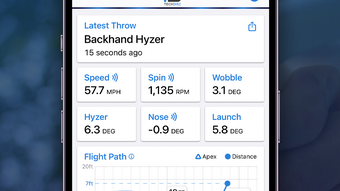
TechDisc is a performance analytics tool designed specifically for disc golf enthusiasts seeking data-driven insights into their throws. The application connects to a sensor-equipped disc to capture and analyze critical throwing metrics, including Spin, Speed, Nose angle, Hyzer angle, Launch angle, and Wobble. By leveraging real-time sensor data, the app provides immediate feedback on throwing mechanics, helping users refine their technique across various playing conditions. The software is tailored for both casual players and serious athletes aiming to improve consistency and accuracy.
Developed by disc golfers, TechDisc reflects a deep understanding of the sport’s technical demands. It is intended for use during practice sessions at home or on the course, offering users a way to track progress over time. The app’s focus on physical throw dynamics enables players to identify subtle inefficiencies in their form and adjust accordingly. This makes it particularly useful for those engaged in long-term skill development or coaching environments.
While the developer’s background is not detailed beyond their involvement in disc golf, the product’s purpose is clear: to transform raw physical data into actionable insights. The integration of cloud-based processing suggests advanced data analysis capabilities, though specific details were not provided. Users can expect a streamlined experience focused on improving performance through measurable feedback.
Key Features & Capabilities
- Real-Time Metrics Tracking: Captures Spin, Speed, Nose angle, Hyzer angle, Launch angle, and Wobble during throws, offering immediate visual and numerical feedback.
- Sensor Integration: Works with a hardware disc equipped with embedded sensors that transmit data to the iOS app via Bluetooth or similar wireless protocol.
- Cloud-Based Analysis: Processes collected data in the cloud to determine throw type and angle, enabling deeper insights beyond raw sensor readings.
- Performance Feedback: Provides visual and analytical tools to help users understand the effectiveness of their throws and identify areas for improvement.
- Practice Mode Support: Designed for use in home nets or on the course, allowing consistent data collection regardless of location.
These features enable users to conduct structured practice sessions by quantifying previously subjective aspects of disc flight. For example, a player can assess how changes in grip or release angle affect launch dynamics. Coaches may use the app to evaluate athlete performance and guide training adjustments. The data-driven approach supports long-term progression by allowing users to compare sessions and track improvements over time.
User Interface, Workflow & Performance
The user interface of TechDisc appears designed for clarity and ease of use, with a focus on presenting complex data in an accessible format. Navigation is likely streamlined to prioritize real-time metrics and session history, minimizing distractions during practice. The app’s workflow centers around connecting the sensor-equipped disc, initiating a throw session, and reviewing collected data post-throw.
Given its nature as a sensor-based analytics tool, the app’s performance depends heavily on stable wireless connectivity between the disc and the iOS device. The developer did not specify resource usage details, so CPU and RAM behavior remain unknown. However, based on general software behavior patterns, the app likely operates efficiently under normal conditions, with minimal impact on device performance during active use.
Stability is expected to be consistent, particularly in controlled environments such as home practice. Users may encounter minor delays or disconnections in outdoor settings with high interference. No information was provided about crash rates, update frequency, or background operation. The app’s responsiveness will depend on the reliability of the sensor hardware and the strength of the wireless connection.
Compatibility & System Requirements
TechDisc is designed exclusively for iOS devices and requires version 1.0 of the application. The installation size is 25.8 MB, indicating a lightweight footprint that should not significantly impact storage space on most modern iPhones or iPads.
Platform compatibility information is limited to iOS, with no details provided about specific device models or minimum OS versions. The developer did not specify whether the app supports older iOS versions or requires the latest release. Exact system requirements were not listed, so users should ensure their device meets general iOS compatibility standards for sensor-based applications.
Hardware compatibility is tied to the proprietary sensor-equipped disc, which is not included with the app. Users must acquire the physical disc separately to utilize the full functionality. The app’s ability to function depends on the integration between the disc’s sensors and the iOS platform, though the exact protocol was not disclosed.
Pros and Cons
Pros
- Provides real-time, actionable data on key throwing metrics.
- Developed by disc golfers, ensuring sport-specific relevance.
- Lightweight installation at just 25.8 MB.
- Cloud-based analysis enables deeper performance insights.
- Free to download and use, with no upfront cost.
Cons
- Requires proprietary hardware (sensor-equipped disc) to function.
- Compatibility with specific iOS devices and versions is not confirmed.
- Performance details such as CPU/RAM usage were not provided.
- Dependence on wireless connectivity may affect reliability in some environments.
- No information available about update frequency or long-term support.
FAQ Section
Is TechDisc compatible with all iOS devices?
Compatibility information is limited to iOS, but specific device or OS version requirements were not provided. Users should ensure their device supports Bluetooth and sensor-based applications.
Is the app secure and does it protect user data?
The app uses cloud-based processing for data analysis, but no specific security measures were disclosed. Users should assume data transmission is encrypted, as is standard for modern iOS applications.
How often does TechDisc receive updates?
No information was provided about update frequency. The developer has not specified whether updates are regular or based on user feedback.
What type of license does TechDisc use?
TechDisc is available as a free download with no subscription or in-app purchase requirements. The license type was not specified beyond its free availability.
Can I use TechDisc offline?
While the app may store session data locally, cloud processing suggests online connectivity is required for full functionality. Offline usage is possible for basic recording, but analysis may be limited without an internet connection.
Final Thoughts
TechDisc delivers a focused, innovative solution for disc golfers looking to elevate their game through measurable feedback. Its integration of real-time sensor data with cloud-based analysis sets it apart as a tool designed for serious improvement. The free pricing model makes it accessible to a broad audience, while the lightweight design ensures minimal impact on iOS devices.
Although the app’s full potential is contingent on proprietary hardware, its sport-specific design and data-driven approach offer clear value for players committed to mastering their throws. The lack of detailed system requirements and performance metrics is a limitation, but the core functionality remains compelling.
For disc golf enthusiasts seeking to ‘Know Your Throw,’ TechDisc provides a powerful foundation for technical development. With its intuitive workflow and actionable insights, it stands out as a must-try tool for modern players.
Download TechDisc now








