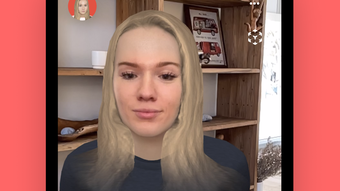

Tele: AR-Powered Group Video Chat
Overview
Tele is a mobile application designed for immersive, group video communication using augmented reality (AR) technology. Developed by Spatial Systems Inc., the software enables users to project their real-time facial expressions and gestures into a 3D environment during video calls. This approach transforms traditional 2D video chats into dynamic, interactive experiences that preserve natural human expressions. The primary purpose of Tele is to enhance social connectivity by allowing users to feel more present during remote conversations with friends and family.
Target users include individuals seeking more engaging ways to communicate across distances, particularly those who value expressive, personal interactions. The app is optimized for iPhone users and functions as a social networking tool within the broader category of communication software. Real-world usage scenarios include virtual gatherings, remote family check-ins, and casual hangouts where emotional authenticity matters. By leveraging face remapping technology, Tele ensures that subtle facial cues—such as side-eyes or playful expressions—are preserved and shared in a visually compelling format.
While the developer did not provide additional details about the app’s underlying architecture or data handling practices, its focus on AR-based interaction suggests a modern, visually driven design philosophy. The app’s free pricing model makes it accessible to a wide audience, encouraging broad adoption among users interested in next-generation communication tools.
Key Features & Capabilities
- AR Face Remapping: Projects the user’s real face onto a 3D avatar, ensuring that facial movements and expressions are accurately mirrored in the virtual space.
- 3D Environment Integration: Places users within a shared 3D space, enabling a sense of physical presence during group interactions.
- Group Video Calls: Supports multiple participants in a single session, facilitating real-time social engagement with friends and family.
- Expression Preservation: Captures nuanced gestures such as duckfaces and side-eyes, translating them into the 3D avatar for authentic communication.
- Immersive Social Interaction: Reduces the sense of distance by creating a shared virtual environment where users can interact more naturally.
These features allow users to break free from the limitations of standard video call interfaces. For example, during a virtual birthday party, participants can express emotions more vividly through their avatars, enhancing emotional connection. In a remote study group, team members can use expressive cues to improve clarity and engagement. The ability to maintain facial authenticity in a 3D space offers a significant upgrade over conventional video conferencing tools, especially for emotionally driven conversations.
User Interface, Workflow & Performance
The user interface of Tele appears to be designed around intuitive AR interaction, with a focus on minimizing friction during setup and call initiation. Navigation is likely streamlined to prioritize quick access to video calls, avatar customization, and environment selection. Based on the app’s description, the workflow centers on launching a session, selecting a 3D space, and joining with others—suggesting a user-friendly, gesture-driven experience.
Performance characteristics are not explicitly detailed by the developer. However, given the app’s reliance on real-time AR processing and 3D rendering, it is expected to require consistent access to the device’s camera, processor, and graphics capabilities. The developer did not specify resource usage details, so actual CPU and RAM behavior remains unknown. Stability during extended sessions has not been documented, but the app’s lightweight size of 25.6 MB suggests efficient resource management.
General performance observations are based on typical behavior of AR-enabled mobile applications. Users may experience variations in responsiveness depending on device performance and network conditions. The app’s reliance on real-time facial tracking implies that smooth operation depends on stable camera input and minimal latency. Without official benchmarks, performance expectations remain aligned with standard AR app standards for iPhone devices.
Compatibility & System Requirements
Tele is designed exclusively for iPhone devices and runs on iOS, as confirmed by the provided information. The software version is 1.0.0, with an installation size of 25.6 MB. This indicates a lightweight deployment that should fit comfortably on most modern iPhones.
Exact system requirements were not listed by the developer. Compatibility with specific iOS versions or hardware models is not specified. The developer did not provide details about minimum processor speed, RAM, or storage capacity needed for optimal performance. Platform compatibility information is limited to the iPhone platform, with no indication of support for iPad, Mac, or other operating systems.
Pros and Cons
Pros
- Immersive AR experience that enhances emotional expression during video calls
- Free to download and use, lowering the barrier to entry
- Optimized for iPhone with a compact installation size of 25.6 MB
- Supports group video calls with real-time face remapping to 3D avatars
- Preserves natural facial expressions, improving authenticity in remote communication
Cons
- Platform restricted to iPhone; no support for other devices or operating systems
- Exact system requirements and compatibility details were not provided
- Limited information on privacy, data security, or cloud storage practices
- Performance under heavy usage or low network conditions remains unspecified
- No indication of offline functionality or local data storage
FAQ Section
Is Tele available for devices other than iPhone?
Based on the provided information, Tele is currently available only for iPhone. There is no indication of support for iPad, Mac, or other operating systems.
Is Tele safe to use in terms of privacy and data security?
The developer did not provide specific details about data handling, privacy policies, or security measures. Users should exercise caution and review the app’s terms before sharing personal information.
Does Tele require an internet connection to function?
Given that Tele enables real-time group video chats with AR processing, it likely requires a stable internet connection for full functionality. Offline usage was not mentioned in the available data.
How often does Tele receive updates?
Information about update frequency was not provided. Users should check the App Store for the latest version and improvements.
What type of license does Tele use?
Tele is offered as a free application. No licensing details were specified beyond its availability at no cost.
Final Thoughts
Tele represents a bold step forward in social communication by integrating augmented reality into everyday video calls. Its ability to map real facial expressions onto 3D avatars offers a fresh, engaging alternative to standard 2D video chats. While the app is limited to iPhone users and lacks detailed technical disclosures, its core concept delivers a compelling user experience centered on authenticity and presence.
For individuals who value expressive, emotionally rich interactions with friends and family, Tele provides a unique solution. The free model enhances accessibility, and the compact size ensures minimal storage impact. Despite the absence of comprehensive system requirements and performance data, the app’s innovative approach to remote connection makes it a noteworthy addition to the social networking landscape.
Download Tele - AR video chat wfriends now and experience the future of group video communication.








