
Download Temperature – Real‑Time Weather App for Mac
Quick Overview of Temperature
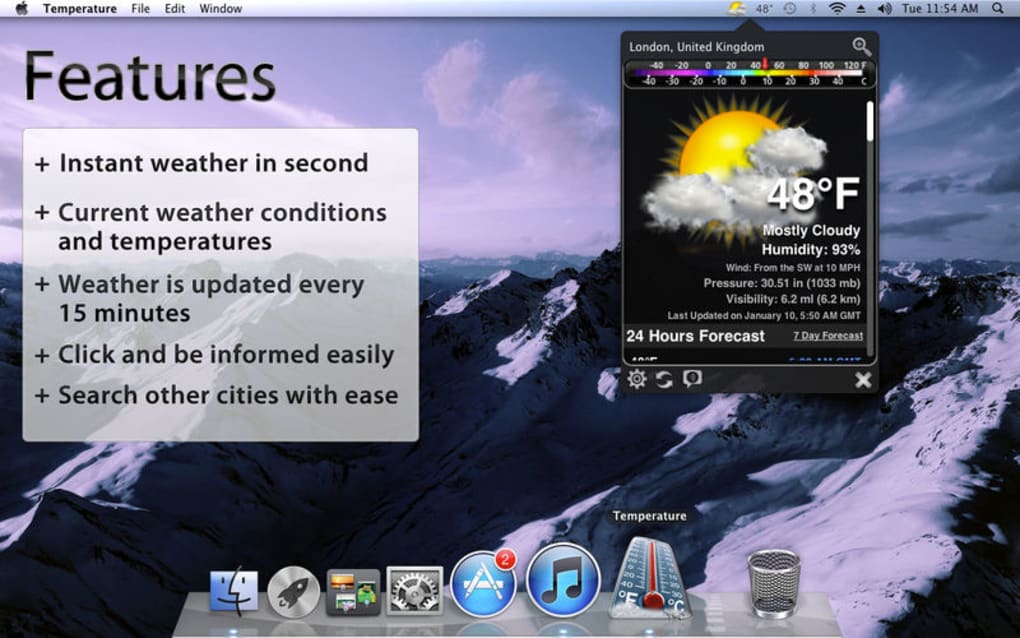
Temperature is a lean, real‑time weather application designed exclusively for macOS. Unlike many cluttered weather tools that overload the screen with animated graphics, Temperature adopts a stripped‑down interface that places the current temperature and weather condition right in your menu bar and dock. The app’s minimalist design translates into a lightweight footprint, meaning it launches instantly and stays out of the way while still delivering the data you need at a glance. Whether you’re checking the forecast before heading out for a meeting or monitoring conditions while you work, Temperature gives you instant access to live temperature, humidity, wind speed, and a short‑term forecast for any of the 150,000+ global locations it supports—including 44,000 U.S. ZIP codes. Because the information lives in the status bar, you can see it without opening a separate window, keeping your workflow uninterrupted. The app updates automatically, ensuring you always have the most recent data without manual refreshes. Temperature’s focus on speed, simplicity, and reliability makes it an ideal companion for professionals, students, and anyone who prefers a clean desktop experience over flashy visuals.
Key Features & Benefits
- Live Temperature in Menu Bar: See the current temperature at a glance without opening a separate window.
- Current Weather Conditions: Displays concise icons for sun, clouds, rain, snow, and more.
- Extensive Location Database: Supports over 150,000 global cities and 44,000 U.S. ZIP codes.
- Fast, Lightweight Performance: Minimal RAM usage and instant launch time.
- Automatic Updates: Real‑time data refreshes every few minutes without user intervention.
- Dock Integration: Optional dock icon shows temperature for quick visual reference.
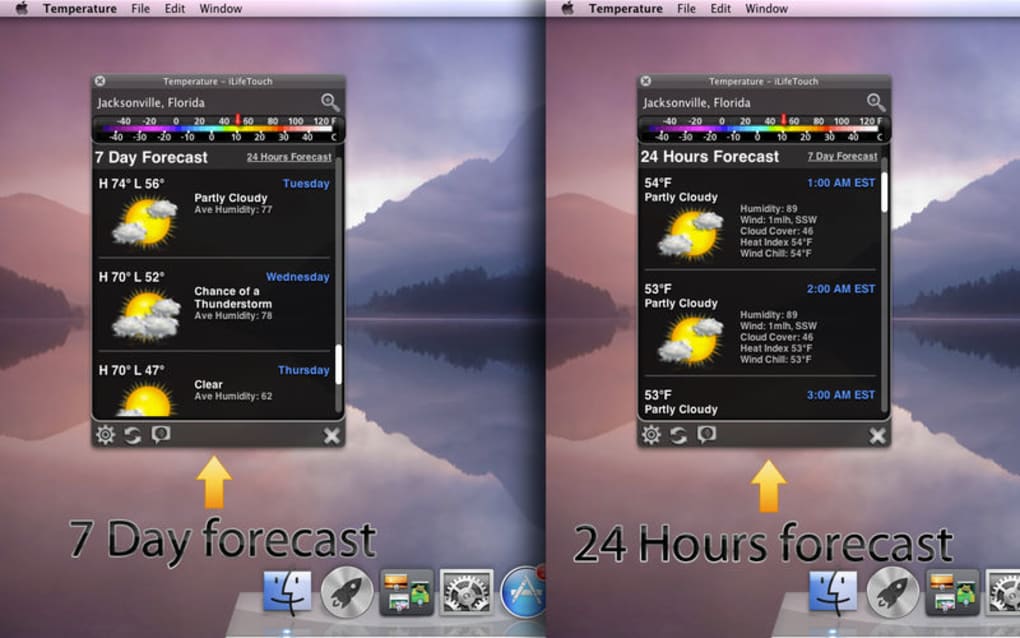
- Simple Forecast View: 3‑day outlook with high/low temperatures and precipitation chances.
- Customizable Units: Switch between Celsius and Fahrenheit, and metric or imperial wind speed.
- Privacy‑First Design: No tracking, no ads, and no unnecessary data collection.
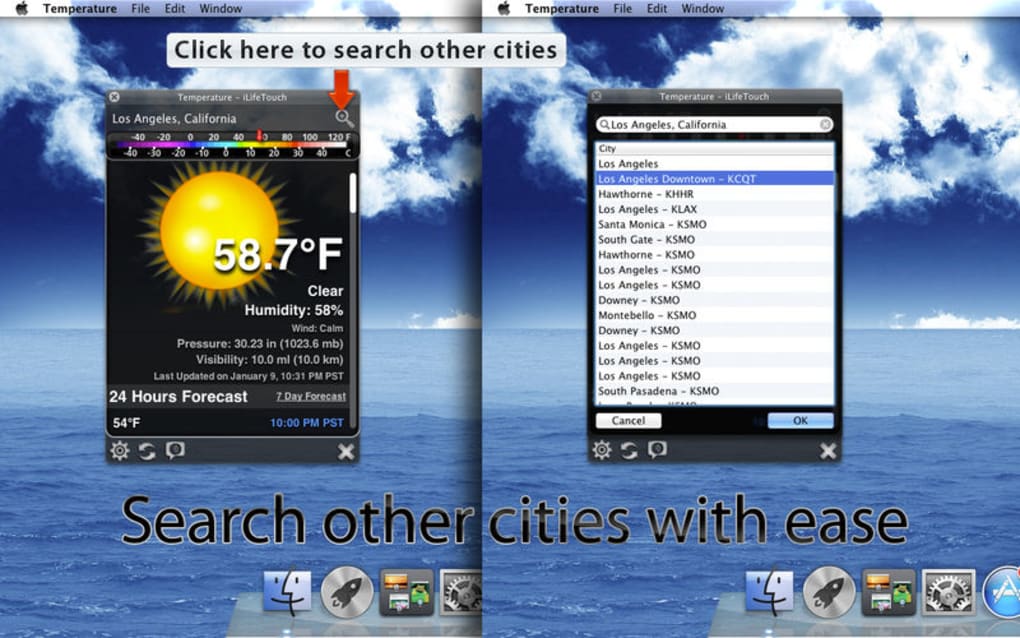
- One‑Click City Switching: Quickly change locations directly from the menu.
Beyond the feature list, Temperature’s design philosophy brings tangible benefits to everyday Mac users. By eliminating heavy graphics and unnecessary widgets, the app conserves battery life—a crucial advantage for laptop users who need reliable weather info on the go. The straightforward layout reduces cognitive load, letting you focus on work or study while still staying informed about the weather. Because the data is sourced from reputable meteorological services, you can trust the accuracy of the temperature and forecast information. Additionally, the app’s low‑impact nature means it plays nicely with other productivity tools, ensuring that your system remains snappy even when multiple applications are running simultaneously. Whether you are a commuter, a remote worker, or a traveler planning trips, Temperature offers the essential weather details you need, delivered in a clean, secure, and instantly accessible package.
Installation, Usage & Compatibility
How to Download and Install Temperature
Getting Temperature up and running on your Mac is a breeze. Follow these steps to download and install the app securely:
- Visit the official Temperature website or the Mac App Store page dedicated to the app.
- Click the “Download” button. The installer package (
.dmg) will begin downloading. - Once the download completes, open the
.dmgfile and drag the Temperature icon into yourApplicationsfolder. - Launch Temperature from the Applications folder or via Spotlight (⌘ Space).
- On first launch, macOS may prompt you to confirm that you want to open an app from an identified developer. Click “Open”.
The entire process typically takes less than a minute on a modern Mac, and because the installer is signed by the developer, you can trust that the software is safe and free from malware.
Using Temperature Effectively
After installation, Temperature automatically adds an icon to your menu bar. Clicking the icon reveals a compact pop‑up with the current temperature, weather condition icon, and a brief three‑day forecast. You can change the displayed location by selecting “Change City” from the pop‑up menu, then typing the city name or ZIP code. The app remembers your last selected location, so you don’t need to re‑enter it each time you restart your Mac.
For users who prefer a dock presence, enable the dock icon via the app’s preferences pane (accessible by right‑clicking the menu bar icon and choosing “Preferences”). From there, you can also toggle units (Celsius/Fahrenheit), set the refresh interval, and choose whether the temperature should appear in the dock.
System Requirements & Compatibility
Temperature is compatible with macOS 10.14 (Mojave) and later, including macOS Ventura and macOS Sonoma. The app runs natively on both Intel‑based Macs and Apple Silicon (M1, M2, and newer) thanks to universal binary support. Because it is a lightweight native application, it does not require any additional runtimes, plugins, or background services. Minimum hardware specifications are modest: 512 MB of RAM and 50 MB of free disk space are sufficient for full functionality.
Temperature also respects the macOS security model. It requests permission only to display notifications if you enable severe‑weather alerts, and it never accesses your contacts, files, or location data beyond the city or ZIP code you explicitly enter. This privacy‑first stance aligns with Apple’s guidelines and ensures a secure experience for all users.
Pros, Cons & Frequently Asked Questions
Pros
- Lightning‑fast launch and minimal CPU usage.
- Clean menu‑bar interface keeps desktop uncluttered.
- Supports a massive database of global cities and U.S. ZIP codes.
- Automatic real‑time updates without manual refresh.
- Works seamlessly on both Intel and Apple Silicon Macs.
- Privacy‑focused: no ads, no tracking, no unnecessary permissions.
- Customizable units and optional dock display.
- Free to download with optional paid upgrade for premium features (e.g., extended forecasts).
Cons
- Lacks detailed radar maps or animated weather visuals that some users may expect.
- No built‑in severe‑weather alert system (requires third‑party integration).
- Limited to macOS; no iOS or Windows counterpart.
- Advanced meteorological data (e.g., UV index, air quality) not available in the free version.
Frequently Asked Questions
Is Temperature free or do I need to pay for it?
Temperature can be downloaded and used for free. A one‑time in‑app purchase unlocks premium features such as extended forecasts and additional customization options, but the core functionality remains completely free.
How often does the weather data refresh?
The app automatically refreshes the temperature and condition data every five minutes by default. Users can adjust the refresh interval in the preferences panel if they prefer more frequent updates.
Can I add multiple locations and switch between them quickly?
Yes. Temperature allows you to save up to five favorite locations. Simply select “Favorites” from the menu, and you can toggle between saved cities with a single click.
Does Temperature work on Apple Silicon Macs?
Absolutely. Temperature is compiled as a universal binary, meaning it runs natively on both Intel‑based and Apple Silicon (M1, M2, etc.) Macs, delivering the same speed and efficiency on all supported hardware.
Is my location data stored or shared with third parties?
No. Temperature only stores the city name or ZIP code you manually enter. It does not collect GPS coordinates, personal identifiers, or share any data with advertisers or third‑party services.
Conclusion & Call to Action
Temperature delivers exactly what a macOS user needs from a weather app: real‑time temperature, concise condition icons, and a lightning‑fast, unobtrusive interface. By focusing on essential data and eliminating visual clutter, it conserves system resources while keeping you informed about the weather wherever you are. Whether you’re a commuter checking the morning chill, a remote worker who wants a quick glance without disrupting workflow, or a power user who values privacy and performance, Temperature fits naturally into the Mac ecosystem.
Ready to simplify your weather checking routine? Download Temperature now for free, enjoy instant access to live temperature in your menu bar, and experience the difference a lightweight, well‑designed app can make. Upgrade to the premium version anytime for extended forecasts and extra customization. Stay informed, stay efficient, and keep your Mac’s desktop as clean as the weather data you trust.








