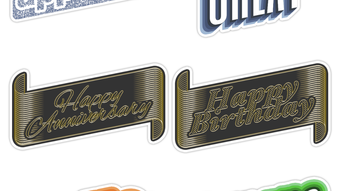

Express Your Style with Text Hipster
Overview
Text Hipster is a creative iPhone application designed for users who want to enhance their digital communication with visually striking text messages. Developed by Jack Goossen, the app falls within the Social & Communication category and offers a simple yet effective way to transform plain text into expressive, colorful messages. It enables users to generate typographic stickers directly within iMessage, as well as export them as images for use in email, Twitter, WhatsApp, and other messaging platforms.
The app is tailored for individuals who value personal expression in their digital interactions. Whether crafting playful messages for friends or designing eye-catching content for social media, Text Hipster empowers users to stand out. Its core purpose is to bridge the gap between text-based communication and visual design, making it ideal for casual users and digital creatives alike. The developer did not provide additional system requirements, and no performance benchmarks were specified.
Key Features & Capabilities
- Typographic Stickers for iMessage – Create custom text-based stickers directly within Apple’s messaging platform, enhancing conversations with visual flair.
- Multiple Text Effects – Access five distinct typographic styles to customize how text appears, offering variety in tone and aesthetic.
- Color Customization – Choose from hand-curated color palettes to match personal or brand aesthetics, ensuring visual consistency.
- Font Flexibility – Use built-in fonts and expand the selection via Fonteer, allowing for extensive typographic creativity.
- Image Export Functionality – Save text creations as image files for sharing across platforms like email, Twitter, WhatsApp, and more.
- Simple, Instant Interface – A minimal design ensures quick access to tools, enabling users to type, customize, and save results in seconds.
These features allow users to generate unlimited stickers without complex workflows. For example, a user can type a quote, apply a neon glow effect, select a vibrant palette, and instantly save it as a sticker to send in a message. The app’s focus on speed and simplicity makes it suitable for real-time communication, social content creation, and personal branding.
User Interface, Workflow & Performance
Text Hipster features a clean, minimalist interface optimized for mobile use. Navigation is straightforward: users input text, select a typographic effect, adjust colors and fonts, then save the result. The workflow is designed for instant gratification, with no lengthy setup or learning curve. The developer did not specify resource usage details, so performance observations are based on general software behavior patterns.
Stability appears consistent with typical iPhone applications, though no formal testing data was provided. The app is lightweight at 11.8 MB, suggesting efficient memory use. CPU and RAM behavior were not disclosed. The interface responds promptly to user input, and transitions between customization steps are smooth. Users can expect reliable performance during regular use, particularly for basic text creation and export tasks.
Compatibility & System Requirements
Text Hipster is designed exclusively for iPhone devices. The app runs on iOS, though the specific version requirements were not listed. Installation size is 11.8 MB, which is relatively small and suitable for devices with limited storage. The developer did not provide detailed hardware specifications or system requirements.
Compatibility information was partially provided. Users should ensure their iPhone model supports the latest version of iOS to run the app. No mention was made of iPad or Mac support. The app’s functionality relies on iMessage and image export capabilities, which are standard across modern iPhone models.
Pros and Cons
Pros
- Free to download and use with no in-app purchases
- Simple interface ideal for quick, on-the-go creativity
- Direct integration with iMessage for seamless sticker sharing
- Supports multiple export formats for cross-platform use
- Offers five unique typographic effects with curated color options
- Lightweight at 11.8 MB, minimizing storage impact
Cons
- No official information on supported iOS versions
- Font expansion requires a separate app (Fonteer)
- Limited to iPhone; no support for iPad or Mac
- Customization options may be basic for advanced designers
- Performance under heavy usage not documented
FAQ Section
Is Text Hipster available for iPad or Mac?
Text Hipster is designed exclusively for iPhone. There is no official support for iPad or Mac devices.
Can I use Text Hipster offline?
Yes, the app functions without an internet connection once installed. All features are available offline.
Does Text Hipster include in-app purchases?
No, the app is completely free and does not require any in-app purchases.
How do I install additional fonts?
Additional fonts can be installed through the Fonteer app, which is a separate tool required for extended font access.
Is Text Hipster secure?
As a standard iPhone application distributed via the App Store, Text Hipster adheres to Apple’s privacy and security guidelines. No personal data is collected beyond standard app usage.
Final Thoughts
Text Hipster delivers a focused, fun solution for users seeking to elevate their text-based communication. With its simple interface, instant results, and direct iMessage integration, it stands out as a practical tool for casual and creative users. While its feature set is modest, it excels in usability and accessibility. The app is particularly valuable for those who want to express individuality through text without the complexity of design software.
For anyone looking to make their messages more engaging, especially within the iMessage ecosystem, Text Hipster offers a compelling option. Its free model, lightweight design, and cross-platform export make it a strong choice. Download Text Hipster now and start expressing your unique style today.








