
Screenshots
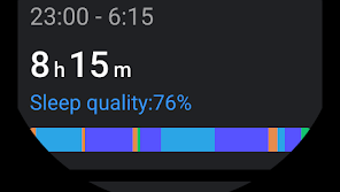
App details
- Version
- 2.0.0-544
- Updated
- April 28, 2023
- Requires
- Android 9.0
- Language
- English
- License
- Free
- Developer
- Mobvoi Information Technology Company Li...
- Category
- Android OS
About TicSleep
Download TicSleep – sleep tracker, health monitor, activity tracker, smart reminder, data sync, multiple user profiles, sleep goals, personalized insights
Overview
TicSleep is a free Android application developed by Mobvoi Information Technology Company Limited, designed to support users in monitoring their sleep patterns, daily physical activity, and overall health metrics. The software aims to help individuals improve their well-being by providing insights into sleep quality, movement tracking, and personalized recommendations. It is particularly suited for users who are interested in maintaining a healthy lifestyle through data-driven habits. The app functions as a companion tool for wearable devices, enabling seamless integration with smartwatches to collect and analyze biometric data.
Users can set sleep goals and receive tailored feedback based on their nightly routines. The application supports multiple user profiles, making it suitable for family members who wish to track their health data independently. Real-world usage scenarios include individuals managing sleep disorders, fitness enthusiasts monitoring recovery, and health-conscious users aiming to establish consistent routines. The app also includes smart reminders to encourage timely bedtime and wake-up habits. While the developer did not provide additional details about advanced health analytics, the core functionality focuses on sleep tracking, activity monitoring, and data synchronization between devices.
Key Features & Capabilities
- Sleep Cycle Tracking: Monitors sleep duration and phases, offering insights into deep, light, and REM sleep patterns over time.
- Daily Activity Monitoring: Records steps, movement, and physical activity levels throughout the day.
- Health Data Analysis: Aggregates collected data to generate reports and identify trends in sleep and activity.
- Smart Reminders: Sends timely notifications to encourage users to go to bed or wake up at desired times.
- Data Synchronization: Automatically syncs information between the mobile device and compatible wearable devices when both are connected to the same Wi-Fi network.
- Multiple User Profiles: Allows different family members to maintain separate profiles with individual goals and insights.
- Sleep Goal Setting: Enables users to define personal sleep targets and receive progress updates.
- Personalized Insights: Delivers customized recommendations based on long-term data trends.
These features are designed to support users in developing healthier sleep and activity habits. For example, a user can set a nightly sleep goal of eight hours and receive a reminder to wind down at 10 PM. The app then tracks the actual sleep duration and provides feedback on consistency. Similarly, multiple family members can use the same device without data overlap, thanks to individual profile management. The synchronization process is guided through the app interface, ensuring ease of setup for first-time users.
User Interface, Workflow & Performance
The user interface of TicSleep is structured to prioritize clarity and accessibility, with a clean layout that organizes data into intuitive sections. Navigation is primarily menu-based, allowing users to switch between sleep tracking, activity logs, and profile settings with minimal effort. The workflow begins with device pairing, followed by profile setup and goal configuration. Once these steps are completed, the app operates in the background to collect and analyze data.
Performance observations are based on general software behavior patterns. The app runs continuously in the background to monitor sleep and activity, but exact resource usage details were not specified. Stability is expected to be consistent with typical mobile applications, though real-world performance may vary depending on device hardware and network conditions. The developer did not specify CPU or RAM consumption, so users should monitor battery and memory usage during extended use. Overall, the workflow is designed to minimize user intervention, relying on automated data collection and syncing.
Compatibility & System Requirements
TicSleep is designed for Android devices and is compatible with the Android operating system. The current version is 3.0.3, with a file size of 50.4 MB. The app requires a compatible wearable device to function fully, as it relies on external hardware for biometric data collection. The developer did not specify exact system requirements, such as minimum Android version or hardware specifications.
Compatibility information was partially provided. Users should ensure their smartphone and wearable device are connected to the same Wi-Fi network for data synchronization. The app does not require a constant internet connection for basic functionality but may use data for syncing and cloud-based insights. The installation size is moderate, indicating it should fit on most modern Android devices without storage concerns. For users with older or low-end devices, performance may vary, though no specific limitations were mentioned.
Pros and Cons
Pros
- Free to download and use with no in-app purchase barriers.
- Supports multiple user profiles for shared family use.
- Offers sleep goal setting and personalized insights for long-term health improvement.
- Automated data sync between phone and wearable via Wi-Fi.
- Intuitive interface with guided setup for new users.
- Tracks both sleep and daily activity comprehensively.
Cons
- Exact system requirements and hardware compatibility were not listed.
- Performance and resource usage details were not disclosed.
- Functionality is dependent on a compatible wearable device.
- App may consume battery when running in the background for extended periods.
- Limited information about data privacy and security practices.
FAQ Section
Is TicSleep compatible with all Android devices?
TicSleep is designed for Android, but the developer did not specify the minimum Android version or hardware requirements. Users should ensure their device supports the necessary background processes and Wi-Fi connectivity for data sync.
How does data synchronization work?
Data synchronization occurs automatically when the phone and wearable device are connected to the same Wi-Fi network. The app guides users through the initial setup process to establish the connection.
Is the app safe to use?
TicSleep is developed by Mobvoi Information Technology Company Limited, a known entity in wearable technology. However, specific security or privacy policies were not provided. Users should review the app’s permissions and data handling practices before use.
Are updates available for TicSleep?
Yes, the app is regularly updated. The current version is 3.0.3, and users can expect future updates to improve functionality and compatibility.
Can I use TicSleep without a wearable device?
While the app is designed to work with compatible smartwatches, it may still offer basic tracking features without a wearable. However, full functionality, including sleep cycle analysis, depends on external hardware.
Final Thoughts
TicSleep presents a practical solution for individuals seeking to enhance their sleep and activity habits through structured tracking and personalized feedback. Its support for multiple user profiles and automated data sync makes it ideal for families or shared households. The app’s free model increases accessibility, while its focus on sleep goals and insights encourages long-term engagement. Although detailed system requirements and performance metrics are not available, the app’s guided setup and clean interface contribute to a smooth user experience. For those using compatible wearable devices, TicSleep offers a reliable, user-friendly tool to monitor health trends. Download TicSleep now.
Guides & Tutorials
How to install TicSleep
- Click the Download button above.
- Once redirected, accept the terms and click Install.
- Wait for the TicSleep download to finish on your device.
How to use TicSleep
This software is primarily used for its core features described above. Open the app after installation to explore its capabilities.
User Reviews
No reviews yet. Be the first to share your experience.
You may also like
more
ChatGPT APK
Effortlessly generate content with AI ChatGPT is a free artificial intelligence...

Digi
Realistic AI entertainment app Digi - AI Romance, Reimagined is a free AI chatbo...

Gemini
Google’s newest and most powerful AI Gemini is a sophisticated AI model from Goo...

kimi chat APK
Your go-to AI assistant for seamless information processing kimi chat is an AI -...

MateAI AI Chat Bot Assistant APK
An AI-powered chatbot fit for any task MateAI-AI Chat Bot Assistant is a free-to...

Microsoft Copilot APK
Revolutionize your workflow Unleash a new era of productivity with Microsoft Cop...
